Best POS System for Grocery Stores in 2026: Top 10 Compared
Searching for the best POS system for grocery store operations? Compare the top 10 grocery POS software options for 2026 by features, pricing, and ease of use.
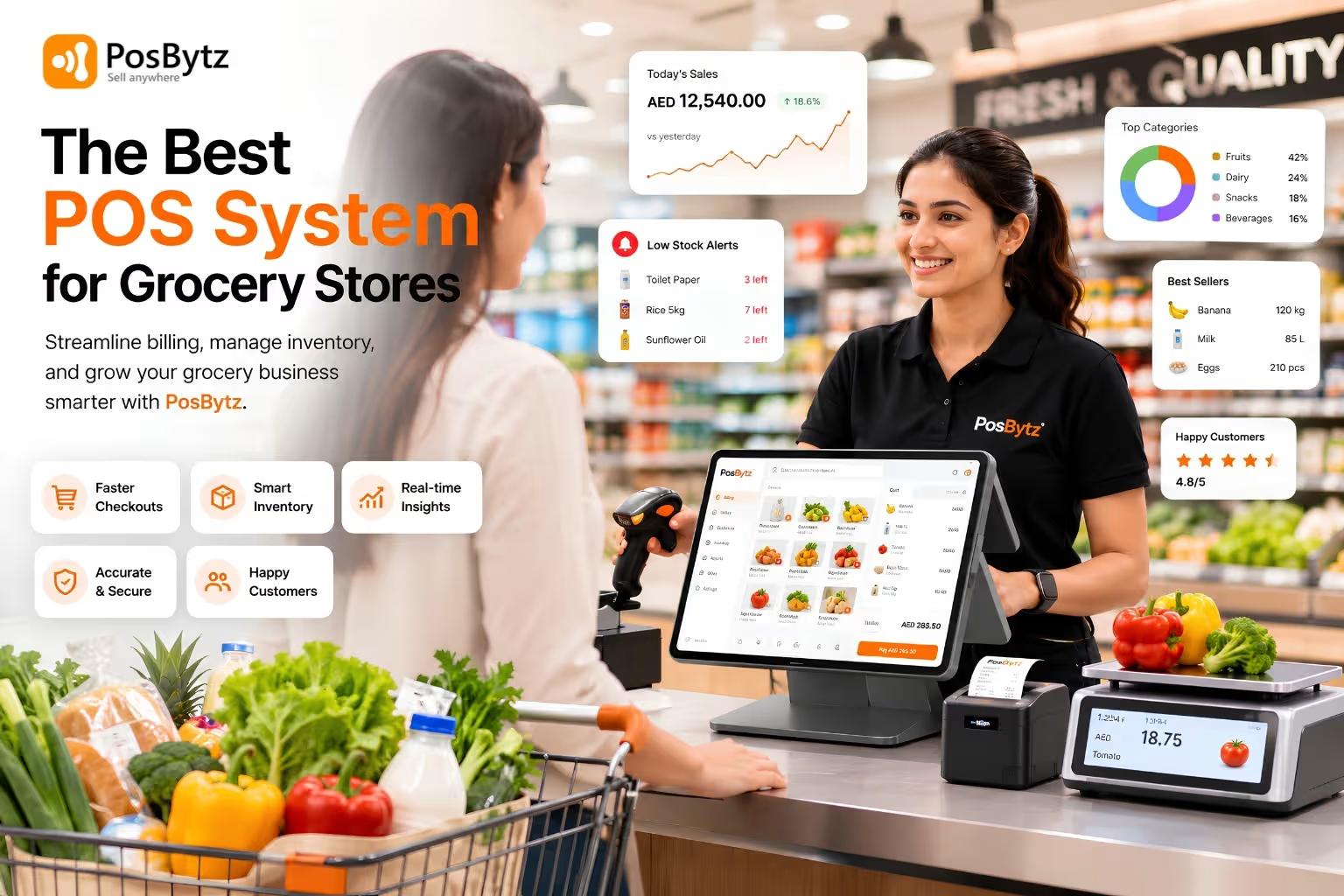


Running a grocery store comes with challenges most retailers never deal with: perishables that expire on a schedule, weighted produce, deli counters, EBT/SNAP payments, and razor-thin margins where a single pricing error can wipe out a day's profit. The right grocery store POS system doesn't just ring up sales — it manages inventory, batch and expiry tracking, supplier orders, and customer loyalty all in one place.
With dozens of options on the market, finding the best POS system for grocery store operations can feel overwhelming. That's why we did the research for you. We compared the leading grocery POS systems on the market based on grocery-specific functionality, pricing, and real-world usability, so you can shortlist the right POS system faster.
This guide breaks down key features, pros, cons, and costs for the top 10 grocery POS platforms in 2026.
Top 10 Point-of-Sale Systems for Grocery Stores in 2026
The best grocery POS software should be fast, accurate, and built to handle high SKU counts, weighted items, and multiple checkout lanes without slowing down. Here are the top picks for 2026, based on features and ease of use.
1. PosBytz
Posbytz is an all-in-one POS system with a high degree of customization. It has been designed specifically for grocery stores and has various features that make it easy to use. As it’s a cloud-based system, it can be accessed from anywhere and connect your store with other businesses like suppliers and distributors.
The system comes with a mobile app that allows staff to enter data while on the go, which is ideal if you have several sales assistants working in different locations. Moreover, its rich features make it the overall best POS for groceries who need great service at an affordable price.
Here are some of the notable features of Posbytz;
- It is compatible with any Windows-based POS system, Android tablets, phones, Apple iPads, or iPhones—without the need for proprietary hardware.
- Stock-in/out reports and audit logs allow you to manage your inventory at multiple outlets from one platform with detailed reports on the cost of inventory & purchase orders.
- Posbytz Discount POS systems can be configured to manage all your online and in-store discounts.
- You can use multiple batch groups to manage each group’s MRP, stock, and expiry dates. Track product expiry dates at the batch level with notifications.
- Manage your orders from purchase order to delivery. Transfer stock automatically between suppliers, warehouses, and customers based on their retail requests.
- It has a CRM to help you stay connected with your customers and upsell your brand wherever they make purchases.
- PosBytz Accounting modules is very unique to manage your booking keeping and filing your VAT/GST reports to your tax authority.
Pros
- One platform covers POS, inventory, CRM, accounting, and online ordering — no stitching together separate tools or paying for multiple subscriptions.
- Batch-level expiry tracking is built in, not an add-on, which directly reduces shrink on perishables.
- Runs on hardware you likely already own (Android, iOS, Windows) instead of locking you into proprietary terminals.
- Transparent, published pricing with a free trial and no long-term contract required.
- Modular pricing — pay only for the modules you actually switch on.
Things to consider
- Full ERP-style features (payroll, advanced accounting) are concentrated in the Plus/Premium tiers, so very small single-register stores may only need a subset of what's available.
Pricing
- Free plan.
- Custom Plan
Rating: 4.5/5 (20+ reviews) on Softwaresuggest
2. Lightspeed POS.
Lightspeed is a cloud-based POS system that provides retailers with the hardware and software options to run their businesses. Its inventory management features are helpful for business owners who want to manage inventory across multiple locations or on mobile devices like tablets, laptops, or smartphones.
Lightspeed’s third-party integrations allow you to take advantage of hundreds of popular apps through its software. The only drawback is that you’ll have to sign up for an annual contract to get the best pricing from Lightspeed which can be expensive for small businesses.
Here are some of the notable features of Lightspeed POS:
- Advanced inventory management makes tracking, creating variations, and bundling items easy.
- You can create a customer profile and manage your customer data and loyalty programs in one place.
- Lightspeed also offers a point-of-sale app for iOS and Android devices.
- You can use it to accept payments, manage cash drawers, track sales, and access reports immediately.
- It has employee management tools to manage your employees’ schedules and tasks.
Pros
- Deep inventory and reporting tools suit large, complex catalogs.
- Large app marketplace for third-party integrations.
- Strong multi-location reporting.
Things to consider
- List pricing is on the higher end of this comparison, and the best rates require annual (not monthly) billing.
- Using a third-party payment processor instead of Lightspeed Payments can add a separate monthly fee, according to Lightspeed's published service terms — worth reading the fine print before choosing a processor.
- Several independent review sites note that support responsiveness is a common theme in user feedback; it's worth asking about typical support wait times during your demo.
- Doesn't include native accounting or CRM
Pricing
- Lean: $79/month.
- Standard: $139/month.
- Advanced: $239/month.
3. Clover POS.
For grocery store owners who want a POS system with high-end features, Clover is a perfect choice. This service supports various payment methods, inventory management capabilities, and customer loyalty options.
Here are some of the notable features of Clover POS:
- Allows you to accept any kind of payment using the POS system.
- You can manage your business from anywhere with the multichannel management feature.
- The software will enable you to keep track of your employees’ schedules and approve or deny their requests for time off.
- It has an online order management system lets you process and track deliveries. Allows you to offer loyalty programs and manage rewards points.
Pros
- Premium, well-built hardware lineup.
- Wide app marketplace for extending functionality.
- Flexible plan tiers by business type.
Things to consider
- Clover hardware is tied to your Clover merchant account and isn't portable to a different processor, so switching providers later means replacing hardware too.
- Because Clover is sold through third-party resellers, contract length, monthly fees, and processing rates can differ significantly between providers — get the full contract terms in writing before signing, and confirm the commitment length upfront.
- Several advanced retail features (like deeper inventory tools or a fully branded online ordering page) require paid app-marketplace add-ons rather than being included in the base plan.
Pricing
- Custom pricing.
4. IT retail.
IT Retail’s POS is a powerful, customizable solution for independent grocery stores of any size. The software provides all the standard features that larger chains offer their customers that are paid add-ons on other POS systems.
Here are some of the notable features of IT retail;
- IT Retail provides easy-to-use software that allows businesses to integrate directly with industry-leading online grocery ordering and delivery platforms.
- The flexible software can be easily configured to meet your specific needs.
- It has an inventory management feature that helps you keep track of stock levels and avoid running out of essential items.
- It has a point-of-sale module that lets you process sales transactions and accept customer payments.
- It will handle both bottle and can deposit, plus ID scans in states that require it—and prompt cashiers to check IDs for age-restricted items.
Pros
- Purpose-built for grocery from day one — deli scales, weighted items, and EBT are native.
- Long track record specifically with independent grocers.
- Offline mode designed for stores with inconsistent internet.
Things to consider
- As with any niche vendor, feature depth and reporting can vary by version — request a live demo of the specific reporting screens your team will use daily.
- Best suited to businesses staying within grocery/convenience formats rather than expanding into full-service restaurant operations.
Pricing
- Custom-built subscription: $99/month.
- Prebuilt hardware and software plan from $149/month.
5. Square for retail.
Square for Retail is a small cloud-based POS operating on iPads. Square for Retail has a small footprint, making it perfect for small businesses and retailers.
Square for Retail is a POS system with an integrated online store. This baseline option is free to use and is perfect if you’re just starting and trying to navigate the basics of retail sales without spending too much money on software.
Here are some of the notable features of Square POS:
- As it runs on your iPads, there’s no need to spend on hardware.
- You can easily manage inventory, sales, and customer data from your POS.
- The system is integrated with Square’s online store, making it easy to sell online and offline.
- Inventory management is also quite simple, as you can create an unlimited number of products and keep track of them using the system.
- You can also take payments from multiple sources, including credit and debit cards.
Pros
- Free plan with no monthly software fee — easy entry point.
- Simple, intuitive interface with minimal setup time.
- No long-term contract.
Things to consider
- Square publicly raised its processing rates in early 2026, so it's worth recalculating your total cost at your actual transaction volume rather than relying on last year's numbers.
- Inventory tools are basic compared to grocery-specific systems — there's no native batch/expiry tracking, deli scale integration, or EBT-specific workflow.
- Like most payment processors, Square's terms of service permit account reviews and temporary holds on funds under certain risk conditions (e.g., unusual transaction patterns); this is standard across the payments industry, but it's worth understanding the policy since grocery stores can have large or irregular transactions.
- Multi-location and more advanced reporting require the Premium tier, which needs a custom quote.
Pricing
- Free.
- Plus: $29+/month.
- Premium: Custom pricing.
6. Revel system.
Revel Systems offers a cloud-based POS system that is highly customizable for customer-facing displays and online ordering, as well as self-order kiosks.
Niche grocery store features, such as bottle deposit processing and robust customer management functionalities, are included in this software with multiple locations making it a suitable option for grocery store owners.
Here are some of the notable features of Revel systems;
- It comes with an inventory management feature that helps you keep track of your inventory, manage it and make changes to ensure you never run out of stock.
- It also has a customer loyalty program feature that allows you to issue coupons and reward points based on customers’ purchases.
- The system allows you to create and maintain employee schedules and keep track of overtime hours.
Pros
- Strong customization for kiosks and customer-facing displays.
- Handles bottle deposit and multi-location needs well.
Things to consider
- Pricing is on the higher end, with per-terminal software fees plus custom hardware and installation costs quoted individually.
- More configuration options can mean a longer setup and training period than simpler platforms.
- Pricing isn't fully published, so budgeting requires a sales conversation upfront.
Pricing
- Software subscription: $99 per terminal per month.
- Hardware costs: Custom-quoted installation fee.
- One-time installation fee: Starting at $674.
7. POSnation.
POS Nation is a cloud-based retail POS that offers scalable features for small markets planning to expand. As your business grows, simply add more terminals, and you won’t have any additional monthly or one-time fees—plus enjoy all the same benefits of its standard plan.
Here are some of the notable features of POS Nation:
- It comes with a mobile POS system that allows you to track sales, manage inventory, and more from your smartphone or tablet.
- It also comes with a customer loyalty program that offers perks and incentives to help you retain customers.
- Cloud-based POS system allows you to process transactions wherever there is an Internet connection.
- Robust inventory tools that allow you to track items and manage your inventory from one location.
Pros
- Predictable per-terminal pricing as you scale registers.
- Solid fit for small markets planning to expand.
Things to consider
- Pricing isn't published online, so you'll need a sales conversation to get exact numbers for your store.
- Fewer built-in omnichannel/e-commerce features compared to some newer all-in-one platforms.
Pricing
- Custom-built subscription: Not disclosed
- Custom-quoted hardware and software plan: Custom-built.
- Prebuilt software and hardware plan: Starts at $149/month.
8. NCR Voyix (formerly NCR Silver).
NCR Voyix Silver is a cloud-based POS system designed for small businesses. It offers several features, including inventory tracking, customer management, and payment processing.
What makes NCR Voyix unique is its “Self-checkout” feature. This is a great feature for small businesses that don’t have the staff to manage a full-service POS system. All you need is a POS system, which your customers can use to check out themselves.
Here are some of the notable features of NCR Silver:
- Customizable systems reduce time-to-market for new capabilities.
- Wide-ranging payment and promotion capabilities.
- Offers flexible integrations with third-party systems and partners.
- Real-time reporting and analytics tools allow you to analyze your business data by location, customer type, product category, salesperson, and more.
Pros
- Self-checkout option is a genuine differentiator for labor-constrained stores.
- Enterprise-grade reporting depth.
Things to consider
- Positioned more toward larger operations, so smaller independent grocers should confirm the plan tier actually matches their store size before committing.
- Pricing is custom/quoted rather than published, which makes upfront budgeting harder.
- The product line has been rebranded from NCR Silver to NCR Voyix, so older third-party reviews and comparisons may reference discontinued plans — get current details directly from NCR.
Pricing
- Starts from $79/month.
9. eHopper POS.
eHopper is a point-of-sale software designed for small-size retail stores and available across multiple platforms. Its POS module offers additional applications, including order management, inventory management, and customer management.
Here are some of the notable features of eHopper POS;
- A range of payment options allows stores to accept payments from multiple sources, including credit and debit cards, cash, and electronic systems such as Apple Pay or Samsung Pay.
- Businesses can personalize their receipts and create and email marketing campaigns with this POS.
- It has all the essential features like inventory management, reports, analytics, and employee management modules to help businesses run smoothly.
- The POS system can be integrated with other third-party applications.
Pros
- Very low cost of entry, including a genuinely usable free tier.
- Simple enough for very small teams to learn quickly.
Things to consider
- Limited grocery-specific functionality out of the box — no native deli scale, batch/expiry, or EBT-specific tools.
- The free tier is fairly limited in features, so most growing grocery stores will need to upgrade fairly quickly.
Pricing
- Essential: Free with limited features
- Omnichannel: $29.99/month.
10. Comcash.
COMCASH ERP is a cloud-based retail management solution customized for multi-channel and multi-location retailers. The point-of-sale module utilizes gesture controls to allow users to navigate the menu intuitively, similar to how iPad users touch their screens.
This system offers many of the same capabilities as other POS systems. Still, it also provides granular features that high-volume grocers need: bottle deposit processing, ID scanning, and expiration date tracking.
Here are some of the notable features of COMCASH ERP:
- It provides e-receipts to customers and allows retailers to customize their receipts.
- It offers loyalty programs and gift cards.
- The system can be integrated with third-party applications, such as inventory management, accounting software, and customer relationship management (CRM) systems.
- The system includes an employee portal where you can manage their schedules.
Pros
- Handles grocery compliance needs (bottle deposits, ID scans, expiration tracking) natively.
- Good fit for multi-channel, multi-location grocers.
Things to consider
- The starting software cost is higher than most alternatives here.
- Hardware costs can add up across multiple checkout lanes.
- Smaller publicly available user-review base than some larger-name providers, which can make it harder to research before buying — ask for references from similarly sized grocers.
Pricing
- POS Software: $125/month
- Hardware costs: From $159 for payment terminals goes up to $749.
How to Choose the Best POS Software for Your Grocery Store?
When choosing a POS system for your grocery store, there are several features you should keep in mind. First and foremost, you should ensure that the system is secure and compliant with industry regulations. You should also consider the cost of the system, both upfront and ongoing.
- Determine the specific needs and requirements of the grocery store, such as inventory management, customer management, and reporting capabilities.
- Research different POS systems and compare their features and pricing.
- Consider the size and complexity of the grocery store, and choose a system that can handle the store’s specific needs and scale with its growth.
- Check for compatibility with existing hardware, such as barcode scanners and cash drawers.
- Look for a system with a user-friendly interface and easy-to-use features that employees can easily navigate.
- Ensure the system offers robust security features to protect sensitive customer and financial data.
- Consider the level of customer support the vendor offers and the ease of integration with other software and systems.
- Have a clear budget and ensure the system meets your budget constraints.
Grocery Store POS System FAQs
What is the best POS system for a small grocery store?
For small, single-location grocery stores, Posbytz's Lite plan is one of the most complete starting points — batch/expiry tracking, inventory, and CRM come standard rather than as paid add-ons. As you add locations or need deeper reporting, the Plus and Premium tiers scale with you without switching platforms.
Do grocery POS systems support EBT/SNAP payments?
Not all of them do out of the box — confirm this before signing up with any general-purpose retail POS. Grocery-focused systems, including Posbytz, are built with these workflows in mind.
Can a grocery POS system track product expiry dates?
Yes, batch and expiry tracking is one of the most important grocery-specific features to look for, and it's exactly the kind of feature that's often missing from generic retail POS platforms. Posbytz lets you manage multiple batch groups with expiry notifications at the batch level, which is critical for reducing shrink on perishables.
Conclusion
Choosing the right point-of-sale system for your grocery store can be challenging. The best point-of-sale system for your business is the one that will make it easier to run, not harder. It should be easy to set up and use—but flexible enough that you can adapt it as needed if your company grows or shifts direction.
From our analysis, the affordable and feature-rich Posbytz POS system is the best option for grocery stores. The grocery POS system offers robust tools to help you manage your business effectively. You can easily create and manage inventory items, print sales reports, track employee performance, and more. The grocery POS system is also very flexible and customizable so that you can add or remove any feature according to your requirements.
Ready to see it for yourself? Start your free Posbytz trial today or get a personalized grocery POS quote — no credit card required.
Related Resources
About the author

Saravana Damodaram
Co-Founder & CEO, PosBytz
Saravana Damodaram is the Co-Founder & CEO of PosBytz, a cloud-based POS-ERP platform built for F&B and retail businesses since 2018. He focuses on unified commerce, inventory, and multi-location operations, and has helped over 5,000 merchants across 25+ countries move off fragmented, disconnected tools and run their entire operation, billing, inventory, kitchen, and accounting on one platform.