How to Build an eCommerce App from Scratch: A Complete Guide
Develop an eCommerce App from Scratch? Are you a beginner? Then you should check this article to know more about it.


Selling through a marketplace or delivery aggregator means giving up a cut of every order and a layer of your relationship with the customer. An eCommerce app puts you back in control: you own the checkout, the customer data, and the experience from the first tap to delivery. This guide covers how to build an ecommerce app from scratch, the features it needs, the development options available to you, and the steps to take it from idea to launch.
Why Build Your Own eCommerce App
A dedicated app lets you reach customers directly through push notifications, remembers their preferences and order history, and keeps them coming back without depending on a marketplace's algorithm or another platform's branding. For sellers already using aggregators or third-party marketplaces, an owned app is usually the fastest way to turn one-time transactions into repeat customers.
Before you commit resources to building one, it helps to ask a few practical questions:
- Can customers browse, order, and pay in real time without delays?
- Is your platform flexible enough to keep pace with your product catalog and pricing changes?
- Does your content (descriptions, images, offers) stay relevant and easy to update?
- Can you track distributors, delivery partners, and stock across every order?
- Do you have visibility into how customers actually behave in the app?
If the answer to most of these is no, that is a sign your current setup needs an upgrade, and building or rebuilding your app is a reasonable next step.
Choosing How to Build Your eCommerce App
There are two broad paths to building an eCommerce app, and picking the right one early saves time and rework later.
Custom Development from Scratch
A custom-built app gives you full control over design, features, and how the app connects to your other systems, including inventory, accounting, and delivery. It is the right choice if you have specific workflows a template cannot handle, or if the app is central to your brand identity. The tradeoff is a longer build time and ongoing development and maintenance.
No-Code and Platform-Based App Builders
If you want to launch faster, ecommerce platforms let you set up a branded storefront and app without writing code. Platforms built for retail and food businesses, such as PosBytz, let you launch a branded online ordering app in minutes, with your own menu or catalog, zero commission on orders, and inventory that updates automatically as orders come in, whether the sale happens on your website, in your app, in-store, or through a delivery aggregator.
Which Approach Fits Your Business
If you are validating a new online sales channel, or you already run a physical store and want to add online ordering without hiring a development team, a platform-based builder gets you live quickly and lets you put savings toward marketing instead. If you are operating at scale with requirements no off-the-shelf platform meets, custom development is worth the investment. Many businesses start on a platform and move to custom development later, once they understand exactly what their customers need. Comparing your options against Shopify alternatives for ecommerce stores is a useful step before you commit either way.
Essential Features Every eCommerce App Needs
Whichever route you take, a handful of features consistently separate apps that convert from apps that get uninstalled.
Customer-Facing Features
- Product browsing and search. Customers should be able to find what they want quickly, with filters for category, price, and availability.
- Ratings and reviews. Social proof is one of the strongest nudges toward a final purchase decision. Most shoppers look for reviews before buying from a brand they do not already know.
- Multiple payment options. Cards, digital wallets, UPI, and cash on delivery all reduce friction at checkout. The more comfortable a customer is with the payment flow, the less likely they are to abandon the cart.
- Order tracking. Real-time status from confirmation to delivery keeps customers informed and cuts down on support queries.
- Wishlists and saved items. Letting customers save products for later increases the chance they return to complete the purchase.
Backend and Operational Features
- Social integration. Letting customers share products or promotions directly from the app extends your reach through their own networks.
- Push notifications. Targeted, relevant notifications about offers or order updates keep customers engaged without requiring them to open the app just to check.
- Inventory sync. Your app should draw from the same inventory system as your website and physical store, so stock levels stay accurate everywhere and you do not oversell.
- Cross-channel synchronization. If you sell through a website, app, and in-store counter, all three need to reflect the same pricing, promotions, and product availability. This kind of unified commerce setup keeps the customer experience consistent no matter where they shop.
- Security. Customers hand over addresses, payment details, and personal information. Encrypting this data and following standard payment security practices is not optional. It is what determines whether customers trust your app enough to keep using it.
Step-by-Step Process to Build an eCommerce App
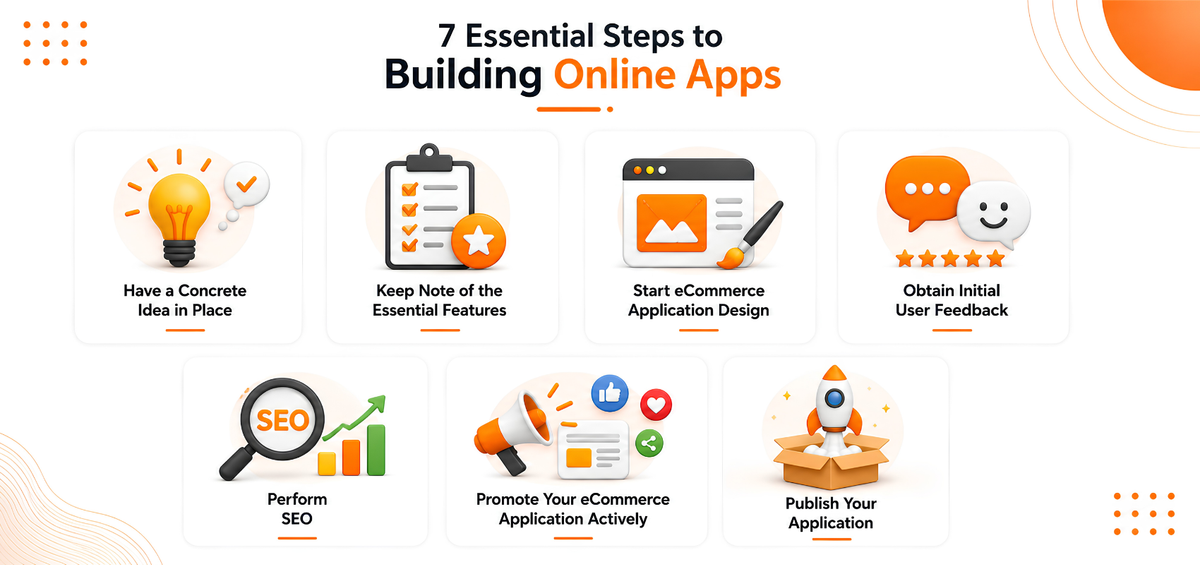
1) Have a concrete idea in place
It is essential to have a high-level idea in place before working on the development of the application. A well-thought-out plan helps your audience understand what you are selling and what your brand stands for. This will also ensure that your eCommerce store is well organized and has the right features in place.
2) Keep note of the essential features your application must have
The second step to building your online application is to make a shortlist of the must-have features currently available in the market and note how your competitors are catering to the audience’s needs.
This must-have list of features include-
- Customer ratings and reviews
The best way to convince your audience to buy your product is through testimonials and reviews. It is essential to add this feature as most customers require a push to make that final purchase decision.
Think of how you are more likely to buy the product if your close friend recommends it?
- Alternate payment options
The COVID 19 pandemic led to a surge in the number of customers making contactless payments. According to the National Payments Corporation of India, there was a surge of 2.53 billion transactions in May 2021. The provision of flexible payment options encourages your customers to feel a sense of comfort and security.
- Social Integration
Integration helps you have a broader customer base as a seller and puts you at the forefront of the competition. Your customers on Facebook, Instagram, Pinterest, or Twitter can easily share your promotions with their friends, and thus, you can quickly gain traction on your website. You can personalize and create user-based content which creates immediate conversions in the long run.
- Synchronization
If you have an eCommerce portal on your website and mobile application, you need to enhance your customer experience by synchronizing the rolling out of features on all platforms. Having seamless synchronizations plays a critical role in conversions.
- Push Notifications
Targeted push notifications can keep your customer warm and aware of the promotional offers that are currently available for the product you are selling. In today’s world, no one has the time to log in to look for the promotions of the product they want to purchase.
3) Start eCommerce application design
While developing your eCommerce application design, you can incorporate application templates for developing your application quickly and easily. Ready-to-use code can help you speed up and optimize your processes.
Next, create guidelines for the best user experience for your customers. A well-planned UI/UX design clearly defines your customer journey and their objectives.
Finally, you should also ensure that your navigation system should have standard navigation patterns that people are used to and are touch-friendly.
4) Obtain initial user feedback
It is crucial to get frequent feedback on your application from your customers. This will help you identify the common problems that your audience generally faces and help you resolve them before the users get fed up and shift to your competitor’s application. Developing a schedule for monitoring helps you stay consistent with your customer’s journey.
5) Perform SEO
Having a proper SEO strategy in place can help your application rank higher than your competitors. There are three main factors that you need to consider to help your application rank higher, this includes your title, keywords, and strong backlinks.
6) Promote your eCommerce application actively.
Your application should have high brand recognition. One way to do this is to develop a clear content marketing strategy consisting of blogs, infographics, and video content. Another way to gain exposure is to post common questions that your audience might have actively.
7) Publish your application
Besides actively promoting your application, you need to make it accessible by publishing it in various mobile application stores. Publishing your application on Google Play Store is simpler than publishing on the Apple Store.
Key Considerations Before You Launch
1. Security
The main concern for online buyers is the security of their user data. Most of the eCommerce stores require information like shipping addresses, card details, and email addresses. Thus, protection of the information from hackers should be the foremost priority. Security features will help you determine your application’s future in the market.
2. Stability
It is vital to keep your application running without it facing frequent crashes. Users prefer to shop on applications that do not have too many bugs.
3. Scalability
While your application gains popularity, it is essential to create an application whose technical functions are scalable.
Conclusion
Building an eCommerce app from scratch, or choosing the right platform to build one on, comes down to matching your approach to your business's stage and resources. Get the essentials right, a clear concept, the features customers actually use, a smooth and secure checkout, and a realistic plan for testing and promotion, and the rest of the details follow.
If you would rather skip the development timeline altogether, PosBytz's ecommerce platform lets you launch a branded online store and app, sync inventory across every channel, and start taking orders directly from customers without the overhead of building from zero.
Frequently Asked Questions
How long does it take to build an eCommerce app from scratch?
It depends on your approach and feature list. A platform-based app builder can get you live within days, since the storefront, catalog, and payment setup are largely pre-built. A fully custom app, with unique design and integrations, takes considerably longer because of the added design, development, and testing cycles.
Do I need a native app, or is a mobile-friendly website enough?
A responsive website is a reasonable starting point if you are testing demand. An app becomes worthwhile once you want direct engagement through push notifications, faster repeat checkouts, and a stronger sense of brand ownership than a browser tab provides.
What features should I prioritize for a first launch?
Focus on product browsing, a smooth checkout with multiple payment options, order tracking, and basic customer accounts. Features such as loyalty programs, advanced personalization, and social integrations are worth adding once you have real usage data to guide the decisions.
Can I build an eCommerce app without hiring developers?
Yes. Platforms such as PosBytz let you launch a branded ordering app without writing code, with inventory, pricing, and order management synced across your website, app, and in-store systems from a single dashboard.
How much does it cost to build an eCommerce app?
Cost depends heavily on your approach. Custom development with a dedicated team costs the most because of design, engineering, and ongoing maintenance. Platform-based builders significantly lower the upfront cost, since you are customizing an existing system rather than building one from the ground up.
Related Resources
About the author

Thaniyeal
Technical Content Writer & SEO Specialist, PosBytz
Thaniyeal is a Technical Content Writer and SEO Specialist on the PosBytz Marketing team, focused on turning complex POS and ERP topics into clear, practical guides for restaurant and retail businesses.