Delivery App Reconciliation for Restaurants: How to Match Talabat, Careem and Deliveroo Payouts
Why your Talabat, Careem or Deliveroo payout never matches your sales, every deduction explained, and a 6-step weekly process to reconcile delivery orders.
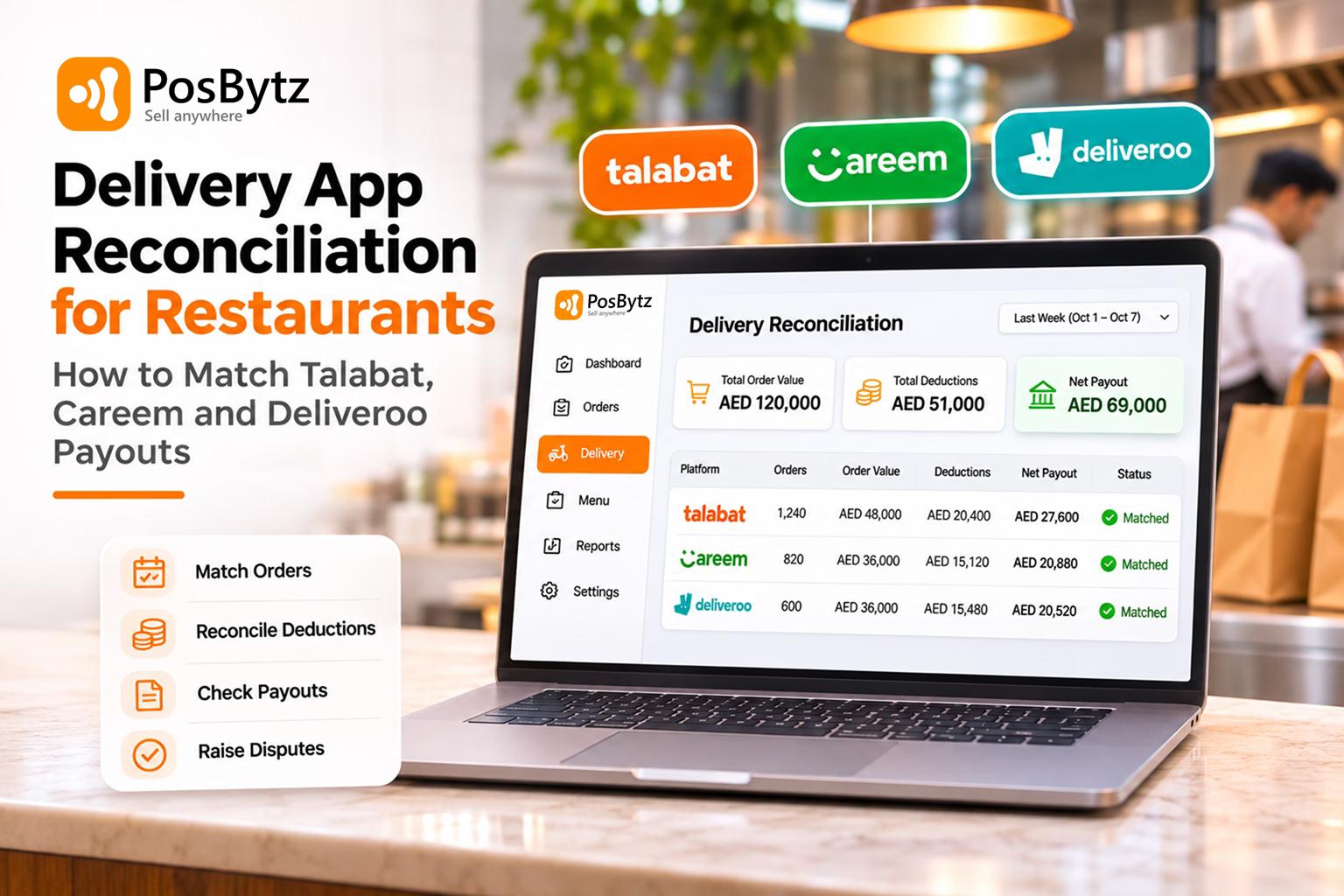


Quick answer: Delivery app reconciliation means matching every order in your POS against the platform's settlement report and the money that reaches your bank. Do it weekly: check the order count, order status, order value, each deduction (commission, fees, promotions you funded, refunds, VAT on the platform's fees) and the final deposit. Anything that does not match becomes a dispute with the platform. A POS that receives Talabat, Careem and Deliveroo orders directly gives you a clean record to match against.
You sold AED 120,000 on Talabat, Careem and Deliveroo last month. The bank shows a lot less. Some of the gap is expected: commission, fees and VAT on those fees. Some of it may not be: an order that was cancelled after you cooked it, a promotion you never agreed to fund, a refund for an item that was in the bag.
Most restaurants in the UAE, Saudi Arabia and the wider Gulf never find out which is which, because the payout statement arrives as a long spreadsheet and the kitchen is already busy with tonight's orders. This guide explains, in plain language, where every dirham or riyal goes between the customer's bill and your bank account, and how to check it in about an hour a week.
What Is Delivery App Reconciliation?
Delivery app reconciliation is the process of checking that what a delivery platform paid you matches what you sold through it, after the deductions you agreed to.
It compares three records:
- Your POS order record: every order you received, accepted, cooked and handed over.
- The platform's settlement report: the orders the platform counted, the deductions it applied and the net amount it says it owes you.
- Your bank statement: the money that actually arrived, and when.
When all three agree, you are done. When they do not, the difference is either a deduction you need to understand or money you need to claim back.
Why Your Talabat, Careem or Deliveroo Payout Never Matches Your Sales
The number on your POS sales report is not the number the platform will pay you, and it should not be. Between the two sit:
- Commission on each order, at the rate in your contract
- Platform and service fees, such as payment or listing fees, depending on your plan
- Promotions and vouchers you funded, where the restaurant shares the cost of an offer
- Refunds and cancellations charged back to you
- Advertising and promoted listing spend deducted from your payout
- VAT on the platform's fees, shown on the platform's tax invoice to you
- Timing: orders from the end of one settlement cycle are paid in the next
None of these is unusual. The problem is when they are applied wrongly, or when you cannot tell.
Anatomy of a Delivery App Payout: From Customer Bill to Your Bank
This worked example uses simple, illustrative numbers. Your own rates are in your partner agreement.
Item value of the order (menu price): AED 100.00. What your menu prices add up to.
- Less: promotion funded by the restaurant: AED 10.00. Your share of a platform offer.
- Order value after your promotion: AED 90.00. Often the base that commission is calculated on.
- Less: commission (example rate): AED 18.00. Per your contract.
- Less: platform or payment fees (example): AED 2.00. Per your plan.
- Less: VAT on commission and fees (5%, UAE example): AED 1.00. Charged by the platform on its own services.
- Net payout for this order: AED 69.00. What should reach your bank.
Three points restaurants often miss:
- Customer-paid charges (delivery and service fees the customer pays) are usually not part of your payout. Check how each platform shows them on the statement.
- VAT on the platform's commission and fees is usually recoverable as input tax if you are VAT registered. Confirm with your tax adviser.
- Your share of promotions reduces the commission base on some contracts and not on others. Read your contract and check one order by hand.
Talabat, Careem and Deliveroo Payout Deductions Explained
Restaurants in the Gulf usually sell through several apps at once: Talabat across the UAE, Kuwait, Qatar, Bahrain and Oman; Careem and Deliveroo in the UAE; and HungerStation, Jahez and others in Saudi Arabia. Every contract is different, so treat this as a list of what to check, not a rate card.
Commission: Matches your contract tier, including any exclusivity terms.
- Delivery, service and payment fees: Applied only to the order types and plan in your contract.
- Restaurant-funded promotions and vouchers: Only campaigns you agreed to, at the agreed share and dates.
- Advertising and promoted listings: Matches the budget and dates you set.
- Refunds for missing or wrong items: Each one has an order ID and a reason you can check.
- Cancellations: You are not charged for cancellations caused by the platform or rider.
- VAT on the platform's commission and fees: Shown on a tax invoice to you; usually recoverable if you are VAT registered.
VAT on Delivery App Fees in the UAE and Saudi Arabia
The platform's commission and fees are a service it supplies to you, so they carry VAT at the local rate: 5% in the UAE and 15% in Saudi Arabia, for example. If you are VAT registered, you can usually recover this as input tax, as long as you hold the platform's tax invoice. Keep those invoices with each settlement.
Two more checks for Gulf restaurants:
- Make sure VAT is not counted twice. Compare the VAT on the platform's fees with the VAT on your own sales, and keep them separate in your books.
- In Saudi Arabia, check e-invoicing. Every sale needs to be covered by an e-invoice that meets ZATCA requirements. Ask your POS provider and tax adviser how delivery app orders are invoiced.
VAT rules change, so confirm treatment with your tax adviser before you file.
Why Settlement Timing Causes "Missing" Money
Platforms pay on a cycle (often weekly) with a delay after the cycle ends. Orders placed late on the last day of a cycle are paid in the next one. Before you raise a dispute, check whether the "missing" orders simply belong to the next settlement.
Also Operating in India? Swiggy and Zomato Payouts
The same reconciliation process works for Swiggy and Zomato, with two tax differences. Since 1 January 2022, the platforms pay GST on restaurant services supplied through them under section 9(5) (CBIC Circular 167/23/2021-GST). They also deduct TDS under section 194-O, at 0.1% since 1 October 2024, which you can adjust against your income tax.
How to Reconcile Talabat, Careem and Deliveroo Payouts: 6 Steps
Do this once a week, per platform, per outlet. Weekly is easier than monthly: the numbers are smaller, the details are fresh, and most platforms give you a limited window to raise disputes.
Step 1: Download the Settlement Report and Bank Statement
From each platform's partner dashboard, download the settlement or payout report for the cycle (order-level, not just the summary). Download the bank statement for the dates the payout should arrive.
Step 2: Export Your POS Orders for the Same Period and Platform
Export every order from that platform for the same dates, with order ID, time, status (delivered, cancelled, rejected) and order value. This works best when aggregator orders arrive in your POS automatically. If staff re-type orders from a tablet, your POS record will already contain errors.
Step 3: Match Orders by Order ID
Match the two lists on the platform's order ID. Sort every order into one of four groups:
- Matched: in both lists, same status and value
- Missing from settlement: in your POS, not in the platform report
- Missing from POS: in the platform report, not in your POS
- Mismatched: in both, but with a different status or value
Step 4: Check Every Deduction Against Your Agreement
For matched orders, recalculate commission and fees at your agreed rates. Check that discounts were only applied to campaigns you joined, and that every refund has a reason that is your responsibility.
Step 5: Match the Net Payout to the Bank Deposit
Add up the platform's net payout and compare it with the bank credit. A difference here usually means a payout was split, delayed, or reduced by an adjustment from an earlier cycle.
Step 6: Log Differences and Raise Disputes
Record each difference with the order ID, amount, reason and evidence. Raise disputes through the platform's partner support channel within its deadline, then track each one until it is credited or closed.
Common Delivery App Payout Mismatches and How to Fix Them
- Order delivered in POS, missing from settlement
- Likely cause: Falls in next cycle, or platform did not record it.
- What to do: Check next settlement; if still missing, raise with order ID and handover time.
- Order cancelled but you are not paid for prepared food
- Likely cause: Cancellation after food was prepared.
- What to do: Dispute with proof of preparation and handover time, if your agreement covers it.
- Refund charged for a "missing item"
- Likely cause: Item genuinely missed, or customer claim.
- What to do: Check your packing record or photo; dispute if the item was packed.
- Commission higher than your agreed rate
- Likely cause: Old rate still applied, wrong base, or plan change.
- What to do: Compare with your current agreement; raise with your account manager.
- Discount deducted on a campaign you did not join
- Likely cause: Campaign opt-in error.
- What to do: Dispute with campaign dates and your opt-in settings.
- Order in settlement but not in POS
- Likely cause: Order was re-typed wrongly or never entered.
- What to do: Fix the POS record; switch to direct aggregator integration.
- Net payout lower than bank deposit expected
- Likely cause: Adjustment from earlier cycle, ads spend, or split payout.
- What to do: Read the adjustment lines; ask for a breakdown.
Weekly Delivery App Reconciliation Checklist
- Order count: POS vs settlement, per platform
- Order status: delivered, cancelled and rejected orders match
- Order value: each order's value matches, after your discount
- Commission and fees: recalculated at your agreed rates
- Discounts: only campaigns you joined
- Refunds: each has a reason; disputes raised for the rest
- Taxes: VAT on fees shown on a tax invoice; platform tax invoices filed
- Net payout: matches the bank credit
- Disputes: logged, with status and amount recovered
How to Reduce Payout Mismatches Before They Happen
- Receive aggregator orders directly in your POS so every order has an accurate record and status.
- Keep one menu for all channels so prices on Talabat, Careem and Deliveroo match your POS.
- Mark items unavailable everywhere at once to avoid cancellations and refunds.
- Check every delivery bag before handover, and photograph high-value orders.
- Read campaign terms before opting in, and note the dates.
- Keep a copy of your current agreement where the person reconciling can see the rates.
How PosBytz Makes Delivery App Reconciliation Faster and More Accurate
Reconciliation is only as good as the order record you match against. If Talabat, Careem or Deliveroo orders are re-typed into the POS from a tablet, or prices differ between apps, every week starts with errors to clean up. PosBytz is built so that your POS is the reliable side of the match.
Every Aggregator Order Arrives in PosBytz Automatically
PosBytz integrates with Talabat, Careem and Deliveroo in the Gulf, as well as Uber Eats, Zomato and Swiggy. Orders flow into the POS automatically, so there is no re-typing from tablets and every order keeps the platform's order ID for matching. You can choose auto-accept or manual review for each platform.
Order Status Syncs Back to the Platforms
PosBytz sends real-time order status back to the aggregators. When your POS and the platform agree on whether an order was accepted, prepared or cancelled, there are fewer status mismatches to chase at the end of the week.
One Menu, One Price, Every Channel
One menu powers your POS, your website and every aggregator. Change a price once and it updates everywhere; when an item goes out of stock, it disappears from every channel. That removes two common causes of payout differences: wrong prices and cancellations for unavailable items.
Consolidated Reports Across All Delivery Channels
PosBytz gives consolidated reporting across all channels, so you can export each platform's orders for a period in one place and compare them with the settlement report.
Aggregator Commissions Posted to Your Books
PosBytz is a POS with built-in accounting. Every online order, discount, tax and aggregator commission posts to the general ledger, so finance sees channel costs without rebuilding them from spreadsheets. PosBytz also integrates with accounting tools such as Zoho Books, QuickBooks and Xero.
Settlement File Matching*
If PosBytz supports uploading platform settlement files and matching them automatically against POS orders, describe it here with a screenshot. If not, remove this section.
What Changes When You Reconcile With PosBytz
- Get a clean order list
- Without an integrated POS: Orders re-typed from tablets; IDs missing or wrong.
- With PosBytz: Orders arrive automatically with platform order IDs.
- Match order status
- Without an integrated POS: Cancellations recorded inconsistently.
- With PosBytz: Status syncs between PosBytz and the platform.
- Check prices
- Without an integrated POS: Menu prices differ between apps.
- With PosBytz: One menu and price for every channel.
- Check deductions
- Without an integrated POS: Commission rebuilt by hand in a spreadsheet.
- With PosBytz: Commission posted to the ledger with each online order.
- Close the books
- Without an integrated POS: Separate exports for each platform.
- With PosBytz: Consolidated channel reports and accounting integrations.
Which Restaurants Need Aggregator Reconciliation Most
- Cloud kitchens and delivery-first brands, where most revenue comes through aggregators
- Multi-outlet restaurants that need channel reports per outlet
- Restaurants on several apps at once, such as Talabat, Careem and Deliveroo in the UAE
CTA: See Talabat, Careem and Deliveroo orders flow into one POS, with commissions in your books. Book a free PosBytz demo.
Delivery App Reconciliation FAQ
Why is my Talabat payout less than my sales?
Your payout is your order value minus commission, platform fees, promotions you funded, refunds, ad spend and VAT on the platform's fees. Some of the gap is expected. Check each line against your contract to find deductions that should not be there.
How often should a restaurant reconcile delivery app payouts?
Weekly, per platform and per outlet. Weekly checks keep the numbers small, make it easier to find the cause of a difference, and help you raise disputes before the platform's deadline.
What documents do I need to reconcile aggregator payouts?
The platform's order-level settlement report, your POS order export for the same platform and dates, your bank statement, the platform's tax invoices for its fees, your current contract, and any campaign or ads records.
Do I pay VAT on Talabat or Careem commission?
The platform charges VAT on its commission and fees at the local rate, such as 5% in the UAE and 15% in Saudi Arabia. If you are VAT registered, you can usually recover it as input tax with a valid tax invoice. Confirm with your tax adviser.
How do I dispute a wrong deduction on Talabat, Careem or Deliveroo?
Collect the order ID, amount, reason and evidence (POS record, handover time, packing photo), then raise it through the platform's partner support within its dispute window. Log every dispute and its outcome.
Can a POS help with delivery app reconciliation?
Yes. A POS that receives aggregator orders directly, syncs status, keeps one menu across channels and reports by channel gives you an accurate order list to match against. PosBytz integrates with Talabat, Careem and Deliveroo and posts aggregator commissions to its ledger.
About the author

Saravana Damodaram
Co-Founder & CEO, PosBytz
Saravana Damodaram is the Co-Founder & CEO of PosBytz, a cloud-based POS-ERP platform built for F&B and retail businesses since 2018. He focuses on unified commerce, inventory, and multi-location operations, and has helped over 5,000 merchants across 25+ countries move off fragmented, disconnected tools and run their entire operation, billing, inventory, kitchen, and accounting on one platform.