How to Manage Multiple Online Orders Without Chaos
Learn how restaurant management software and centralized order systems help manage multiple online orders efficiently without confusion, delays, or inventory errors.
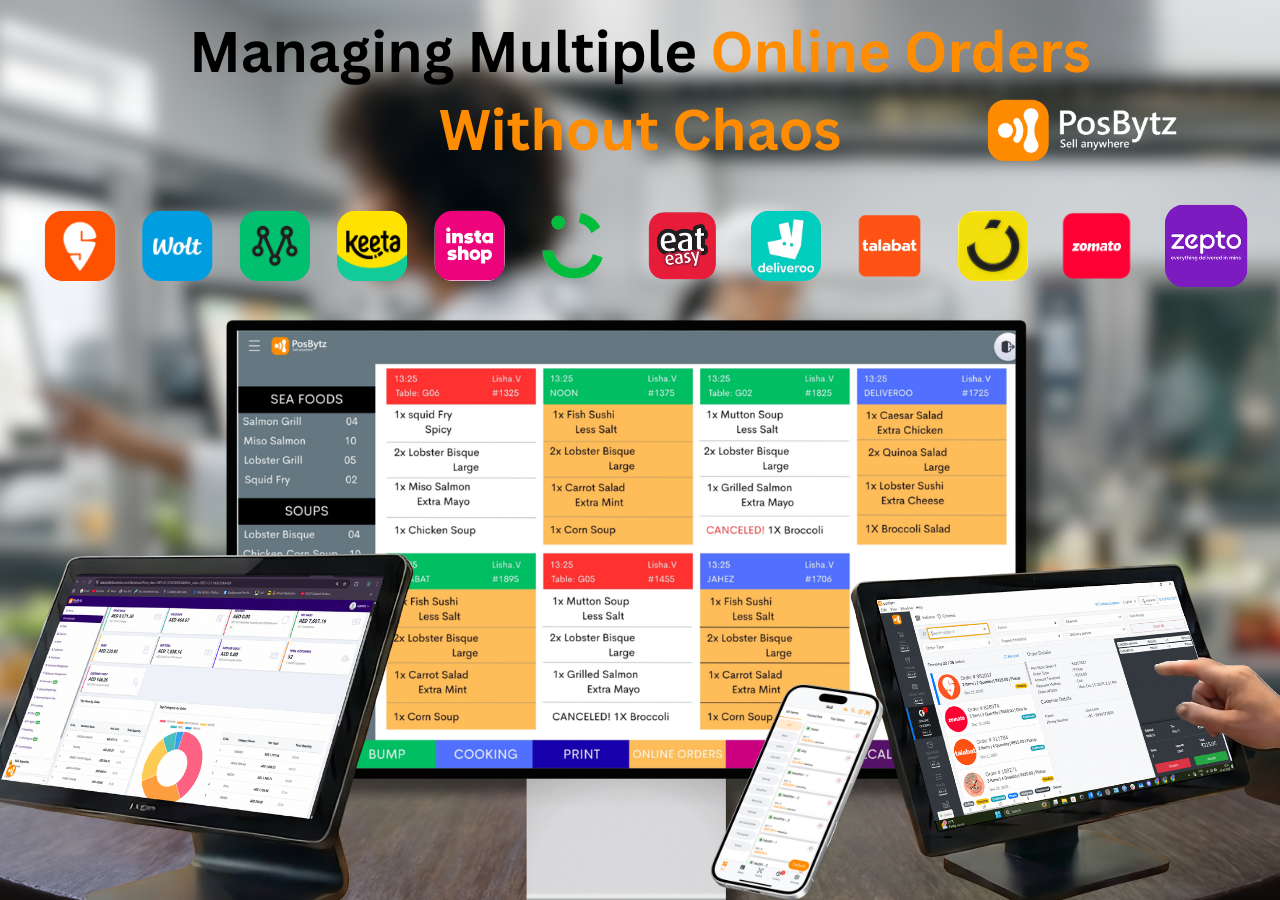


The modern restaurant isn’t any more confined to a single space. Today, orders are made through dine-in counters, web & mobile apps and third-party delivery aggregator platforms, usually simultaneously. Online ordering may have created new opportunities for revenue however, it has also brought a new operational problem that is managing several online orders without losing control.
For restaurant owners who are new to the business, or cloud kitchen operators and food brands that are growing in the absence of a system that is organized can rapidly lead to confusion in orders, kitchen delays, inventory, mixed-up orders, and dissatisfied customers. This guide will explain how restaurants can improve efficiency, clarity and control of the online ordering process with the proper restaurant management software.
The Reality of Multi-Channel Ordering in Restaurants
Online food ordering is no longer an option, but an essential business channel. Customers want the flexibility to place orders from any location and get fast, accurate service. But from a practical perspective, the multiple orders from different sources can cause real issues:
- Orders arriving on different devices and apps at the same time
- Kitchen staff juggling dine-in tickets alongside delivery orders
- Manual stock updates that lead to items showing as available when they are not
- Delays in food preparation during peak hours
- Poor coordination between front-of-house, kitchen, and delivery teams
In the absence of a proper infrastructure, restaurants are often dependent upon manual procedures or a lack of tools, which create chaos during busy hours.
Why Restaurants Need a Centralized Restaurant Order Management System
A restaurant order management system acts as the single command center for every order coming in, whether it is placed at the table, on a website, through an app, or via a delivery aggregator. Instead of staff switching between multiple tablets and screens, a centralized restaurant order management system consolidates everything into one interface.
What a Modern Restaurant Order System Does:
- Captures orders from websites, apps, as well as delivery platforms
- Shows the status of orders in real-time to kitchen staff
- Automatically syncs the order details to POS and inventory
- Reduces the chance of manual entry errors
- Improves speed and accuracy of order
Daily Operational Role of Restaurant Management Software
A powerful restaurant management software transforms complicated restaurant operations into easy automated workflows.
1. Real-Time Order Visibility
Dine-ins, takeaway and delivery are displayed on one dashboard. This helps eliminate confusion and ensures that each order is recognized and processed promptly.
2. Stock Updates that are Real-Time
Inventory is automatically updated when orders are placed. When a particular menu item goes out of inventory, it is immediately reported across all online channels, preventing excessive selling and dissatisfaction among customers.
3. Kitchen Workflow Optimization
Orders are delivered straight to the kitchen team through the KDS in the correct order. The kitchen team is aware of what to prepare, when to prepare, and how long each order has been in the queue. This speeds up preparation and increases consistency.
4. Faster Order Fulfillment
By automation of workflows, restaurants are able to reduce delays of order preparation, improve on-time deliveries, and manage higher volume orders without additional staff.
Best Practices For Managing Restaurants That Take Online Orders
Even with modern software, operating discipline is crucial. Here are some industry-tested best practices:
1. Separate Workflows for Dine-In and Online orders
Create separate kitchen workflows to accommodate online and dine-in orders to reduce congestion during peak times.
2. Set up the Menu Availability Controls
Make use of an application for managing restaurants to block the items that are not available instead of dealing with complaints later.
3. Train Employees on Order Prioritization
Staff should be aware of how to handle high load such as delivery deadlines, delivery times, and aggregator System Level Agreements (SLAs).
4. Track Peak Hours of Operation and Supply Trends
Review the reports generated by the restaurant’s management software to find the most popular time slots, optimize staff schedules, and adjust capacity for preparation.
Why Real-Time Inventory Management Matters
One of the most common reasons restaurants face difficulties with online orders is the inaccuracy of inventory tracking. Real-time updates on stock solve this issue from the beginning.
Benefits of Stock Updates in Real-Time
- Prevents accepting orders for items that are no longer available
- Reduces food waste from over-preparation
- Improves supplier and purchase planning
- Keeps menu availability consistent across every ordering channel
How to Choose the Right Restaurant Management Software
There is no shortage of software built for modern restaurants, so it helps to know exactly what to look for. When evaluating options, prioritize:
- Unified order dashboard: All dine-in, online, and delivery orders should appear in one place instead of across separate tablets.
- Direct POS integration: Orders should flow straight into your existing POS without manual re-entry.
- Menu and price sync: Updates to pricing or availability should reflect instantly across your website, app, and every connected restaurant online ordering system or aggregator.
- Kitchen display system integration: Tickets should route to the kitchen automatically, in the order they were received.
- Real-time inventory sync: Stock levels should update across every channel the moment an order is placed.
- Multi-outlet and multi-brand reporting: If you run more than one location or virtual brand, look for consolidated reporting across all of them.
- Cloud-based access: You should be able to monitor operations and reports from any device, not just from the restaurant.
From Chaos to Control: Bringing Order Management Together
Handling multiple online order channels does not have to mean constant firefighting. With the right restaurant management software and a centralized restaurant order management system, restaurants can turn day-to-day complexity into a workflow their team can actually rely on during peak hours.
PosBytz is built to help restaurants manage online ordering, kitchen operations, and inventory from one connected system, so orders from every channel end up in the same place your team is already working from.
Conclusion
Multi-channel ordering is now the norm for restaurants of every size, and managing it well comes down to visibility, automation, and coordination between the front counter, kitchen, and stockroom. A centralized restaurant order management system removes the guesswork, keeps inventory accurate, and gives kitchen staff a clear, prioritized queue to work from.
Ready to bring your online orders, kitchen, and inventory onto one system? Explore PosBytz's restaurant management software to see how it fits your operation.
Frequently Asked Questions
What is a restaurant order management system?
A restaurant order management system consolidates orders from dine-in, online ordering, and delivery aggregators into a single dashboard, so staff can view, process, and track every order from one screen instead of switching between multiple devices.
How can restaurants avoid missing orders during peak hours?
Using a centralized order system with real-time notifications, along with separate kitchen workflows for dine-in and online orders, reduces the chance of orders getting overlooked when volume spikes.
Does restaurant management software work with delivery aggregators like Zomato, Swiggy, and Talabat?
Yes. Restaurant management software with aggregator integration pulls orders from platforms like Zomato, Swiggy, and Talabat directly into one dashboard, syncing menus, pricing, and availability across all of them automatically.
How does real-time inventory management prevent overselling on delivery apps?
When inventory updates in real time, an item that runs out is automatically marked unavailable across the website, app, and every connected delivery platform, so customers cannot order something the kitchen no longer has.
Can one restaurant management software handle dine-in, online, and delivery orders together?
Yes. A cloud-based restaurant management software is designed to bring dine-in, takeaway, online ordering, and delivery aggregator orders into a single system, with orders synced to the POS, kitchen display, and inventory at the same time.
Related Sources
Read More: Cloud Kitchen Operations
Read More: Aggregator Integration
Read More: Key Features of POS System
About the author

The PosBytz Marketing Team
Editorial Team, PosBytz
The PosBytz Marketing Team shares practical insights on running smarter restaurants and retail stores from POS best practices to inventory management, online ordering, and customer loyalty strategies.