How to Use Last Year's Sales Data to Plan Diwali Inventory
Turn last Diwali's POS sales reports into this year's order list. A step-by-step method with formulas, a worked example, and what to do if you have no data.


Quick Answer: How Do You Plan Diwali Inventory From Last Year's Sales?
- Pull last year's item-wise sales for the same festive window, measured in days before and after Diwali, not by calendar date.
- Clean the numbers: remove one-off bulk orders and add back sales you lost when items sold out.
- Adjust for this year: recent sales trend, new outlets or channels, and planned offers.
- Add safety stock for bestsellers, based on supplier delivery time.
- Subtract stock you already have and stock on order.
Order quantity = Forecast demand + Safety stock − Current stock − Stock already on order
The result is your order list. The worked example below shows the full calculation for four festive items.
Why Last Year's Data Beats Gut Feeling
Most festive stock problems come from ordering on memory: "We sold a lot of dry fruit boxes last year, so let's order more." Memory remembers what felt busy, not what actually sold.
Your POS remembers precisely. It knows which items sold out and on which day, which items were left over after Labh Pancham, and which hours were busiest. Used properly, that history tells you:
- What to order more of: items that sold out early
- What to order less of: items left on the shelf after Diwali
- When to receive stock: before the days your sales actually peaked
- How much buffer to keep: based on how fast bestsellers moved on peak days
Watch Out: Diwali Falls 19 Days Later This Year
Diwali 2025 (Lakshmi Puja) was on Monday, 20 October 2025. Diwali 2026 is on Sunday, 8 November 2026, 19 days later in the calendar.
So comparing "1–31 October 2025" with "1–31 October 2026" will mislead you. Last year's peak fell inside October; this year much of it falls in early November.
Compare by days relative to Diwali instead. For example:
- Dhanteras: Saturday, 18 October in 2025, and around 5–6 November in 2026.
- Diwali (Lakshmi Puja): Monday, 20 October in 2025, and Sunday, 8 November in 2026.
- 21 days before Diwali to Diwali: 29 September – 20 October in 2025, and 18 October – 8 November in 2026.
Pick a window that matches how your customers shop. Many stores use 21 days before Diwali through Labh Pancham, then pull the same window for last year.
Two other calendar effects to consider:
- Weekdays vs weekends: Diwali 2026 falls on a Sunday, while last year it was a Monday. Weekend-heavy stores may see the peak spread differently.
- Salary timing: Last year, Diwali came before the end-of-month salary date for many customers. This year it comes after the 1 November salary date, which may concentrate spending in the final week. Watch your early sales and adjust.
Step-by-Step: Turn Last Year's Sales Into an Order List
Step 1: Pull the Right Reports
From your POS, export or note these reports for last year's festive window:
- Item-wise sales by day: shows how many units of each item sold, and on which day.
- Category-wise sales: tells you which categories grew and which ones shrank.
- Low-stock or stock-out history: shows which items ran out and on what day.
- Closing stock after the festival: tells you what was left over once it ended.
- Purchase report: lists what you bought, when you bought it, and from whom.
- Hourly sales: shows which days and hours were busiest, so you can plan deliveries and staff around them.
Step 2: Clean the Numbers
Raw sales figures hide two common distortions.
Remove one-off bulk orders. If one company bought 40 hampers last year, those 40 units don't represent normal demand. Remove them from the baseline and plan corporate orders separately, ideally from confirmed pre-orders.
Add back sales you lost to stock-outs. If an item sold out two days before Diwali, your sales report shows what you had, not what customers wanted.
Lost sales ≈ Average daily sales before the stock-out × Days the item was out of stock
If a dry fruit box sold about 12 a day and was out of stock for the last 2 days, you lost roughly 24 sales.
Step 3: Calculate Baseline Festive Demand
Baseline demand = Units sold − One-off bulk orders + Estimated lost sales
This is your best estimate of what customers would have bought last year with enough stock and no unusual orders.
Step 4: Adjust for This Year
Last year isn't this year. Apply a growth factor to each item or category, based on evidence:
- Recent trend: compare the last three months with the same three months last year. If a category is up 10%, start with +10%.
- New outlets or channels: add demand for a new branch or online store, based on its normal share of your sales.
- Planned offers: if you plan a combo or tiered offer on an item, expect higher volume. See our guide to Diwali discount ideas that don't kill your margin.
- Price changes: if an item is now noticeably more expensive, expect slightly lower volume.
- Items no longer sold: drop them, and move their demand to replacements if customers will switch.
Forecast demand = Baseline demand × (1 + Growth factor)
Be conservative with growth for items that can't be returned to suppliers or that spoil.
Step 5: Add Safety Stock for Bestsellers
Safety stock protects you if sales run ahead of forecast or a supplier delivers late.
Safety stock = Peak daily sales × Supplier delivery time in days
If your best dry fruit box sold 15 on its busiest day and your supplier needs 2 days to deliver a top-up, keep a safety stock of 30.
Keep safety stock high for bestsellers that sold out last year, low for seasonal-only items you can't sell after Diwali, and minimal for perishables with short shelf life.
Step 6: Subtract What You Already Have
Order quantity = Forecast demand + Safety stock − Current stock − Stock already on order
Count current stock physically before you calculate, especially leftover festive stock from last year.
Step 7: Set Reorder Levels for the Festive Weeks
Don't place one big order and hope. For bestsellers, split purchasing into a main order and a top-up, and set a low-stock alert:
Reorder level = Average daily festive sales × Supplier delivery time + Safety stock
When stock falls to this level, place the top-up order.
Worked Example: A Gift and Dry Fruit Store
Here is the full calculation for four items, using a 10% growth factor where recent sales support it.
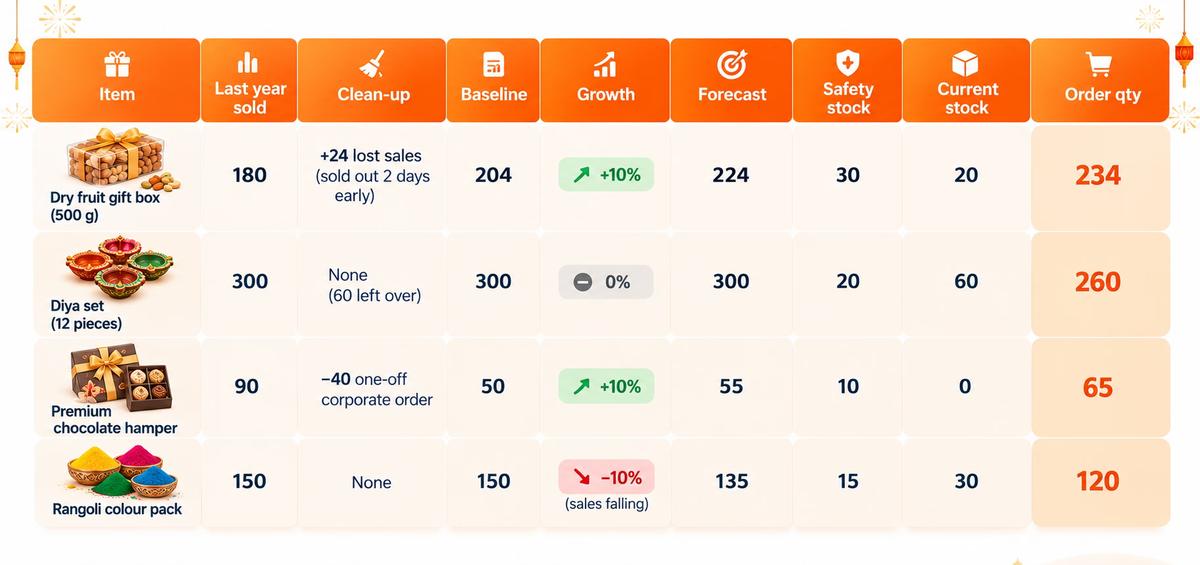
No stock is currently on order for these items. Forecasts are rounded to whole units.
What the numbers say:
- The dry fruit box sold out last year, so it gets more stock and a solid safety buffer.
- The diya set had 60 left over, which now count as current stock. The store orders less than it sold last year without risking a shortage.
- The chocolate hamper looked like a bestseller, but most of the volume came from one company. Retail demand is planned at 65, and corporate orders are handled separately from confirmed pre-orders.
- The rangoli pack is trending down, so the forecast is reduced.
Without this method, the most likely mistakes are re-ordering 90 hampers, ordering 300 diya sets on top of 60 in stock, and missing two days of dry fruit sales again.
Special Cases
Perishables: Sweets, Dry Fruits, and Food Hampers
For sweets and fresh items, plan by day, not for the whole season. Use last year's daily sales to plan production or deliveries for each day, with smaller batches early and larger batches on peak days. Sell older stock first, and track expiry dates. Our guide to restaurant food waste explains demand-based preparation in more detail.
Seasonal-Only Items
Diyas, décor, and Diwali-themed packaging often won't sell after the festival. Order leaner, keep safety stock small, and plan a post-Diwali clearance before you order.
Multiple Outlets and an Online Store
Run the calculation per outlet, because demand differs by location. If you also sell online, include online sales in the baseline and keep one shared inventory, so an item doesn't sell twice. See our Diwali checklist for your online store.
What If You Don't Have Last Year's Sales Data?
Many shops reach this point and realise they don't have item-wise sales history. Maybe billing was handwritten, the old software only recorded totals, or the data was lost.
You can still build a reasonable estimate:
- Use purchase records. Supplier invoices show what you bought for last Diwali. Combined with what was left over, they give a rough figure for what sold. Approximate units sold = Opening stock + Units purchased − Closing stock
- Ask your suppliers. They often know how much stock similar stores in your area took last season.
- Use payment records. UPI and card settlement reports show which days were busiest, even without item details.
- Start small and reorder fast. Place a smaller first order, set up quick top-up arrangements with suppliers, and watch daily sales closely.
And start recording properly now. Every bill you ring up this Diwali in a POS with item-wise reports becomes next year's planning data. The stores that plan Diwali 2027 accurately will be the ones that start recording in October 2026.
During and After Diwali: Close the Loop
- Check sales against forecast every day for your top 20 items, and trigger top-up orders early.
- Record stock-outs with the date and time, so next year's lost-sales estimate is accurate.
- After Labh Pancham, compare forecast with actual sales for each item, note leftover stock, and save these notes with your festive reports.
Each year your forecast gets more accurate, because it starts from better data.
How PosBytz Turns Sales Data Into Stock Decisions
PosBytz is a cloud-based POS and ERP for retail stores and restaurants. It records the data this method depends on, automatically, with every bill:
- Item-wise, category-wise, and time-based sales reports you can review for any period, including last year's festive window
- Inventory that updates as you sell and buy, with low-stock alerts for festive bestsellers
- Purchase orders, goods received, and supplier records, so you know what you bought and when
- Multi-outlet stock visibility, so you can plan per outlet and move stock where it's needed
- One inventory for in-store and online sales, with a free online store and Shopify POS integration
- Recipe-based inventory for sweet shops, bakeries, and restaurants
- Real-time reports from anywhere, so you can compare sales with your forecast during festive week
Don't have last year's data? Start recording this Diwali, so next year's order list builds itself. Start your 14-day free trial, check pricing, or talk to the PosBytz team.
Preparing your billing counter too? Read our Diwali 2026 POS checklist.
Frequently Asked Questions About Diwali Inventory Planning
How do I forecast Diwali demand from last year's sales?
Pull item-wise sales for the same festive window measured from Diwali, remove one-off bulk orders, add back sales lost to stock-outs, and apply a growth factor based on your recent sales trend. The result is your forecast demand for each item.
What is the formula for how much stock to order for Diwali?
Order quantity = Forecast demand + Safety stock − Current stock − Stock already on order. Safety stock is usually peak daily sales multiplied by your supplier's delivery time in days.
Why can't I compare October last year with October this year?
Diwali moves every year. In 2025 it fell on 20 October; in 2026 it falls on 8 November, 19 days later. Compare the same number of days before and after Diwali instead of the same calendar dates.
How do I account for items that sold out last year?
Estimate lost sales by multiplying the average daily sales before the item sold out by the number of days it was out of stock. Add this to last year's sales to get true demand.
How much safety stock should I keep for Diwali?
Keep more for bestsellers that sold out last year, less for seasonal-only items you can't sell after Diwali, and very little for perishables. A common starting point is peak daily sales multiplied by supplier delivery time.
What if I don't have last year's sales data?
Estimate units sold from purchase records using opening stock plus purchases minus closing stock, ask suppliers for guidance, and start with smaller orders and quick top-ups. Begin recording item-wise sales in a POS this year so you have data next Diwali.
Should I order all my Diwali stock at once?
Not for bestsellers. Place a main order and plan a top-up, with low-stock alerts set at your reorder level. This reduces both stock-outs and leftover stock.
How do I plan perishable stock like sweets for Diwali?
Plan by day rather than for the whole season. Use last year's daily sales to set production or delivery quantities for each day, and sell older stock first.
Final Thoughts
Last Diwali already told you most of what you need to know about this one. It's in your sales reports: what sold out, what was left over, and when customers came in.
Pull the right window, clean the numbers, adjust for this year, add sensible safety stock, and subtract what you already have. Then you'll go into Dhanteras with shelves full of the right products, not just more products.
Shubh Deepavali from the PosBytz team.
عن الكاتب

سارفانا دامودارام
المؤسس المشارك والرئيس التنفيذي، PosBytz
سارفانا دامودارام هو المؤسس المشارك والرئيس التنفيذي لشركة PosBytz، وهي منصة سحابية تجمع بين نقاط البيع وERP ومصممة لقطاع الأغذية والمشروبات والتجزئة منذ عام 2018. يركز على التجارة الموحدة وإدارة المخزون وتشغيل الفروع المتعددة، وقد ساعد أكثر من 5,000 تاجر في أكثر من 25 دولة على الاستغناء عن الأدوات المتفرقة وإدارة العمليات والفوترة والمخزون والمطبخ والمحاسبة من خلال منصة واحدة.