Diwali 2026 POS Checklist: 25 Things Retailers and Restaurants Must Check Before the Festive Rush
Get your billing counter Diwali-ready. A 25-point POS checklist for retailers and restaurants covering devices, GST, stock, payments, staff, and day-end cash.


Quick Answer: How Do You Get Your POS Ready for Diwali?
To get your POS ready for Diwali, do these five things at least a week before Dhanteras:
- Test every billing device, printer, scanner, and card machine, and keep a spare billing device ready.
- Update your product list, prices, and GST rates, including festive items, hampers, and combos.
- Count fast-moving stock and set reorder levels, so you don't run out mid-rush.
- Set up payments, cash floats, and staff logins with approval rules for discounts and voids.
- Plan a day-end cash and stock reconciliation for every festive day, not just at month-end.
The full 25-point checklist below covers each of these in detail, with extra steps for restaurants, cafés, and sweet shops.
Key dates: Dhanteras falls on around 5–6 November 2026, Diwali (Lakshmi Puja) on Sunday, 8 November, and Labh Pancham on Saturday, 14 November. Dhanteras timing depends on when the tithi begins in your city.
Why a POS Checklist Matters More During Diwali
On a normal day, a slow printer or a missing barcode costs you a few seconds. On Dhanteras evening or the weekend before Diwali, the same problem creates a queue, and some customers in that queue will walk out.
Festive problems at the billing counter usually fall into a few patterns:
- Hardware fails under load: printers run out of paper, scanners disconnect, and card machines lose network.
- The product list isn't ready: new festive items have no barcode or the wrong price, so staff type them in manually.
- Stock runs out of the items people actually came for, while slow-moving stock fills the shelves.
- Temporary staff make mistakes with discounts, voids, and payments.
- Cash doesn't match sales at the end of a chaotic day, and nobody knows why.
Every item in this checklist exists to prevent one of these. Start a week to ten days before Dhanteras, so you have time to fix what you find.
The Diwali 2026 POS Checklist: 25 Things to Check
Devices and Hardware (1–5)
1. Test every billing device under real conditions. Switch on every POS terminal, tablet, and laptop you bill from. Ring up a few test bills, print receipts, and check that sales appear in your reports. Install pending app and operating system updates at least a week before the rush, not the night before Dhanteras, so you have time to fix anything an update breaks.
2. Keep a backup billing device ready. If your main terminal fails during peak hours, you need a second device that is already logged in and tested. A cloud POS that runs on Android, iPad, or a web browser lets you turn a spare tablet or phone into an extra billing counter in minutes. That is also useful as a "queue-buster" counter on the busiest evenings.
3. Stock up on receipt paper and printer supplies. Check your paper usage from last Diwali in your sales reports (number of bills × typical receipt length) and stock at least 1.5 times that amount. Confirm the roll width your printer takes before you buy. Clean the print head and check the cutter on every thermal printer.
4. Test barcode scanners, weighing scales, cash drawers, and card machines. Scan a few products from each category, weigh a few loose items if you sell by weight, open and close the cash drawer from the POS, and run a small test card payment. Keep spare cables and chargers at the counter.
5. Prepare for internet outages. Keep a mobile hotspot or second internet connection as backup. Find out exactly what your POS does offline: which functions keep working (billing, receipt printing) and which wait for the connection (online payments, live reports, online orders). Test it by switching off the router for five minutes on a quiet day.
Products, Prices, and Tax (6–11)
6. Add festive products and bundles to your POS before they reach the shelf. Create every new festive SKU: gift hampers, dry fruit boxes, diyas, décor, sweets, and seasonal menu items. Print and stick barcodes before the stock goes out. Items without barcodes are the biggest cause of slow billing during the rush.
7. Set up hampers and combos so stock deducts correctly. If you sell a gift hamper containing five products, set it up so each component's stock reduces when the hamper is sold. If the hamper is only entered as one item, your stock of the individual products will be wrong by the end of the season.
8. Check prices and GST rates on every festive item. GST rates were rationalised from 22 September 2025, and many items moved into the new 5% and 18% slabs. Check that each product, especially new items and items you haven't sold since last Diwali, has the correct HSN code, GST rate, and selling price. Never sell above the printed MRP. Confirm rates with your accountant if you are unsure.
9. Configure festive offers in advance, with start and end dates. Set up combos, tiered discounts, and coupon codes in the POS before the rush, rather than letting staff apply manual discounts at the counter. Give every offer a clear end date so it doesn't keep running after Labh Pancham. For offer ideas that protect your margin, see our guide to Diwali discount ideas that don't kill your margin.
10. Update your receipt and invoice details. Add a festive greeting, your exchange and return policy for festive purchases, and your phone or WhatsApp number to the receipt footer. Check that your GSTIN, business address, and invoice numbering are correct. If e-invoicing applies to your business, test that B2B invoices for corporate gifting orders generate correctly.
11. Back up your data and confirm sync. Make sure all past sales, products, and customer data are backed up. With a cloud POS, confirm that every device is syncing correctly before the rush, so no bills are stuck on one terminal.
Stock and Inventory (12–15)
12. Count your fast-moving stock now. Do a physical count of your top-selling items and festive stock, and correct any differences in the POS. Accurate stock before the rush means accurate reorder decisions during it.
13. Set reorder levels for festive bestsellers. Use last year's Diwali sales report to find the items that sold out, and set low-stock alerts for them. Confirm with suppliers how quickly they can deliver a top-up order during festive week. For a full planning method, see our Diwali 2026 stock planning guide.
14. Track expiry dates on perishable festive stock. Sweets, dry fruits, chocolates, and gift hampers with food items have limited shelf life. If your POS supports expiry or batch tracking, enter the dates now and sell the oldest stock first.
15. Plan stock across outlets and your online store. If you have more than one outlet or sell online, decide where festive stock sits and how you will move it if one location runs short. Online and in-store stock should come from the same inventory so you don't sell the same item twice. Our Diwali checklist for your online store covers this in detail.
Payments and Cash (16–19)
16. Set up every payment method your customers will use. Display your UPI QR code clearly at every counter, test your card machine, and set up wallets if you accept them. Train staff to confirm every UPI payment on your own device or soundbox before handing over goods. Never accept a customer's phone screen or a screenshot as proof of payment, because fake payment screenshots are a common festive-season fraud.
17. Prepare cash floats and cash drop rules. Keep enough change in small notes and coins at every counter. Decide how often excess cash is moved from the drawer to a safe during the day, and who does it. Less cash in the drawer means less risk.
18. Make sure split payments work. Large festive bills are often paid partly by card and partly by UPI or cash. Test a split payment on your POS so staff can handle it without confusion during a queue.
19. Plan a day-end reconciliation for every festive day. At the end of each day, match cash, card, and UPI totals with the POS sales report. Counting by two people is safer. Find and fix differences the same day, while staff still remember what happened.
Staff and Security (20–22)
20. Give every staff member, including temporary staff, their own login. Never share one login across the counter. Individual logins show who billed what, which protects honest staff as well as the business. Create accounts for festive temporary staff with limited permissions, and deactivate them after the season ends.
21. Require approval for discounts, voids, and refunds. Set your POS so that discounts above a limit, deleted items, voided bills, and refunds need a manager's approval. The Diwali rush is when unapproved discounts and voids are easiest to hide. Our guide to restaurant employee theft prevention explains these controls in more detail, and they apply equally to retail.
22. Run a 15-minute billing drill with every new staff member. Before their first shift, have each new cashier bill a hamper, apply an approved offer, split a payment between UPI and cash, and handle a return. A few practice bills on a quiet morning prevent many mistakes on Dhanteras evening.
Customers and Offers (23–24)
23. Capture customer phone numbers at billing. Diwali brings many first-time customers. Ask for a phone number at billing so you can send post-Diwali offers, invite them to a loyalty programme, and bring them back after the season. A POS with built-in CRM saves this automatically with each bill.
24. Prepare for corporate and bulk gifting orders. Businesses buy gifts in bulk before Diwali. Set up bulk pricing, GST invoices with the buyer's GSTIN, advance payment recording, and a clear delivery schedule. Gift vouchers are also popular with corporate buyers, so decide your voucher terms and how they will be recorded.
After Diwali (25)
25. Review the season and close out cleanly. After Labh Pancham, review your festive sales report:
- Which items sold out, and which are left over?
- Which offers increased bill value, and which only cut margin?
- Which staff members had the most voids or discounts?
- How did each outlet perform?
Process festive returns and exchanges, deactivate temporary staff logins, end any offers still running, and plan clearance for leftover festive stock. These notes become next year's Diwali plan.
Extra Checks for Restaurants, Cafés, and Sweet Shops
If you run a food business, add these to your checklist:
- Kitchen printers and KDS: Test every KOT printer and kitchen display, and stock extra paper for each station.
- Festive menu items: Add Diwali specials, sweet boxes, and thalis to the POS, with modifiers and correct prices.
- Recipe mapping: Link festive dishes and sweet boxes to their ingredients so stock deducts as you sell. See our guide on restaurant food waste for why this matters during high-volume periods.
- Pre-orders and bulk orders: Record sweet box and catering pre-orders with advance payments and pickup times, so the kitchen can plan production.
- Online and aggregator orders: Check that your Swiggy, Zomato, or own-website menu matches your POS, mark sold-out items unavailable quickly, and keep aggregator orders flowing into the same kitchen queue.
- Delivery riders: Confirm rider availability for peak days and track cash on delivery per rider. See our guide to free delivery management apps for restaurants.
- Table and token management: For dine-in and quick-service counters, check table layouts and token numbering for busy evenings.
Diwali POS Preparation Timeline
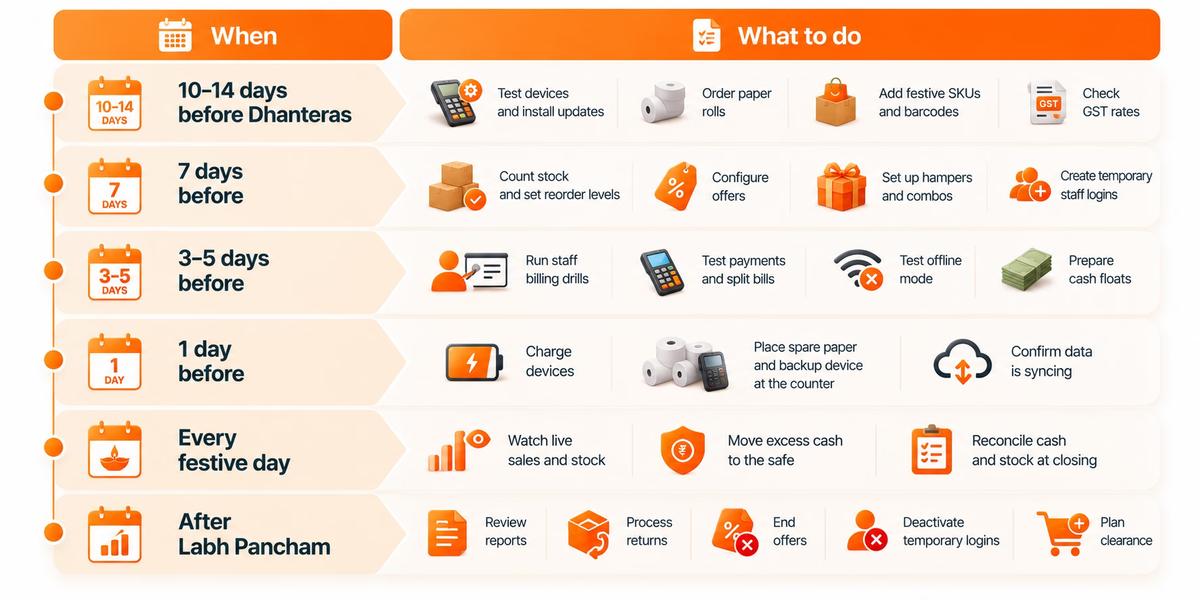
- 10–14 days before Dhanteras: Check that all billing devices are working properly, install pending software updates, stock up on receipt paper rolls, add festive products and barcodes to the system, and verify GST rates.
- 7 days before: Complete a stock count, set reorder levels for fast-selling products, configure festive offers, prepare gift hampers and product combos, and create temporary logins for seasonal staff.
- 3–5 days before: Train staff on billing and returns, test payment methods and split bills, check whether billing can continue in offline mode, and keep enough cash ready for change.
- 1 day before: Fully charge billing devices, keep spare receipt paper and a backup device near the counter, and check that sales and inventory data are syncing correctly.
- Every festive day: Keep an eye on sales and stock levels throughout the day, move excess cash to a secure location, and reconcile cash collections and stock records before closing.
- After Labh Pancham: Review festive sales reports, process pending returns, remove expired offers, deactivate temporary staff accounts, and plan clearance sales for leftover festive stock.
Printable Diwali POS Checklist
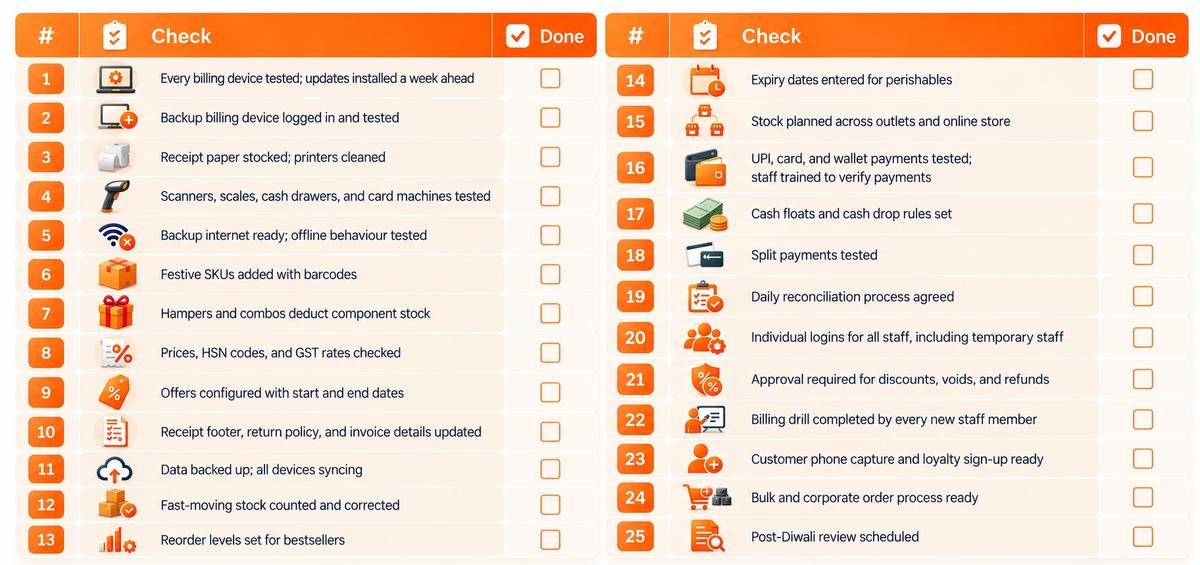
- Every billing device tested; updates installed a week ahead
- Backup billing device logged in and tested
- Receipt paper stocked; printers cleaned
- Scanners, scales, cash drawers, and card machines tested
- Backup internet ready; offline behaviour tested
- Festive SKUs added with barcodes
- Hampers and combos deduct component stock
- Prices, HSN codes, and GST rates checked
- Offers configured with start and end dates
- Receipt footer, return policy, and invoice details updated
- Data backed up; all devices syncing
- Fast-moving stock counted and corrected
- Reorder levels set for bestsellers
- Expiry dates entered for perishables
- Stock planned across outlets and online store
- UPI, card, and wallet payments tested; staff trained to verify payments
- Cash floats and cash drop rules set
- Split payments tested
- Daily reconciliation process agreed
- Individual logins for all staff, including temporary staff
- Approval required for discounts, voids, and refunds
- Billing drill completed by every new staff member
- Customer phone capture and loyalty sign-up ready
- Bulk and corporate order process ready
- Post-Diwali review scheduled
How PosBytz Helps You Through the Diwali Rush
PosBytz is a cloud-based POS and ERP for retail stores and restaurants. Here is how it supports the checklist above:
- Extra counters when you need them: Runs on Android, iPad, Windows, and web browsers, so a spare tablet can become an extra billing counter.
- Fast, GST-compliant billing with e-invoicing support for India.
- Inventory that updates as you sell and buy, with low-stock alerts and multi-outlet stock visibility.
- Staff logins, roles, and approvals so every discount and void is recorded against a named person.
- CRM and loyalty to save customer details at billing and run campaigns after Diwali.
- Accounting with Zoho Books and QuickBooks integrations, so festive sales flow into your books.
- Online selling in the same system: a free online store, Shopify POS integration, and restaurant online ordering with aggregator integration.
- Real-time reports from anywhere, so you can check sales and stock across outlets during the busiest days.
There is still time to set up before Dhanteras. Start your 14-day free trial, check pricing, or talk to the PosBytz team for a demo with your own products.
Frequently Asked Questions About Diwali POS Preparation
When should I start preparing my POS for Diwali?
Start 10 to 14 days before Dhanteras. That gives you time to test devices, install updates, add festive products, count stock, and train temporary staff before the rush begins.
What should a retailer check before the Diwali rush?
Check billing devices and printers, receipt paper, barcodes on festive items, prices and GST rates, stock levels of bestsellers, payment methods, cash floats, staff logins, and discount approval rules. Plan a daily cash and stock reconciliation.
How can I speed up billing during Diwali?
Add barcodes to every festive item, set up hampers and combos as single items, configure offers in the POS instead of manual discounts, open an extra billing counter on a tablet, and train staff with practice bills before the rush.
What if my internet goes down during the Diwali rush?
Keep a mobile hotspot as backup and find out which POS functions work offline. Test this before the rush by switching off your internet for a few minutes and billing as normal.
How do I avoid fake UPI payment scams during Diwali?
Confirm every UPI payment on your own phone, payment app, or soundbox before handing over goods. Never accept a screenshot or the customer's phone screen as proof of payment.
Do GST rates matter for Diwali billing?
Yes. GST rates were rationalised from 22 September 2025, so check that every item, especially new festive products, has the correct HSN code and GST rate. Confirm with your accountant if you are unsure.
Should temporary festive staff get their own POS login?
Yes. Individual logins with limited permissions show who billed what and protect honest staff. Deactivate temporary logins after the festive season.
How do I manage gift hamper stock in a POS?
Set up the hamper so the stock of each component reduces when the hamper is sold. Otherwise, your stock of individual items will be wrong after the season.
What should restaurants check before Diwali?
Test KOT printers and kitchen displays, add festive menu items with recipe mapping, set up sweet box and catering pre-orders, sync your online and aggregator menus, and confirm delivery rider availability.
What should I do after Diwali?
Review sales, stock, offer performance, and staff-wise discounts and voids. Process returns, end festive offers, deactivate temporary logins, and plan clearance for leftover stock.
Final Thoughts
The Diwali rush rewards the stores that prepared. A tested printer, a barcoded hamper, a trained temporary cashier, and a clear end-of-day count don't look exciting, but together they decide whether your busiest week is also your most profitable one.
Work through the checklist this week, fix what you find, and go into Dhanteras with a billing counter that can keep up.
Shubh Deepavali from the PosBytz team.
About the author

The PosBytz Marketing Team
Editorial Team, PosBytz
The PosBytz Marketing Team shares practical insights on running smarter restaurants and retail stores from POS best practices to inventory management, online ordering, and customer loyalty strategies.