Billing software in UAE: features, pricing and how to choose
A buyer's guide to billing software in UAE. Compare automated, mobile and online billing features, understand pricing models, and score vendors before you buy.


Buying billing software looks simple until you sit through three demos in a week. Every vendor says they're VAT compliant, every dashboard looks clean, and every sales rep promises setup in a day. By Thursday it is hard to remember which system did what.
This guide is for owners and managers across the Emirates who want a clear way to compare options. It covers which type of software you need, the features that separate good billing tools from basic invoicing apps, how pricing is structured in the UAE, and a simple scorecard and trial plan for making the final call.
If you run a business in Dubai specifically, our guide to the best billing software in Dubai covers Dubai-specific needs and recommendations by business type.
Billing software, POS or ERP: which one do you need?
These three terms get used interchangeably, and that leads to buying too much or too little.
Billing or invoicing software creates invoices and records payments. It suits service businesses, consultants, and wholesalers who send a few invoices a day and don't track shelf stock.
A POS system adds a checkout screen, receipt printing, payment terminals, and usually inventory. Shops, cafés, restaurants, and salons that serve walk-in customers need a POS, because speed at the counter matters as much as the invoice itself.
An ERP connects billing to accounting, purchasing, HR, and payroll. It makes sense once you have several outlets, a warehouse or central kitchen, or an accountant who is tired of reconciling exports from four tools.
Many growing UAE businesses start with a POS and move to an ERP later. Choosing a vendor that offers both saves you a migration. Our guide to ERP for small businesses explains when the jump is worth it.
Features that separate good billing software from basic invoicing
Automated billing software: the tasks you should stop doing by hand
Automated billing software earns its cost by removing repetitive work that invites mistakes. A useful test is to list what your staff do manually today and ask the vendor which of those steps the system handles on its own. Good candidates are:
- applying scheduled prices, such as lunch combos or weekend offers, without a cashier choosing them
- deducting ingredients or stock the moment an item is sold
- raising purchase orders when stock falls below a set level
- emailing the owner a daily sales summary after closing
- posting sales and VAT into the accounts so nothing is re-entered
If the answer to most of these is "you can export it and do it in Excel", the software is recording sales but not automating anything.
Mobile billing software: billing wherever the customer is
Mobile billing software runs on a phone or tablet, so the bill goes to the customer instead of the customer queuing at a counter. That matters in a table-service restaurant, a busy retail floor during a sale, a food truck, a pop-up at an exhibition, or a delivery rider collecting payment at the door.
When you evaluate a mobile option, check three things: whether it prints to a Bluetooth or network printer, whether it accepts card payments on the same device or a paired terminal, and whether orders taken on the handheld reach the kitchen or stock system instantly. PosBytz runs on Android, iPad, and Windows, so a fixed counter and handheld devices can share one live system.
Online billing software: your sales from any emirate, any time
Online billing software stores your data in the cloud. An owner in Abu Dhabi can check the Sharjah branch's sales before it closes, and an accountant can pull reports without visiting the shop. Cloud systems also handle updates and backups for you, which removes a job most small businesses forget until a hard drive fails.
The trade-off is dependence on the internet, so the best online billing software keeps billing when the connection drops and syncs afterwards. Read more in our guide to cloud POS systems.
Staff permissions and an audit trail
Cash leakage in retail and F&B usually comes from voided bills, unexplained discounts, and refunds processed after the customer has left. Your software should let you decide who can void, discount, or refund, and it should log each of those actions with the staff member's name and time. Ask vendors to show you the void report during the demo.
Reports you will actually open
Most systems offer dozens of reports. What you need is a short set you check every week: sales by hour, best and worst sellers, discounts given, stock variance, and payment method totals for cash reconciliation. See how these work in practice in our article on POS reports.
Compliance questions to put to every vendor
Every vendor in the UAE will say their software is VAT compliant, so ask for evidence. Request a sample tax invoice and a credit note, and check that the TRN, VAT amount, and invoice details are correct. Then ask for the VAT summary report your accountant would use for the quarterly return.
E-invoicing needs a separate conversation. Under the new framework, invoices must be issued in machine-readable XML and transmitted through accredited service providers on the Peppol network. The first mandatory phase starts on 1 January 2027 for businesses with revenue of AED 50 million or more, and smaller in-scope businesses go live on 1 July 2027. Sales to walk-in consumers are outside the mandate, but any invoices you issue to companies or government entities are within scope.
Useful questions to ask are how the vendor's system connects to an accredited service provider, whether your existing invoice data will need cleaning before go-live, and who handles support if an e-invoice is rejected. Our Dubai billing software guide sets out the full timeline.
Understanding billing software pricing in the UAE
Common pricing models
Vendors in the UAE price billing software in a few different ways, and the model affects your total cost as much as the headline number.
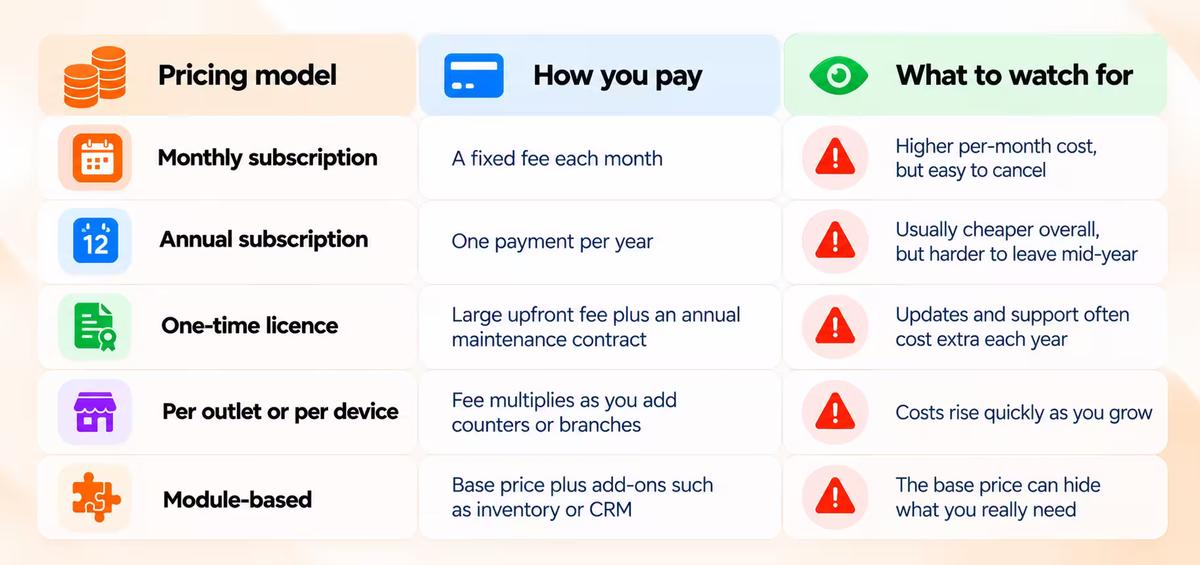
For current market ranges, see the pricing section of our Dubai billing software guide and our breakdown of restaurant POS costs.
Costs that sit outside the subscription
The quote you receive rarely covers everything. Before signing, ask about hardware such as printers, scanners, cash drawers, and kitchen screens; card payment processing fees; delivery app integration charges; onboarding, training, and data migration; and whether weekend and evening support costs extra. Adding these up over three years gives a truer comparison than the first-year price.
How to choose: a scorecard for comparing vendors
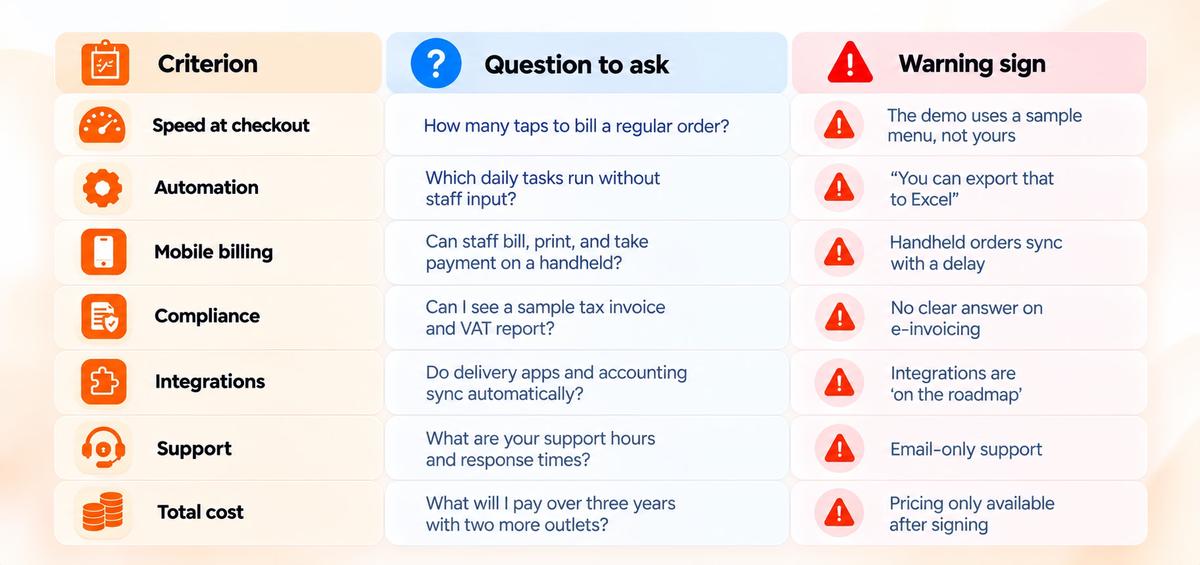
Score each vendor from 1 to 5 on the criteria below straight after the demo, while details are fresh. Weight the rows that matter most for your business.
Getting the most from a 14-day free trial
A free trial is only useful if you test the system with real work. Here's a simple plan for two weeks.
In the first week, load your real product list or menu, set up VAT and your TRN, connect a printer, and run the software alongside your current system during a quiet shift. Try a discount, a split payment, a refund, and a void, then check that each appears correctly in the reports.
In the second week, run a full busy shift on the new system. Test billing with the internet switched off, take orders on a handheld device, and send the VAT report to your accountant for a second opinion. Call support at least once, ideally outside office hours, to see how quickly they respond.
By the end you'll know whether your staff can use it under pressure, which a demo can't show you.
How PosBytz fits this checklist
PosBytz is a cloud POS and ERP for retail and F&B businesses, with billing, inventory, accounting, CRM, and HR and payroll in one system. For the automation points above, sales deduct stock and post into the accounting module without manual entry. For mobile billing, the same account runs on Android, iPad, and Windows devices. For online access, owners can view every outlet from one dashboard, and billing continues offline when the connection drops.
PosBytz also offers a UAE e-invoicing solution, Arabic language support, and integrations with delivery platforms such as Talabat, plus accounting tools. You can take the full system through the trial plan above, because PosBytz offers a 14-day free trial with full access to all features and no credit card is required to start.
Frequently asked questions
Can one billing system work across different emirates?
Yes. Cloud billing software isn't tied to a location, so outlets in Abu Dhabi, Sharjah, Ajman, or Ras Al Khaimah can run on the same account with shared products, prices, and reports.
Is automated billing software suitable for a small shop?
Yes. Small teams often gain the most, because the owner is usually the one doing stock counts, price changes, and end-of-day reports by hand.
What devices does mobile billing software need?
Most systems run on standard Android phones, tablets, or iPads. You may need a Bluetooth receipt printer and a card terminal that pairs with the device.
Is online billing software safe for my business data?
Reputable cloud providers encrypt data and back it up automatically, which is often safer than one computer at the counter. Ask each vendor where data is stored and how access is controlled.
Can I switch billing software in the middle of a VAT period?
You can, but keep reports from your old system for the part of the period it covered, and ask the new vendor to migrate historical data so your accountant has a complete record for the return.
Find the right fit for your business
Use the scorecard in your next demo, and test the shortlisted system with your real products during a trial. To see how PosBytz scores, start a free trial or book a demo with our team.
About the author

The PosBytz Marketing Team
Editorial Team, PosBytz
The PosBytz Marketing Team shares practical insights on running smarter restaurants and retail stores from POS best practices to inventory management, online ordering, and customer loyalty strategies.