Free Restaurant POS Software: 7 Best Picks for 2026
Free restaurant POS software isn't always what it seems. See what's really included, what's not, and which option fits your restaurant.



Are you looking for the Free Restaurant Pos Software? Are you tired of searching for the best free options? If you said yes, we’ve got you covered.
In today’s food industry, maintaining transactions is a task in itself. With the rise of Apple Pay, Credit Cards, and Debit Card payments, it is hectic to track everything manually. This is where free pos software for small restaurants comes into play to streamline your daily operations.
What Is Free Restaurant POS Software?
Free restaurant POS software is point-of-sale software that lets a restaurant take orders, process payments, and track sales without paying a monthly software fee. Most providers make their money elsewhere — through payment processing rates, paid hardware, or premium add-ons rather than charging for the core plan.
Is Restaurant POS Software Ever Truly Free?
Rarely 100% free, but often genuinely low-cost if you understand the trade-off going in. Free restaurant POS plans generally fall into one of three models:
- Processing-fee-funded: the software is free, but you're required or strongly encouraged to use the provider's own payment processing, at a rate that covers their cost of offering the free tier.
- Hardware-bundled: you get free software in exchange for committing to the provider's terminal, printer, or handheld hardware — sometimes with a contract term attached.
- Freemium/feature-gated: the base plan is free indefinitely, but reporting, loyalty, multi-location tools, or advanced inventory sit behind a paid upgrade.
Things To Consider When Evaluating Free Restaurant POS Software:
While there are many options for a free restaurant pos software download online, there are a few critical factors you must evaluate before committing.
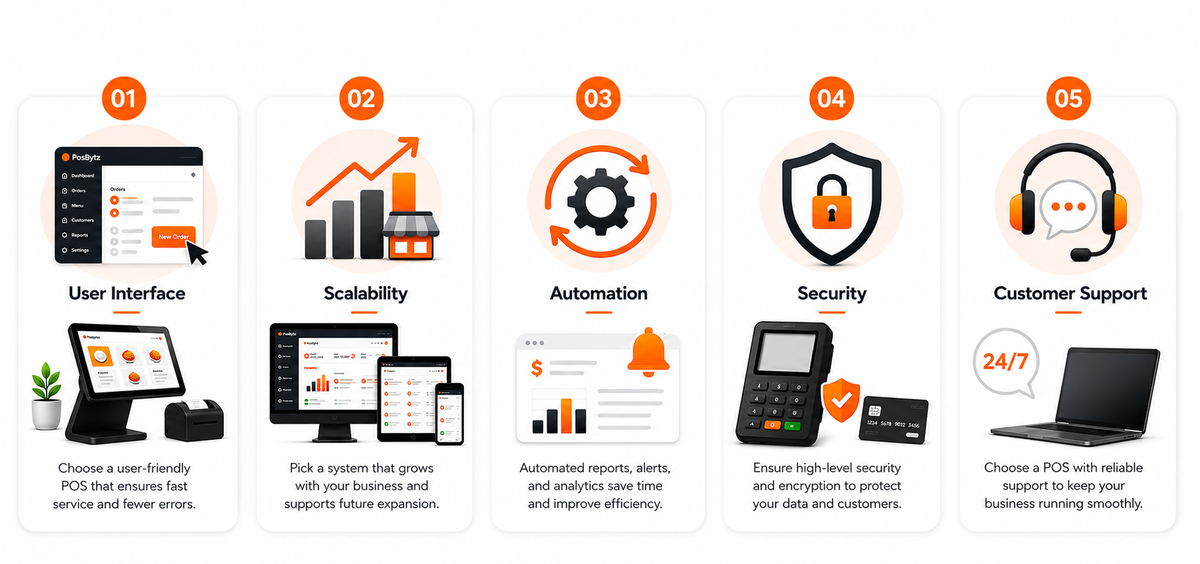
User Interface
The UI of your free restaurant pos software is essential. Your staff needs a system that is user-friendly and smooth to ensure fast service during peak hours. A complicated interface leads to order errors and slow checkout times.
Scalability
It is better to choose free pos software for small restaurants that can grow with you. As your demand increases, you might need to expand your menu, add more terminals, or open new branches. Ensure your chosen “free” plan has a clear path for upgrades.
Automation
The best free pos for restaurants should be automated. You need a system that creates automated end-of-day reports, inventory alerts, and sales analytics to make your management job easier.
Security
Choosing free restaurant pos software that provides a robust security system is vital. Since you are handling sensitive transaction data and money, your POS needs high-level encryption to protect your business and your customers.
Customer Support
Reliable support is critical. Even with the best free pos for restaurants, you may face technical glitches. Having access to a support team ensures your kitchen doesn’t stop running due to a software issue.
Best Free Restaurant POS Software: Detailed Reviews
While there are various options for free pos software for small restaurants, here are our top picks:
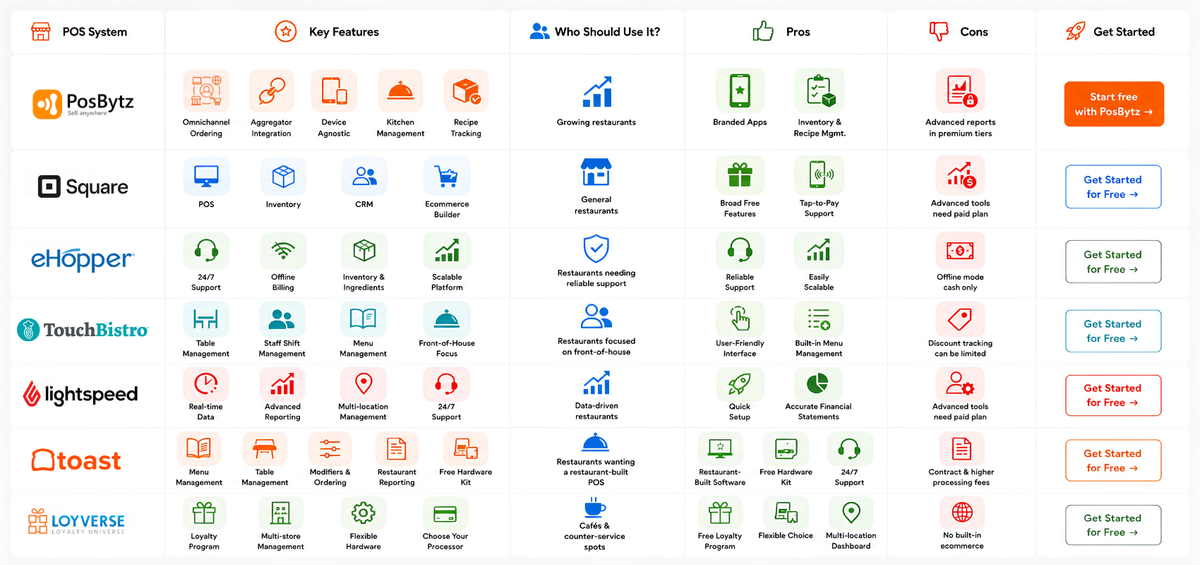
PosBytz - Best for Scaling Multi-Outlet Restaurants
PosBytz offers a highly comprehensive Free Restaurant Pos Software tier designed specifically to help small businesses scale. It includes essential features like billing, inventory tracking, and basic reporting, allowing you to modernize your shop without any upfront software costs.
PosBytz is a one-stop Restaurant Management software. It is suitable for all sorts of restaurants and helps the overall management under a single platform. As a scalable Free Restaurant Pos Software, it helps you manage everything from Employee Management to Recipe Ingredient Management and Billing.
Download the Free POS for Restaurant App
PosBytz Features:
- Omnichannel Ordering: Build your own Online ordering platform and free delivery app in minutes.
- Aggregator Integration: Seamless POS integration with Zomato, Swiggy, UberEats, Talabat, and more.
- Device Agnostic: Runs across Android, Windows, and iPad.
- Kitchen Management: KOT Management Services display order details in multiple kitchens instantly.
- Recipe Tracking: Track the availability of stock for all ingredients with every order placed.
Who should use it:
Restaurants that expect to grow — adding a second location, a delivery-only brand, or online ordering — and want that growth to happen inside the same system rather than triggering a migration.
Pros:
Branded customer apps for iOS/Android; manage inventory with ingredient/recipe management seamlessly.
Cons:
Certain advanced report enhancements are reserved for premium tiers.
Square - Best Overall Free POS for General Restaurant Use
Square's free plan bundles POS software, basic inventory, CRM, and a free ecommerce site builder, with restaurant-specific tools like open checks, table management, and kitchen performance reports included at no monthly cost. It's a strong fit if you don't yet need deep restaurant-specific workflows like recipe-level inventory.
Pros: Broad feature set for a free tier; free ecommerce site builder included; works with tap-to-pay on iPhone/Android with no extra hardware. Cons: Advanced inventory and reporting require a paid plan; phone support is limited on the free tier.
eHopper - Best for 24/7 Support and Offline Billing
eHopper is a prominent best free pos for restaurants choice known for its 24/7 support and offline capabilities. They have specifically curated software that lets you manage transactions, inventory, and ingredients under a single platform.
Pros: Reliable support; easily scalable as your business grows. Cons: Offline mode primarily supports cash transactions.
TouchBistro - Best for Front-of-House Table Management
A free pos software for small restaurants that focuses on front-of-house efficiency. They provide seamless table mapping and staff shift allocations to ensure your dining room runs smoothly.
Pros: User-friendly interface with built-in menu management tools. Cons: Some users find specific discount details hard to track on bills.
Lightspeed
Lightspeed delivers high-performance Free Restaurant Pos Software solutions. They are known for providing exceptional 24/7 customer service and real-time transaction data that helps you stay on top of your restaurant’s health.
Pros: Quick to set up; provides highly accurate financial statements. Cons: Advanced staff tools often require a move away from the basic free options.
Toast - Best for Free Hardware-Included Setup
Toast pairs restaurant-specific POS software with a free starter hardware kit, in exchange for using Toast Payments and accepting a standard contract term. It's built specifically around restaurant workflows — menu management, modifiers, table tracking — more deeply than general-purpose POS platforms.
Pros: Restaurant-built software, not adapted retail software; free countertop or handheld hardware kit; 24/7 support included even on the free tier. Cons: Processing fees run higher than paid-plan rates; requires a standard contract term; inventory tools are limited compared to full-service restaurant needs.
Loyverse - Best for Cafés and Counter-Service Spots
Loyverse offers free multi-store management, basic inventory, and a built-in loyalty program, with the flexibility to choose your own payment processor and hardware rather than being locked into one ecosystem.
Pros: Free built-in loyalty program; flexible hardware and processor choice; free multi-location dashboard. Cons: No built-in ecommerce/online ordering; most third-party integrations require a paid add-on.
How to Choose the Right Free POS for Your Restaurant
- List your must-haves first. Billing, KOT routing, and basic inventory are non-negotiable; everything else is a nice-to-have until you know your workflow.
- Understand how the provider gets paid. Ask directly: is it processing fees, hardware, or feature gating? That answer tells you your real monthly cost.
- Confirm hardware compatibility. Don't buy new devices to fit the software — pick software that fits the devices your team already knows.
- Run a live test shift. Place an order, split a check, and print a kitchen ticket before you commit — friction shows up fast in a real service rush.
- Check the upgrade path. If you expect to add a location or a delivery channel, confirm that growth doesn't mean starting over on a different platform.
What to Watch Out For With Free POS Plans
- Feature caps that surface later. Reporting, loyalty, or advanced inventory tools that seemed unnecessary at launch often become essential within the first year.
- Processor lock-in. Some free plans require their own payment processor at a rate that's hard to compare against a flat monthly fee upfront.
- Support gaps mid-shift. A frozen screen during dinner rush is a different emergency than a slow ticket queue — confirm what support actually looks like in real time, not just what's listed on the pricing page.
- Multi-location limits. Many free tiers are built for a single counter. If a second location is even a possibility, confirm now what changes when you add one.
Frequently Asked Questions
Which Free Restaurant POS Software is Best?
While there are many good systems, we recommend PosBytz for its superior scalability and all-in-one ERP features.
Does free POS software work on iPad and Android?
Most modern free restaurant POS platforms — including PosBytz, Square, Loyverse, and TouchBistro — are device-agnostic and run on iPad, Android, and Windows.
What features should I look for in a free restaurant POS?
At minimum: fast billing, kitchen order ticket (KOT) printing or routing, basic inventory tracking, and support for the device you already own.
Can free restaurant POS software handle online ordering and delivery?
Some do, some don't. PosBytz includes a branded online ordering setup and aggregator integrations (Swiggy, Zomato, Uber Eats, Talabat) in its restaurant plans; many competitors reserve delivery and aggregator sync for paid tiers.
What are the hidden costs of "free" restaurant POS software?
The most common ones are card processing markups, required proprietary hardware, and premium add-ons for reporting, loyalty, or multi-location management.
When should a restaurant upgrade from a free POS plan?
Typically when you open a second location, need deeper inventory/recipe-level tracking, or outgrow the reporting and staff-management tools in the free tier.
Can free POS software support multiple restaurant locations?
A few can, but most free tiers are built for a single counter. If multi-location is on your roadmap, confirm the upgrade path before you build your menu and staff logins into a system that won't scale with you.
Conclusion: Start Free, Scale Without Switching
Choosing the right free pos software for small restaurants is your call, but ensure the software you pick is scalable. If a system doesn’t grow with you, it will eventually hinder your business. For a truly future-proof solution, manage your inventory, billing, and staff all under one roof.
Modernize Your Restaurant Today
Experience the efficiency of the best free pos for restaurants. Streamline your operations, cut commissions, and manage everything from anywhere.
Start Your Free Trial with PosBytz
Related Resources
Traditional vs. Cloud POS
Discover why cloud systems are the top choice for small restaurant growth.
8 Best POS Inventory Systems
Learn how to track every ingredient and reduce food waste for free.
About the author

Saravana Damodaram
Co-Founder & CEO, PosBytz
Saravana Damodaram is the Co-Founder & CEO of PosBytz, a cloud-based POS-ERP platform built for F&B and retail businesses since 2018. He focuses on unified commerce, inventory, and multi-location operations, and has helped over 5,000 merchants across 25+ countries move off fragmented, disconnected tools and run their entire operation, billing, inventory, kitchen, and accounting on one platform.