QR Code Ordering for Restaurants: The Complete Guide
Everything restaurant owners need to know about QR code ordering — how it works, setup steps, best practices, and real operational trade-offs.



Dine-in traffic is back, but guest expectations have changed: most diners now expect to view the menu, order, and pay from their own phone rather than wait to flag down a server. QR code ordering for restaurants makes this possible guests scan a code at the table, order directly, and the ticket lands in the kitchen without a server re-keying it.
Done well, QR code ordering speeds up table turns, reduces order errors, and frees staff to focus on hospitality instead of order-taking. Done poorly with no fallback for guests who don't want to use it, or a menu that isn't kept current it creates friction instead of removing it. This guide covers how QR code ordering for restaurants works, how to set it up, and the operational details most guides skip.
What Is QR Code Ordering for Restaurants?
QR code ordering for restaurants is a contactless system where guests scan a code at their table to view the menu, place an order, and pay from their own phone — no app download required. The order routes directly to the POS and kitchen, cutting wait times and reducing manual order-taking.
Why Restaurants Are Adopting QR Code Ordering
- Reduce guest wait times during peak 2026 dining hours.
- Enable instant menu updates without reprinting physical copies.
- Drive higher average order values through visual upselling.
How QR Code Ordering Works
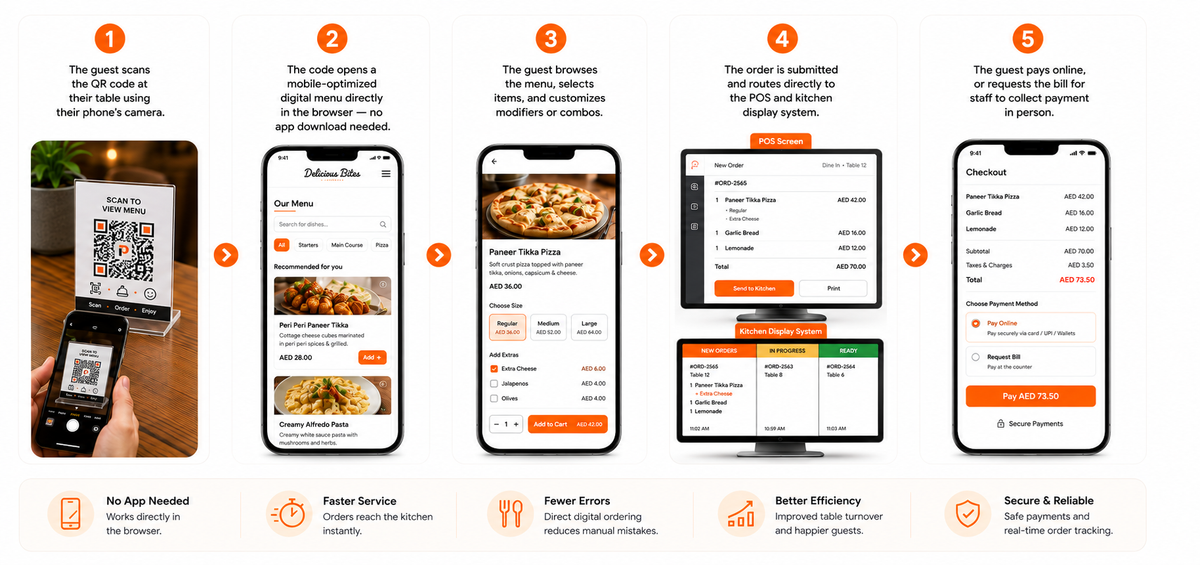
- The guest scans the QR code at their table using their phone's camera.
- The code opens a mobile-optimized digital menu directly in the browser — no app download needed.
- The guest browses the menu, selects items, and customizes modifiers or combos.
- The order is submitted and routes directly to the POS and kitchen display system.
- The guest pays online, or requests the bill for staff to collect payment in person.
Tips to Optimize Dine In with QR Menu Ordering
Moving beyond a mere safety precaution, QR Code Ordering technology has become a staple in the hospitality industry. QR menus on the tables free up staff to focus on hospitality and put customers in control of the ordering process, making order management more fluid. With improved accuracy and faster table turnover, qr code menu ordering helps create a premier dining experience.
However, simply enabling codes without operational adjustments isn’t enough. By adding thoughtful enhancements to your workflow and presentation, your QR code ordering system will be a resounding success.

Come up with a clear plan
Streamlining your operating system is the first step. Consider how to assist guests without smartphones, decide between table service or counter pickup, and assign specific staff to monitor digital orders in real-time.
Keep your menu up to date
Nothing annoys a customer more than ordering an out-of-stock item. With a QR code ordering system, you can update your digital menu in real-time to ensure only available dishes are displayed.
Guide your guests and set expectations
While most people know how to scan a code, using it for qr code menu ordering is a specific journey. Have your hosts explain the process as they seat guests. Key points to remember:
- Ensure codes are clear, well-lit, and easy to scan.
- Keep the digital interface short and intuitive.
- Include simple steps (Scan -> Order -> Enjoy) on table placards.
- Highlight digital loyalty rewards to encourage higher order volumes.
Train your staff
While staff no longer need to take every manual order, their role evolves into “hospitality experts.” They should be ready to discuss flavor profiles, recommend pairings, and assist guests who want to add extra items to their existing table order manually.
How to Set Up QR Code Ordering for Your Restaurant
Setting up a QR code ordering system doesn't require custom development. With PosBytz's QR code ordering system:
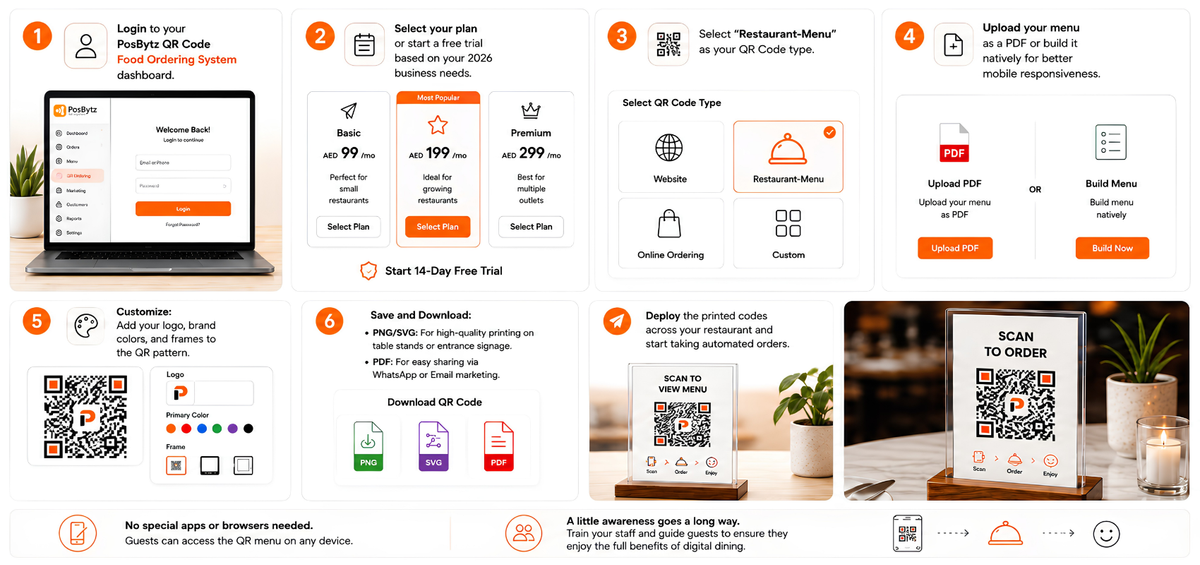
- Login to your PosBytz QR Code Food Ordering System dashboard.
- Select your plan or start a free trial based on your 2026 business needs.
- Select “Restaurant-Menu” as your QR Code type.
- Upload your menu as a PDF or build it natively for better mobile responsiveness.
- Customize: Add your logo, brand colors, and frames to the QR pattern.
- Save and Download:
- PNG/SVG: For high-quality printing on table stands or entrance signage.
- PDF: For easy sharing via WhatsApp or Email marketing.
- Deploy the printed codes across your restaurant and start taking automated orders.
Most of the time, a QR code food ordering system doesn’t require any special apps or browsers. You should also let the guest access the QR menu by using the preferred handoff method from any platform, including Google. Though the QR Code Ordering process is easy, awareness and staff training may be required. You may have to educate the guests about how to use the technology to ensure they enjoy the full benefits of digital dining.
Best Practices to Optimize QR Code Ordering
Turning on QR codes alone isn't enough — a few operational adjustments make the difference between guests loving it and guests avoiding it.
Have a clear service plan. Decide how you'll assist guests who don't want to use a smartphone, whether payment happens at the table or the counter, and who monitors incoming digital orders in real time.
Keep the menu current. An out-of-stock item showing as available is one of the fastest ways to frustrate a guest. Update availability the moment something runs out.
Guide guests instead of assuming they know what to do. Have hosts briefly explain the process at seating. On the table:
- Make sure the code is well-lit and easy to scan
- Keep the on-screen flow short — menu, cart, checkout, nothing more
- Add a simple "Scan → Order → Enjoy" prompt on the table card
- Surface loyalty rewards where guests will actually see them, at the point of ordering
Train staff for a different role. Staff spend less time taking orders and more time acting as hosts — recommending dishes, catching problems early, and helping guests who want to add something mid-meal.
Common Challenges and How to Solve Them
Not every guest wants to use a QR code. Some guests often older diners or those unfamiliar with the process prefer a physical menu or a server. Keep a small stock of printed menus available on request rather than making QR ordering mandatory.
Codes that are hard to scan. Faded prints, glare from table lighting, or codes placed too small are common causes of failed scans. Use a matte finish, place the code away from direct glare, and print it large enough to scan from a normal seated distance.
Staff adjusting to a new role. Some staff may initially see QR ordering as reducing their relevance. Framing the shift clearly, less time on order-taking, more time on service and upselling and training staff to use the same dashboard to monitor and assist orders helps the transition.
Conclusion
QR code ordering for restaurants works best when it's treated as an operational upgrade, not just a QR sticker on the table. Restaurants that pair it with an always-current menu, clear guest guidance, and staff trained for a hospitality-first role see the real benefit: faster service, fewer errors, and more time for staff to focus on the guest experience.
PosBytz's QR code ordering system integrates directly with your POS, kitchen display, inventory, and CRM, so QR orders aren't a separate workflow to manage — they're part of the same system as every other order channel.
Frequently Asked Questions
1. What is QR code ordering for restaurants?
It's a system where guests scan a QR code at their table to browse the menu, place an order, and often pay — all from their own phone, without needing an app or server assistance for the initial order.
2. How Does QR Ordering Work?
Customers scan a QR Code Ordering marker at their table, browse the menu on their phone, select items, and submit their order. The order is sent directly to the POS system and then to the kitchen, and payment can often be completed online.
3. What Are the Benefits of QR Menu for Restaurants?
- Faster service and improved order accuracy.
- Reduced labor costs during the 2026 staffing crisis.
- Contactless and hygienic dining experience.
- Easy menu updates without the need for reprinting.
- Enhanced upselling and personalized guest journeys.
4. Do Customers Need to Download an App?
No. Most QR code ordering systems work through a standard web browser. Customers simply scan the code and access the menu instantly via their mobile browser.
5. Can Customers Customize Their Orders?
Yes, many systems allow customers to modify ingredients, select modifier sizes, and add special instructions for their meals directly from their phones.
6. Does QR Menu Ordering Support Multiple Payment Methods?
Most platforms support credit/debit cards, mobile wallets like Apple Pay and Google Pay, and sometimes even cash-on-delivery options for 2026 shoppers.
7. Can QR Ordering Integrate with POS Systems?
Yes, modern QR code ordering system solutions integrate seamlessly with POS systems to streamline order management, inventory tracking, and reporting.
8. Is QR code ordering suitable for full-service restaurants, or only quick-service?
Both. Quick-service restaurants use it to speed up counter and takeaway orders, while full-service restaurants typically use it as a table-side option alongside — not a replacement for — server interaction.
9. What happens if a guest doesn't want to use QR ordering?
A good implementation keeps a manual fallback: staff can take the order the traditional way, or a printed menu can be offered on request.
Automate Your Restaurant Today
Experience the best QR code ordering system for 2026. Empower your guests with digital menus and instant table-side payments.
Start Your Free Trial Book a Live Demo
Related Resources
Suggested Read: Restaurant QR Code Ordering System
Suggested Read: QR code table ordering enhances customer experience
Enhancing Guest Experience
Discover how QR table ordering transforms the dining journey.
Best Restaurant ERP
Automate your operations with the best ERP for restaurants.
Small Restaurant Guide
Streamline operations with our ERP comprehensive guide.
Streamlining Services
How QR Code Ordering reduces wait times and staffing pressure.
About the author

Saravana Damodaram
Co-Founder & CEO, PosBytz
Saravana Damodaram is the Co-Founder & CEO of PosBytz, a cloud-based POS-ERP platform built for F&B and retail businesses since 2018. He focuses on unified commerce, inventory, and multi-location operations, and has helped over 5,000 merchants across 25+ countries move off fragmented, disconnected tools and run their entire operation, billing, inventory, kitchen, and accounting on one platform.