Which Is the Best POS for Cloud Kitchens in India?
A practical, criteria-based comparison of the top cloud kitchen POS systems in India, multi-brand support, aggregator sync, and pricing at a glance.


Which POS is best for a cloud kitchen? The honest answer is: it depends on how many brands you run, how many aggregators you sell on, and how tightly you need inventory tracked across all of them. When comparing cloud kitchen POS systems, map these variables to the features you truly need.
Cloud kitchens don't run like dine-in restaurants. There's no table management, but there is a constant stream of orders from Swiggy, Zomato, your own app, and sometimes three or four virtual brands operating out of one kitchen. A POS that isn't built for that specific workload creates the exact problems it's supposed to solve, missed orders, mismatched inventory, and no clear view of which brand is actually profitable.
We compared the cloud kitchen POS software most commonly used by Indian delivery-only kitchens in 2026, on aggregator integration, multi-brand support, inventory depth, and pricing, so you can shortlist the right one for your setup and choose pos software for cloud kitchen workflows that matches your scale..
What Is a Cloud Kitchen POS Software?
A cloud kitchen POS is billing and management software built for delivery-only restaurants. It consolidates orders from Swiggy, Zomato, and your own app into one screen, routes kitchen order tickets (KOTs) to the right prep station, deducts inventory automatically, and reports sales across every virtual brand, without the table-management features a dine-in POS doesn't need. In short, it's POS software for cloud kitchen operations.
If you're setting up a delivery-only kitchen from scratch, PosBytz's dedicated cloud kitchen software walks through billing, order routing, and delivery management in one system.
Why Cloud Kitchens Need a Specialized POS
A general restaurant POS is built around dine-in workflows, table maps, split billing by seat, waiter apps. Every recommendation on this page still assumes a modern cloud POS software foundation underneath, but cloud kitchens don't need those dine-in extras. They do need things most dine-in POS systems treat as an afterthought:
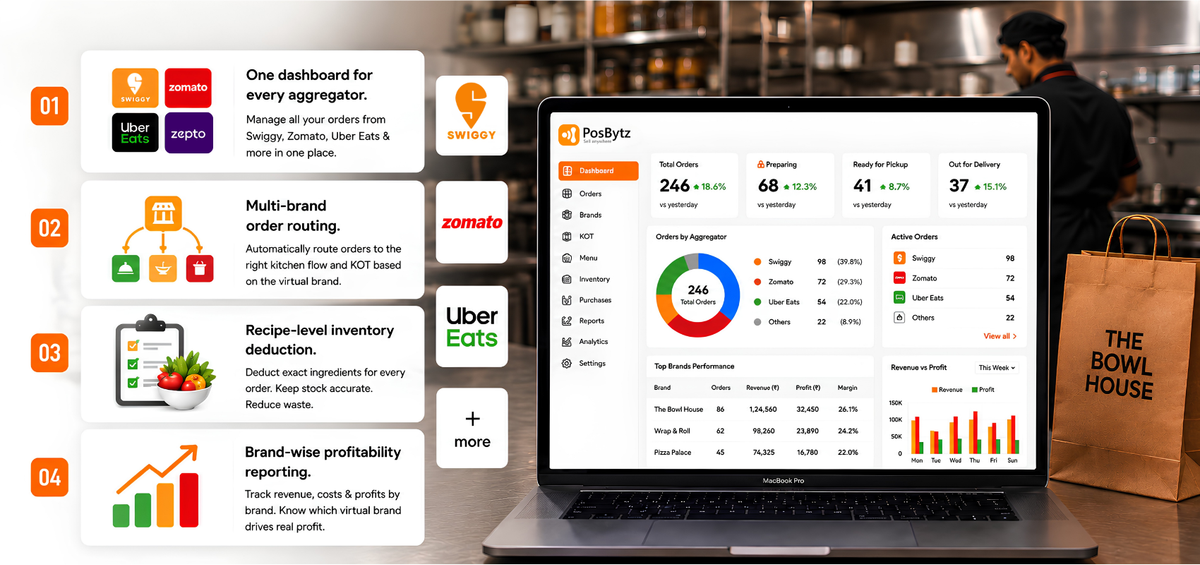
- One dashboard for every aggregator. Without it, staff juggle separate tablets for Swiggy, Zomato, and Uber Eats, and orders get missed during rush hours.
- Multi-brand order routing. If you run two or three virtual brands from one kitchen, the POS needs to route each order to the correct KOT format and prep flow automatically.
- Recipe-level inventory deduction. Every order should deduct the exact ingredients used, so stock counts stay accurate without manual recounts.
- Brand-wise profitability reporting. You need to know which virtual brand is actually making money, not just total revenue.
How to Choose the Best POS for Your Cloud Kitchen
To find the best POS for cloud kitchen setups, focus on workflows and scale rather than generic feature checklists.
- List every channel you sell on: Swiggy, Zomato, your own app, call-in orders.
- Check for a single dashboard that pulls all of those into one screen.
- Confirm multi-brand support if you operate more than one virtual brand.
- Verify automatic, recipe-level inventory deduction rather than manual stock updates.
- Compare reporting depth: brand-wise, item-wise, and consolidated views.
- Ask for pricing per outlet/brand, including how aggregator commissions and payouts reconcile with your sales data.
- Run a free trial or live demo before committing, screenshots don't show you rush-hour performance.
List Of The Best Cloud Kitchen Software
Here is the curated list of the best cloud kitchen POS systems available in the market for modern delivery-only restaurants:
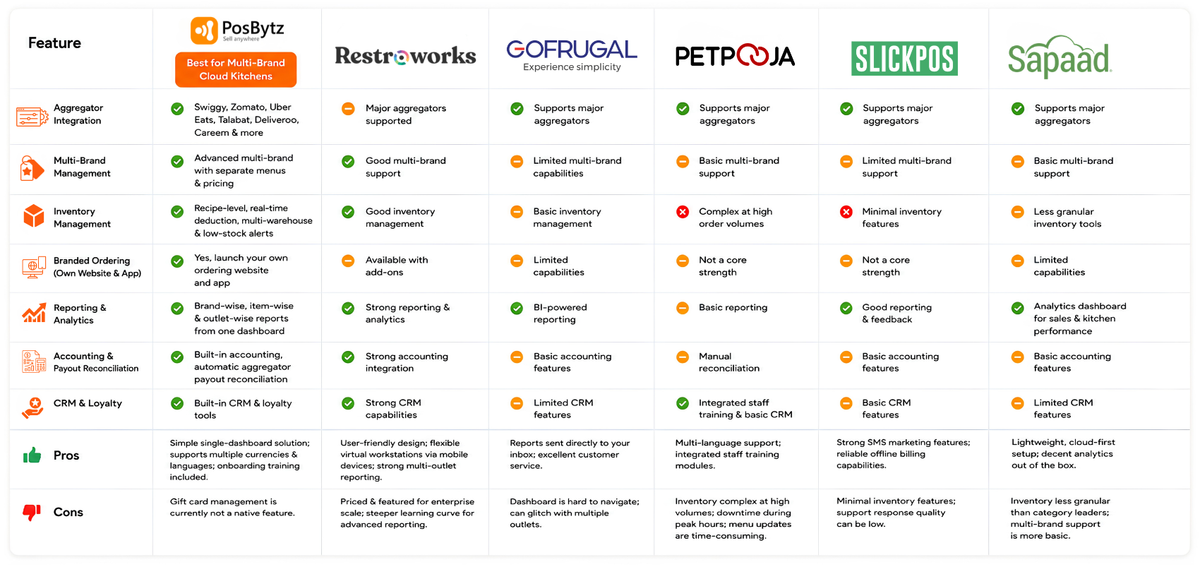
1. PosBytz - Best for Multi-Brand Cloud Kitchens
PosBytz is the Best Cloud Kitchen POS Software choice for brands looking for a “one-stop shop” solution. This cloud-based platform manages every aspect of a virtual restaurant, from complex inventory to unified sales data across all point-of-purchase terminals.
Why it fits cloud kitchens:
- Aggregator integration: Unified order management across Swiggy, Zomato, Uber Eats, Talabat, Deliveroo, and Careem, with automatic menu, pricing, and availability sync.
- Multi-brand management: Run multiple virtual brands from one kitchen and one dashboard, with separate menus and pricing per brand.
- Branded ordering: Launch your own ordering website and app to build direct customer relationships and reduce aggregator commission dependence.
- Inventory control: Recipe-level, real-time inventory deduction across online orders, in-store, and delivery aggregators, with low-stock alerts and multi-warehouse support.
- Reporting: Brand-wise, item-wise, and outlet-wise sales and profitability reports from one dashboard.
- Accounting: Built-in accounting and financial reports that reconcile aggregator payouts automatically, instead of manual spreadsheet work.
- Customer relationships: CRM and loyalty tools built into the same dashboard, so repeat delivery customers aren't just numbers on an aggregator app.
Pros
Simple single-dashboard solution; supports multiple currencies and languages; onboarding training included.
Cons
Gift card management is currently not a native feature.
2. Restroworks (formerly POSist)
Restroworks (the current branding for what was previously marketed as POSist) offers a clean interface aimed at enterprise and chain restaurants, with strong CRM and reporting depth. It's positioned as a broader restaurant management platform rather than a cloud-kitchen specialist, so smaller single-brand kitchens may find it more than they need.
Pros
User-friendly design; flexible virtual workstations via mobile devices; strong multi-outlet reporting.
Cons
Can be priced and featured for enterprise scale rather than smaller cloud kitchens; steeper learning curve for advanced reporting.
3. GoFrugal
A hybrid online-offline platform, GoFrugal is popular for small businesses needing BI-powered reporting. However, its heavy focus on retail can make the restaurant dashboard feel cluttered.
Pros
Reports sent directly to your inbox; excellent customer service.
Cons
Dashboard is hard to navigate; can glitch with multiple outlets.
4. Petpooja
Petpooja is a widely used best pos for cloud kitchen in India due to its large support network. While it covers basics like cash management, its inventory system is notoriously complex.
Pros
Multi-language support; integrated staff training modules.
Cons
Inventory management gets complex at higher order volumes; some users report downtime during peak hours and time-consuming menu updates.
If Petpooja isn't the right fit, PosBytz's comparison of Petpooja alternatives breaks down where the gaps usually show up.
5. SlickPOS
SlickPOS is a fully-featured system that excels in gathering customer feedback and tax reporting. It offers a best pos for cloud kitchen free trial, though its inventory tools are limited.
Pros
Strong SMS marketing features; reliable offline billing capabilities.
Cons
Minimal inventory features; support response quality can be low.
6. Sapaad
Sapaad's cloud-native architecture lets operators manage multi-channel orders from one place, with an analytics dashboard for sales trends and kitchen performance.
Pros
Lightweight, cloud-first setup; decent analytics out of the box.
Cons
Inventory tooling is less granular than category leaders; multi-brand support is more basic.
If inventory depth is your priority, PosBytz's rundown of Sapaad alternatives covers where it falls short.
What a Real Multi-Brand Kitchen Setup Looks Like
Consider a kitchen running three virtual brands, a biryani brand, a wrap brand, and a dessert brand, from a single 400 sq. ft. facility. Without a unified system, staff would need separate tablets for each aggregator per brand, manual inventory counts across shared ingredients like rice and chicken, and no clean way to see which brand actually turns a profit after commissions. A cloud kitchen POS with native multi-brand support consolidates all of that: one dashboard for every order, shared inventory that deducts correctly regardless of which brand sold the dish, and brand-wise P&L visibility, the difference between guessing and knowing which brand to scale next.
Frequently Asked Questions
1. What is a Cloud Kitchen POS Software?
It's a system built specifically for delivery-only restaurants. It consolidates orders from multiple aggregators and your own channels, routes kitchen order tickets (KOTs) automatically, and tracks inventory in real time, without dine-in features like table management.
2. Which is the Best Cloud Kitchen POS Software?
While several exist, PosBytz is the top one-stop solution due to its native multi-brand handling and deep aggregator integrations.
3. What are the core requirements for the best POS for cloud kitchen?
A cloud kitchen requires centralized inventory control, seamless delivery app integration, and real-time revenue analytics brand-wise.
4. How much does a cloud kitchen POS cost in India?
Pricing varies by vendor, outlet count, and feature tier, and changes frequently, get a current quote directly from the vendor rather than relying on published rates. Many pos software for cloud kitchen vendors also offer tiered plans, so confirm what is included.
5. Can one POS manage multiple virtual brands from a single kitchen?
Yes. Systems built for cloud kitchens, like PosBytz, let you run several virtual brands, each with its own menu, pricing, and branding, from one dashboard and one physical kitchen.
6. Does a cloud kitchen POS need to integrate with Swiggy and Zomato?
Yes, for any kitchen selling through aggregators, integration should be automatic (menu, pricing, availability, and order sync), not manual re-entry across separate tablets.
7. Is a cloud kitchen POS different from a regular restaurant POS?
Yes. A regular restaurant POS is built around dine-in workflows like table management. A cloud kitchen POS is built around order consolidation across delivery channels, KOT routing, and inventory accuracy for a delivery-only operation.
Scale Your Multi-Brand Kitchen Today
Unify your brands and streamline your delivery operations with the Best Cloud Kitchen POS Software.
Related Resources for Cloud Kitchen Owners
8 Best POS Inventory Systems
Automate stock tracking and recipe costing across all virtual brands.
What are POS Reports?
Understand the critical data metrics that drive delivery profitability.
Starting a Cloud Kitchen
A complete roadmap from concept to first delivery for virtual restaurants.
CRM for Customer Engagement
How to use data to build loyalty in a delivery-first business model.
Boosting Success with ERP
Leverage an integrated ERP to scale multiple locations seamlessly.
About the author

Saravana Damodaram
Co-Founder & CEO, PosBytz
Saravana Damodaram is the Co-Founder & CEO of PosBytz, a cloud-based POS-ERP platform built for F&B and retail businesses since 2018. He focuses on unified commerce, inventory, and multi-location operations, and has helped over 5,000 merchants across 25+ countries move off fragmented, disconnected tools and run their entire operation, billing, inventory, kitchen, and accounting on one platform.