Restaurant Inventory Management Software to optimize operations
Restaurant inventory management software to efficiently track your stock, reduce waste, reorder stocks and calculate food costing


Introduction
If you run a restaurant, cafe, or cloud kitchen and want a clearer picture of what's coming in, what's going out, and where money is being lost to waste, this guide covers everything you need to know about restaurant inventory management software.
Inventory is the backbone of any food business. A single stock oversight, an unrecorded spill, an unlogged expiry, can quietly erode your margins over a month. With food costs rising and labor still one of the biggest line items on a P&L, tightening up restaurant inventory management is one of the most direct ways operators can protect profitability.
This article breaks down what restaurant inventory software actually does, why it matters, how to set it up correctly, and what to look for when choosing a system for your business.
What is Restaurant Inventory Management Software?
Restaurant inventory management software is a system for tracking and controlling the purchase, storage, usage, and transfer of stock across your restaurant. It shows you exactly how much of every ingredient or item you have on hand at any moment and helps you restock intelligently, before you run out or over-order.
Restaurant inventory management directly affects your food costs, cash flow, and profitability. Carrying too much stock ties up cash and increases the risk of spoilage. Carrying too little makes it difficult to fulfil orders during busy periods. The goal of a good restaurant inventory system is to keep you in that middle zone: enough stock to meet demand, without excess sitting in the storeroom.
Why Restaurant Inventory Management Matters
The core purpose of a restaurant inventory system is to help you decide how much to buy and when to order it. Manual counting or spreadsheets can technically get this done, but dedicated restaurant inventory management software simplifies the process, improves accuracy, and surfaces financial insights that are hard to see in a spreadsheet, including automatic reordering once stock hits a set threshold.
Key Benefits of a Restaurant Inventory System
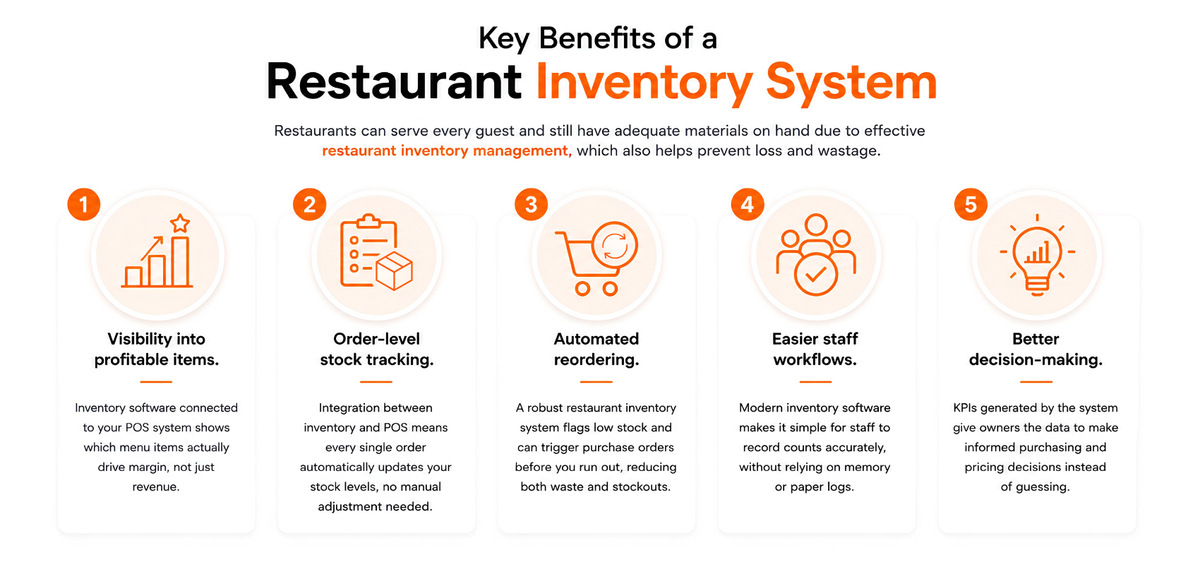
Restaurants can serve every guest and still have adequate materials on hand due to effective restaurant inventory management, which also helps prevent loss and wastage.
- Visibility into profitable items. Inventory software connected to your POS system shows which menu items actually drive margin, not just revenue.
- Order-level stock tracking. Integration between inventory and POS means every single order automatically updates your stock levels, no manual adjustment needed.
- Automated reordering. A robust restaurant inventory system flags low stock and can trigger purchase orders before you run out, reducing both waste and stockouts.
- Easier staff workflows. Modern inventory software makes it simple for staff to record counts accurately, without relying on memory or paper logs.
- Better decision-making. KPIs generated by the system give owners the data to make informed purchasing and pricing decisions instead of guessing.
How To Get Started With Inventory Tracking?
How you track inventory depends on the size and type of your operation, but the same core steps apply whether you run a quick-service counter or a full-service kitchen.
For Made-to-Order Items
- Create recipes and ingredients. Start by defining your base ingredients. A sauce made from several spices and liquids, for example, becomes a single component used across multiple menu items.
- Map quantities. Attach each recipe and ingredient to the specific menu item it belongs to, with the exact quantity and unit type.
- Standardize unit measurement. Use consistent, logical units (hamburger meat by the pound, buns by the dozen) so your restaurant inventory management stays precise across the board.
- Record unit prices. Log the price you most recently paid for each item so your system reflects current stock value and restocking costs accurately.
- Log the final selling price. Add each item's selling price alongside its cost for accurate margin tracking.
- Set par levels. Decide the minimum quantity you want on hand for each item. Your restaurant inventory system should alert you automatically when it's time to reorder.
For Pre-Prepared Items
For batch-prepared items, such as burger patties or sauces made ahead of service, the process runs through a preparation order flow instead of a simple recipe deduction. This lets you track how much raw stock goes into a batch and how much finished product comes out, so your counts stay accurate even for items prepped in advance.
How to Manage Inventory in a Restaurant
Consistency is what makes restaurant inventory management work. Assign dedicated staff to track stock regularly, and use software to automate the parts that are easy to get wrong by hand.
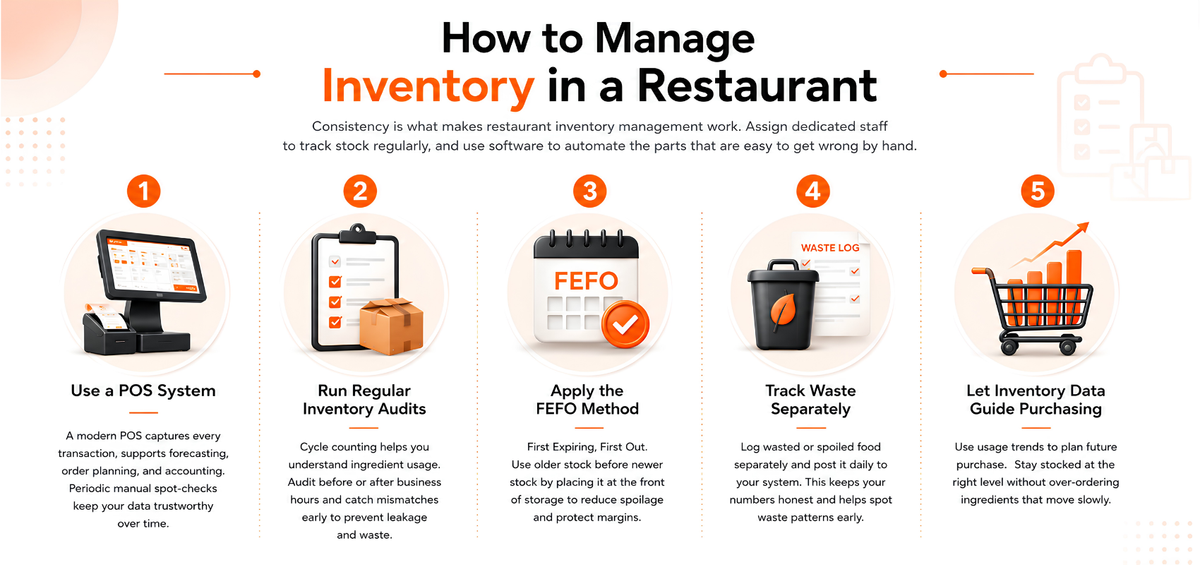
Use a POS System
A modern point of sale system supports forecasting, order planning, and accounting by capturing every transaction as it happens. The software handles the heavy lifting, but periodic manual spot-checks still matter, they're what keep your restaurant inventory management data trustworthy over time.
Run Regular Inventory Audits
Cycle counting means checking your supplies on a regular schedule to understand how quickly you're using ingredients. It's best to audit stock before or after business hours, when the kitchen is quiet. If the physical count doesn't match what your restaurant inventory system shows, you can catch leakage or waste issues early, before they compound.
Apply the FEFO Method
First Expiring, First Out (FEFO) is one of the simplest habits that protects margins in food service. Always place older stock at the front of your storage so it gets used before newer stock. This directly reduces spoilage and waste.
Track Waste Separately
Log food that's wasted or spoiled on its own sheet or system, separate from your regular stock counts. At the end of each day, post that waste to your restaurant inventory system so stock levels adjust accordingly. This keeps your inventory numbers honest and gives you an accurate picture of your true profit and loss. Reviewing a waste log regularly also helps you spot patterns, over-prepped items, ingredients that spoil faster than expected, and adjust before they become a recurring cost.
Let Inventory Data Guide Purchasing
Regular restaurant inventory management surfaces usage trends over time. Use that data to plan future purchases so you're consistently stocked at the right level, without over-ordering ingredients that move slowly.
Key KPIs for Restaurant Inventory Management
Tracking the right numbers turns inventory management from a chore into a growth lever. A few indicators matter most:
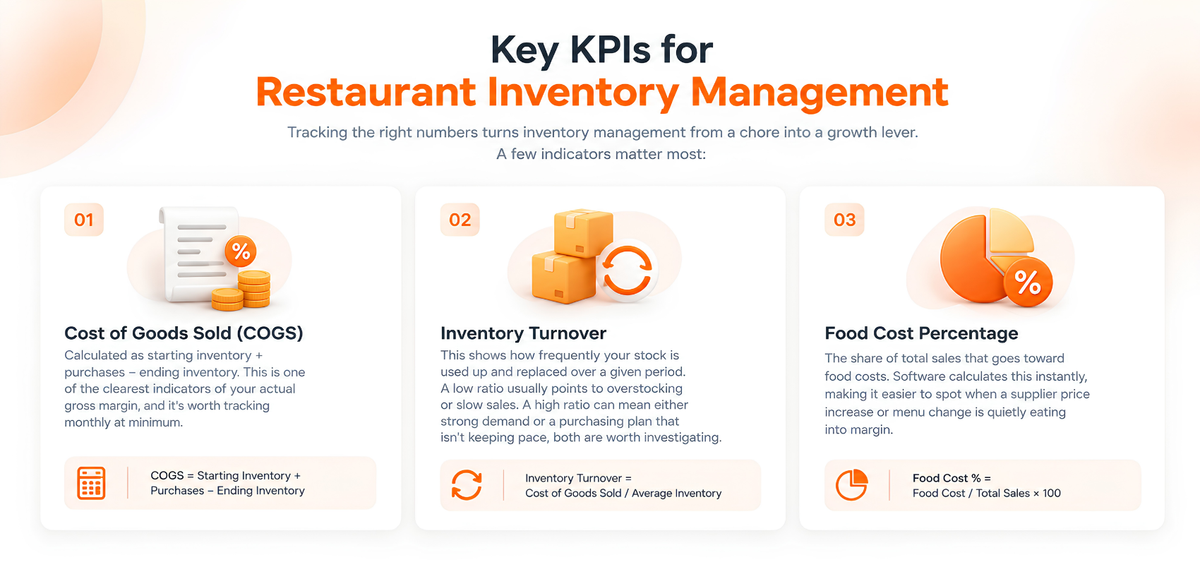
Cost of Goods Sold (COGS)
Calculated as starting inventory plus purchases, minus ending inventory. This is one of the clearest indicators of your actual gross margin, and it's worth tracking monthly at minimum. Built-in accounting tools can calculate this automatically as sales happen, instead of you reconciling it by hand at month-end.
Inventory Turnover
This shows how frequently your stock is used up and replaced over a given period. A low ratio usually points to overstocking or slow sales. A high ratio can mean either strong demand or a purchasing plan that isn't keeping pace, both are worth investigating.
Food Cost Percentage
The share of total sales that goes toward food costs. This is a calculation restaurant inventory management software can run instantly, rather than requiring a manual spreadsheet exercise each week. Tracking it consistently also makes it much easier to spot when a supplier price increase or menu change is quietly eating into margin. For a broader view of restaurant performance metrics, see our guide to restaurant KPIs.
How to Choose the Right Restaurant Inventory Management Software
When evaluating a restaurant inventory system, weigh a few practical factors: the size and format of your business, the integrations you actually need (accounting, CRM, online ordering), whether it supports multi-location tracking if you plan to grow, and the total cost of ownership rather than just the sticker price. It's also worth checking whether the software works offline during connectivity issues, since a system that goes down during service isn't much help.
If you're comparing multiple platforms, our roundup of inventory software options for small restaurants walks through what to prioritize at different budget levels.
Conclusion
Restaurant inventory management is one of the highest-leverage areas for controlling costs and protecting margin, because small errors compound quickly across hundreds of orders a week. Whether you're setting up a system for the first time or replacing one that's not keeping up, the goal is the same: accurate, real-time visibility into what you have, what you're using, and where waste is happening. PosBytz brings inventory, recipe costing, and accounting together in one platform built for restaurants, cafes, and cloud kitchens.
Frequently Asked Questions
How often should a restaurant do an inventory audit?
Most restaurants run a full count once or twice a week, but counting stock every time you receive a delivery helps keep counts accurate and catches discrepancies earlier.
How does restaurant inventory management affect net profit?
By reducing waste and preventing over-ordering, effective restaurant inventory management lowers your cost of goods sold, which flows directly into higher net profit.
What should I look for in restaurant inventory management software?
Look for real-time stock tracking, recipe-level ingredient deduction, low-stock alerts, POS integration, and reporting that shows food cost percentage and profitability by item, without requiring manual reconciliation.
Does PosBytz support cafes, cloud kitchens, and food trucks?
Yes. PosBytz supports all food and beverage formats, including cafes, cloud kitchens, and food trucks.
Can restaurant inventory software work across multiple outlets?
Yes, most restaurant inventory systems, including PosBytz, support multi-location tracking so you can view stock centrally while managing each outlet's counts separately. For a deeper look, see our guide to managing inventory across multiple outlets.
Stop Losing Money on Food Waste
Get the best Restaurant Inventory Management Software. Track recipes, ingredients, and waste in real-time to maximize your 2026 profits.
Start Your Free Trial Book a Live Demo
Related Resources
Multi-Outlet Inventory
A guide to managing stock across multiple locations seamlessly.
ERP Efficiency Success
Revolutionize your business with integrated ERP systems.
SaaS POS Benefits
How cloud-based POS can enhance operations and stock tracking in 2026.
About the author

Saravana Damodaram
Co-Founder & CEO, PosBytz
Saravana Damodaram is the Co-Founder & CEO of PosBytz, a cloud-based POS-ERP platform built for F&B and retail businesses since 2018. He focuses on unified commerce, inventory, and multi-location operations, and has helped over 5,000 merchants across 25+ countries move off fragmented, disconnected tools and run their entire operation, billing, inventory, kitchen, and accounting on one platform.