Top Sapaad Alternatives for Restaurants (2026 Guide)
Looking beyond Sapaad? Compare the best restaurant POS alternatives on features, integrations, and pricing — and see how PosBytz stacks up.
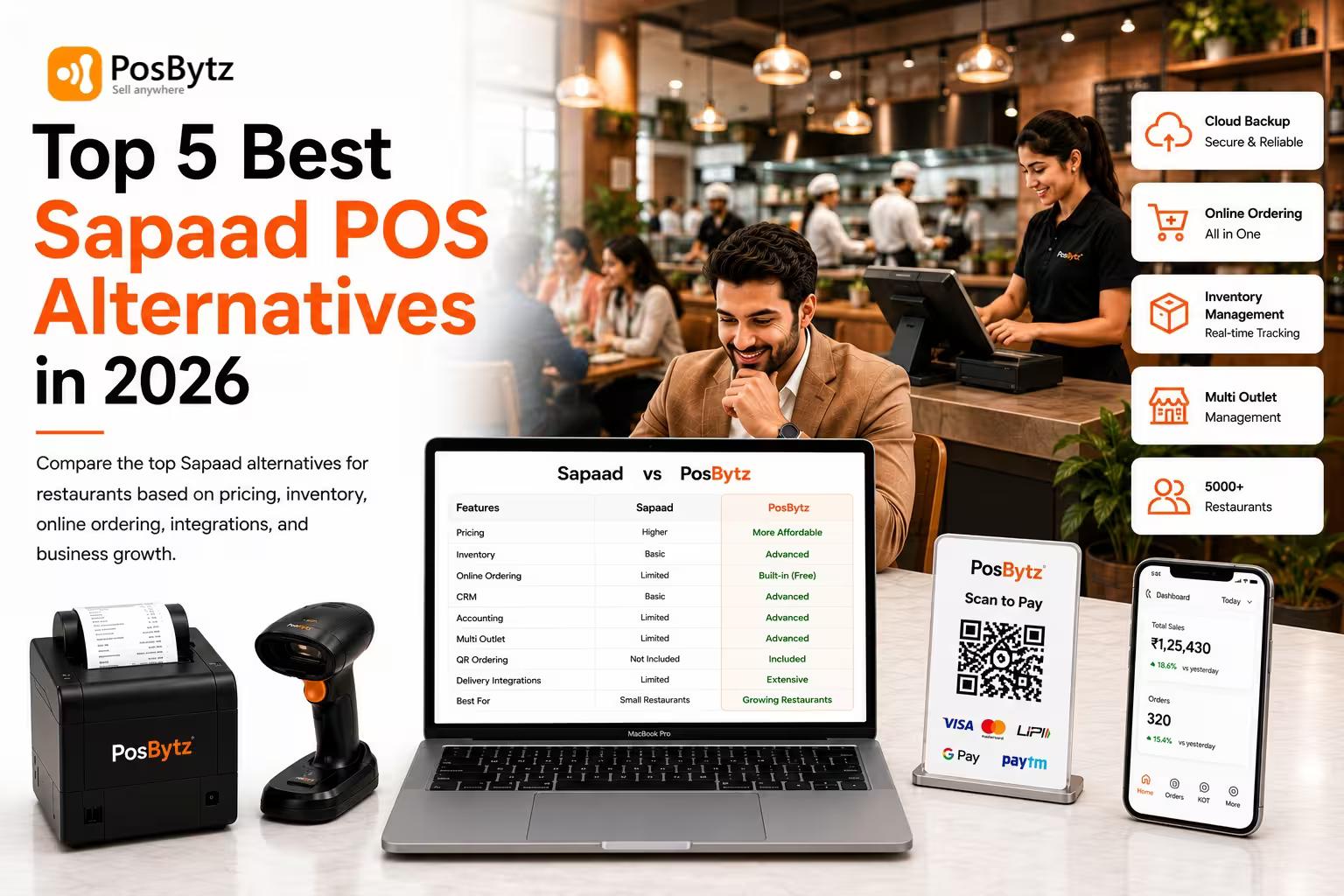


Sapaad has long been a familiar name in cloud restaurant management, but as your outlets, order volume, or operational needs grow, its limitations — especially around accounting, inventory costing, and delivery-order reliability — start to show. If you're comparing Sapaad alternatives, this guide breaks down the top options, what to look for, and how a platform like PosBytz compares on the features that matter for day-to-day restaurant operations.
What Is Sapaad Software and Why Restaurants Look for Alternatives
Sapaad is a cloud-based restaurant management platform offering POS, order management, inventory tracking, reporting, and delivery-aggregator integrations. It suits basic single-outlet setups well, but restaurants scaling to multiple outlets, or needing tighter financial and inventory controls, often start evaluating Sapaad alternatives for a more complete solution.
Key Limitations of Sapaad POS
Sapaad POS app offers some good features for restaurant business but also there are multiple limitations with Sapaad software. Restaurant owners evaluating Sapaad commonly raise these concerns:
- Device support: Sapaad POS app supports mostly with Windows & Android based devices.
- Delivery-aggregator sync issues: Multiple issues with Online delivery platforms integrations where there is always delays with orders relays and multiple orders gets missed through the POS when compared with other POS integrated with delivery platforms like Hungerstation, Jahez, Talabat , Careem, Noon Foods etc..,
- Limited technical support bandwidth: Limited support resources having on-boarded multiple restaurants and managing the support request with limited technical support. Very difficult to reach out to their technical team on calls.
- Basic inventory and recipe costing: Sapaad Inventory management system is not very comprehensive for managing the recipes or ingredients for calculating the food costing and other reports. So no been promoted much by their Sales team as well
- No built-in accounting module: No inbuilt Accounting system with Sapaad to manage your bookkeeping and filing returns.
- Integration with third party accounting software is not a seamless need to have implementation consultants to do the integrations and mostly does not work 100%.
- Table QR: Limited options with Table QR code ordering along with payments options from Table with Sapaad POS login
- Data security & compliance is also one of the major concerns with Sapaad POS app.
- Sapaad Pricing: Sapaad POS pricing also is very expensive compared to other POS software with more features.
- No HR & Payroll module to manage Employees shifts, attendance and payroll management
Best Sapaad Alternatives
Below are some of the best Sapaad POS Alternatives you can choose based on various business requirements.
Sapaad Alternative #1: Posbytz
PosBytz is one the best restaurant Management software with more than 5000 + restaurants globally trusting for automating their restaurant business. Having many features and also very competitive with respect to Sapaad POS app pricing.
Pros:
- Track your kitchen inventory from managing your vendors to purchases and consumptions. Generate food costing reports to operate your restaurant profitable all the time
- Easy to use POS without much training with options to get started within hours.
- Device agnostic Restaurant POS that can deployed in Windows/Android/IOS from Desktop/PC/Laptop/Tablets/IPADS and mobile phones
- Inbuilt Accounting module to manage all your book keeping, cashflows & reports.
- Integrated with all leading food delivery aggregators Like Hungerstation , Jahez , Talabat , Careem an Noon Foods etc..,.,
- Online ordering system to have your own branded website & apps along with free delivery apps.
- CRM to manage & promote your restaurant through multiple channels
- HR & Payroll to automate your employee managment
Cons:
- Multilingual options can be considered to support other languages other Arabic, french, English and Spanish
- Few reports additional reports can be developed for projections
Sapaad Alternative #2: Petpooja
Petpooja is widely used across QSRs and cloud kitchens, particularly for restaurants with heavy delivery-order volume.
Pros:
- Deep integrations with major delivery aggregators
- Established support network
- Menu and order management built for high-volume operations
Cons:
- Some users find advanced reporting less detailed than dedicated restaurant-ERP platforms
- Feature depth (accounting, HR) varies by plan
Sapaad Alternative #3: Revel Systems
Revel systems offers simple POS software for restaurant businesses from single or multi-chain outlets along with options to manage the KOT & other basic modules
Pros:
- Table management to manage table orders to KOT
- KDS having kitchen display system to manage kitchen orders from Tablets
- Waiter app to take orders from Tables
- Integration with delivery platforms for Online orders
- Basic inventory module for entry of stock in/out.
- Basic Accounting module to manage accounting
Cons:
- No table QR code ordering feature for ordering from tables
- Third party integration for CRM and Accounting modules only with Enterprise edition
- On Comparison Sapaad POS pricing Revel POS system is equally expensive and less features as well
Sapaad Alternative #4: Lightspeed POS
Lightspeed is one of the leading restaurant POS Software providers that provide many different features for a great user experience. Lightspeed is known for its 24/7 customer support as they strongly believe that user experience is all that matters. They have specifically designed and curated restaurant software for all sorts of businesses, from small to large chains of restaurants, and the best part is you can use the software Offline too.
Pros:
- They provide 24/7 customer support for all your queries and needs
- They are available for online and offline usage, which is convenient.
- It has a smooth user interface, and it is easy to use.
- It is easily scalable, which is a great feature
- It provides accurate data information.
Cons:
- Many features are additional paid Addons.
- A few verified users stated that they must reboot the system once in a while to operate the software and not update it for a very long time.
- SaPaad POS is expensive compared to Lightspeed
Sapaad Alternative #5: NCR Aloha
NCR Aloha is yet another top pos restaurant software free that strives to provide easy, quick, and seamless POS management services. They strongly believe in innovation and technology and are always finding ways to improve their software. NCR Aloha provides all types of restaurant POS features, from Table management to inventory management to payment management.
Pros:
- It is user-friendly and has a smooth UI.
- It comes with inventory and menu management tools which makes it super helpful.
- The free restaurant pos has seating management where you can easily change the seat layouts.
- It provides daily reports, which makes it convenient to track growth.
- Employee management features come in handy for the employees to clock in and out easily with free pos software restaurants.
Cons:
- A few verified users say they cannot view discount-related details on the bills.
- Many modules are additional paid addons.
- Aloha is only for branded chain outlets with high budgets compared POS Sapaad
Sapaad Alternative #6: Touchbistro
Touchbistro is a top POS restaurant software company that provides POS solutions for all your retail and restaurant needs. They provide exceptional customer service, and they have 24/7 customer support.
Pros:
- It is an easy-to-use POS and has a great UI.
- It is easy to set up and takes no time to set it up.
- It has 24/7 customer support for all your needs.
- It provides stock management and inventory management tools which makes it super convenient.
Cons:
- As a few verified users stated, no free trial option is available.
- A few users suggest that Touchbistro could provide a bit of an extensive staff management tool.
- No challenges with pricing compared to POS Sapaad but has limited features for Restaurants
Sapaad Alternative #7: Posist
Posist is positioned for larger restaurant groups and chains needing centralized, enterprise-grade control.
Pros:
- Centralized multi-outlet reporting and menu management
- Strong analytics for large restaurant groups
- Established presence with enterprise restaurant chains
Cons:
- Can be relatively complex/costly for small, single-outlet operators
- Onboarding may require more setup time for smaller teams
Discover how Sapaad Software compare with PosBytz
Enjoy a detailed comparison table about features and pricing
How to Choose the Right Sapaad Alternative for Your Restaurant
Use this quick checklist to narrow down your options:
- Single outlet, simple needs: A lightweight POS with solid delivery integration may be enough.
- Multi-outlet or cloud kitchen: Prioritize centralized reporting and multi-outlet management (PosBytz, Posist).
- Need built-in accounting/HR: Look for platforms bundling these modules natively rather than relying on third-party integrations (PosBytz).
- High delivery-order volume: Prioritize platforms with proven, low-latency aggregator sync.
- Budget-conscious: Compare total cost including add-ons, not just the base plan price.
Why Restaurants Choose PosBytz Over Sapaad
Even though there are multiple Sapaad POS app alternatives, PosBytz standout’s to be the best Alternative to POS Sapaad comparison to various aspects.
- Advanced features with value for money solution for automating your restaurants business
- Very high secure and confidential data security for all your business data.
- Assured intime support and assistance for your business as technology partner
- Competitive to Sapaad pricing with our standard pricing plans
- Multiple third party integrations to manage expand your business in ease
How to Migrate Data from Sapaad Software to PosBytz
Follow very simple and easy steps to Migrate data from Sapaad POS login to your PosBytz platform by click of a button.
- Download the various masters – Categories , items , inventory & customer details with export option from Sapaad
- Sign-up and download the excel sample data upload sheet from PosBytz under Imports section
- Copy and paste the data into the excel sheet as per the template provided.
- Now import the data into the PosBytz backend using the excel sheet. To know more check the tutorial below for reference
- PosBytz Data Import Guide
Frequently Asked Questions
What is the best alternative to Sapaad POS?
PosBytz, Petpooja, and Posist are among the most commonly evaluated Sapaad alternatives, each suited to different restaurant sizes.
Why do restaurants switch from Sapaad to another POS?
Common reasons include limited built-in accounting, inconsistent delivery-order sync, and restricted inventory/recipe costing.
Can we use PosBytz as Sapaad Software Alternative for Cafe shop?
Yes we can use PosBytz for all types of F&B businesses including Cafe shop. Please check our features for Cafe Shop
Is PosBytz cheaper than Sapaad?
Pricing varies by plan and outlet count for both platforms, request a current quote directly from each vendor for an accurate comparison.
Does PosBytz work on iPad and Android tablets, unlike Sapaad?
Yes. PosBytz supports Windows, Android, and iOS, while Sapaad is primarily built for Windows and Android devices.
Can we install PosBytz in Android Tablets along with Sapaad POS app?
Yes, PosBytz Android Billing POS can be installed in any Android based devices from Tablets, Touch devices and Mobile phones.
Can I use PosBytz for a cloud kitchen or multi-outlet restaurant chain?
Yes, PosBytz supports multi-outlet management with centralized reporting.
What should I look for in a Sapaad alternative?
Key factors include delivery-aggregator reliability, built-in accounting, inventory/recipe costing depth, device flexibility, and support responsiveness.
How do I migrate my data from Sapaad to PosBytz?
Export your categories, items, inventory, and customer masters from Sapaad, then import them into PosBytz using its Excel import template.
Related Resources
- Best Restaurant POS software in UAE
- ZATCA Approved e invoicing software in Saudi Arabia
- Best Restaurant POS software in Saudi Arabia
- Best E invoicing software in Saudi Arabia
- Best Restaurant POS software in Kuwai
Ready to move beyond Sapaad?
See how PosBytz handles inventory costing, built-in accounting, and multi-outlet reporting in one platform — book a free demo and bring your Sapaad data over in a few simple steps.
About the author

Saravana Damodaram
Co-Founder & CEO, PosBytz
Saravana Damodaram is the Co-Founder & CEO of PosBytz, a cloud-based POS-ERP platform built for F&B and retail businesses since 2018. He focuses on unified commerce, inventory, and multi-location operations, and has helped over 5,000 merchants across 25+ countries move off fragmented, disconnected tools and run their entire operation, billing, inventory, kitchen, and accounting on one platform.