Internet Down During Dinner Rush? How to Never Stop Billing Again
Internet down at dinner, lunch or festive rush? Use this 5-minute playbook, offline billing setup and failover checklist so your restaurant never stops billing.
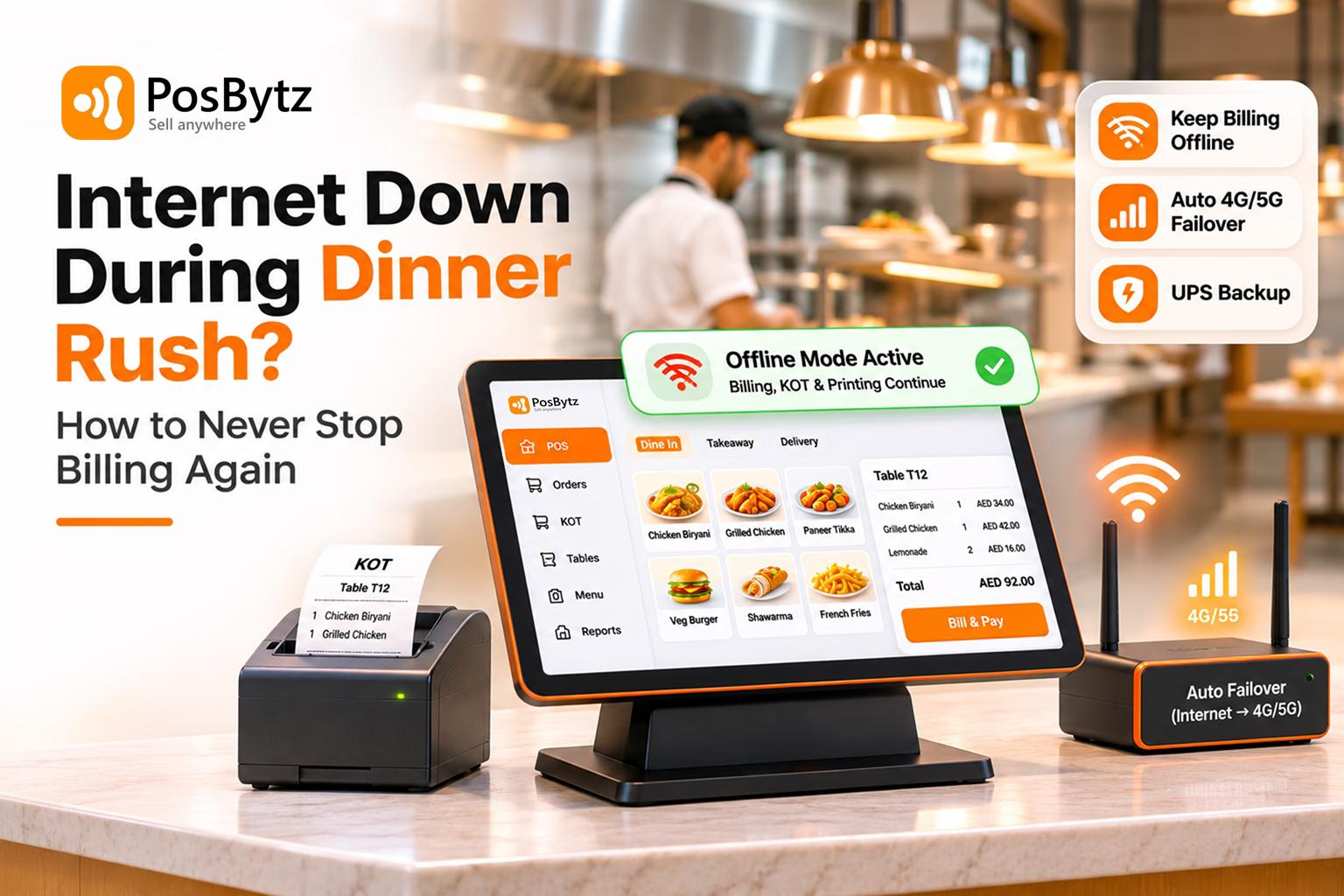


Quick answer: To keep billing when the internet goes down during a rush, use an offline-first POS that bills, prints KOTs and stores invoices locally, then syncs when the connection returns. Back it with an automatic 4G/5G failover router and a UPS for your router and billing terminal. Keep a printed outage card so staff switch over in under 2 minutes.
It's 8:30 on a Saturday. Every table is full, the takeaway counter has a queue, and delivery tablets are pinging. Then the billing screen freezes. Cards won't go through. The kitchen stops getting tickets.
This doesn't only happen at dinner. The same outage hurts at the 1 pm mall food court lunch rush, the 8 am coffee and karak queue, the weekend-night rush, the minutes before iftar in Ramadan, Eid and National Day holidays, the match-night delivery spike and the late-night shawarma crowd. Your busiest minutes are exactly when your network is under the most load, so they are when it is most likely to fail.
This guide gives you a first-5-minutes playbook, explains what actually failed, and shows the three-layer setup that means you never stop billing again, whatever the rush.
What one outage really costs
Take a restaurant in Dubai billing AED 3,000 an hour at peak (about SAR 3,000 in Riyadh). A 30-minute outage puts AED 1,500 of sales at risk before you count the extras: walk-outs, comped meals for guests who waited, Talabat and Careem orders cancelled with refunds, and staff paid to stand still.
Timing makes it worse. The same 30 minutes at 4 pm might cost a tenth as much. Downtime is priced by the rush it lands in.
Every rush is a different outage risk
A rush is any window where orders arrive faster than normal and every minute of billing is worth more. Each type stresses your setup in a different way, so each needs a slightly different plan.
Breakfast, coffee and karak rush
- When it hits: 7 to 10 am
- Who feels it most: Cafés, bakeries and coffee chains
- Why the internet fails or hurts more: Fast tap payments, a long queue and one till
- Priority fix: An offline-capable card terminal at the counter
Office and mall lunch rush
- When it hits: 12 to 3 pm
- Who feels it most: Food courts, QSR and cloud kitchens
- Why the internet fails or hurts more: A short window and congestion on the shared mall Wi-Fi
- Priority fix: A wired POS on a separate POS network
Dinner rush
- When it hits: 8 pm to midnight
- Who feels it most: Dine-in, casual and fine dining
- Why the internet fails or hurts more: Many terminals, KOT printers and KDS, plus guest Wi-Fi at peak
- Priority fix: An offline-first POS with local KOT routing
Weekend-night rush
- When it hits: Weekend evenings (days vary by country)
- Who feels it most: All formats
- Why the internet fails or hurts more: The highest bandwidth load of the week
- Priority fix: QoS and a failover router
Late-night rush
- When it hits: Midnight to 3 am
- Who feels it most: Shawarma, burger and cafés open late
- Why the internet fails or hurts more: Thin staff, no IT help and ISP maintenance windows
- Priority fix: Auto failover and a printed outage card
Delivery peak
- When it hits: Hot summer evenings, match nights and sale days
- Who feels it most: Cloud kitchens and delivery-heavy brands
- Why the internet fails or hurts more: Talabat, Careem and Deliveroo orders keep arriving when the POS is dark
- Priority fix: An aggregator pause plan and offline order capture
Ramadan iftar and suhoor rush
- When it hits: Minutes before sunset, and late night
- Who feels it most: All formats across the GCC
- Why the internet fails or hurts more: Everyone orders and pays in the same 20 minutes
- Priority fix: Pre-billed set menus, offline billing and extra terminals
Eid, National Day and festival rush
- When it hits: Eid holidays, UAE and Saudi National Days, shopping festivals and New Year
- Who feels it most: All formats and catering
- Why the internet fails or hurts more: Days of peak in a row and city-wide network congestion
- Priority fix: UPS and backup power, plus a pre-season drill
Event, match-day and stadium rush
- When it hits: Before kickoff, at half-time and during seasonal events
- Who feels it most: Stadiums, venues, pop-ups and food trucks
- Why the internet fails or hurts more: Thousands of phones jam mobile data
- Priority fix: Local network billing, store-and-forward cards and a cash float
Summer peak
- When it hits: June to September
- Who feels it most: Malls and indoor venues
- Why the internet fails or hurts more: Heavy power load and more indoor dining
- Priority fix: UPS, a generator-backed circuit and failover internet
Whatever the rush, the rule is the same: billing must not depend on the internet being up in that minute.
Internet down mid-rush: what to do in the first 5 minutes
Don't reboot everything first. Find out what failed, keep billing on whatever still works, protect delivery orders, and only then fix the connection. Print this section and keep it at the billing counter.
- Minute 0: Check if billing still works. If your POS is offline-first, keep billing. Tell staff "we're offline, bill as normal". Most guests will never notice.
- Minute 0 to 1: Find what failed. Use the table below. One device down is a device problem; every device down is the internet, Wi-Fi or power.
- Minute 1: Protect delivery orders. Pause your store on Talabat, Careem, Deliveroo, HungerStation, Jahez, Keeta or other apps from the merchant app on a phone using mobile data, unless orders still reach your kitchen.
- Minute 1 to 2: Switch connection. If you have an automatic failover router, confirm the backup light is on. If not, connect the main billing terminal to a phone hotspot. Turn off guest Wi-Fi to save bandwidth.
- Minute 2: Switch payments. Move card, Apple Pay and mada payments to an offline-capable terminal or a standalone card machine with its own SIM. Accept cash as the final fallback.
- Minute 2 to 3: Restart in order. If nothing else worked: modem first, wait 60 seconds, then router, then one terminal.
- Minute 3 onwards: Run the paper fallback only if the POS is truly dead. Use numbered order slips, a short menu of top sellers, and one person logging every payment.
- After the rush: Reconcile. Let the POS sync, match card settlements against bills, and enter any paper bills with their original time.
What just failed? Diagnose in 60 seconds
Websites and apps fail on all devices, router light red
- What failed: Internet (ISP or fibre)
- What still works: Local network, offline POS and printers
- First fix: Failover router or hotspot
Phones on mobile data work, but terminals can’t see each other or printers
- What failed: Wi-Fi or local network (router, switch, access point)
- What still works: Internet on phones
- First fix: Restart the router or switch, and use a wired cable for the main terminal
Screens, router and printers all dark
- What failed: Power
- What still works: Devices on UPS or battery
- First fix: UPS, inverter or generator
Internet fine, but the POS app shows an error or won’t load
- What failed: POS provider cloud outage
- What still works: Offline mode (if any)
- First fix: Check the provider status page and switch to offline mode
POS fine, only cards decline
- What failed: Payment gateway or card network
- What still works: Cash and billing itself
- First fix: Backup card machine on another network, or cash
Only one terminal stuck
- What failed: That device
- What still works: Other terminals
- First fix: Move staff to another terminal and restart the stuck one
What to say to staff and guests
- To staff: "Internet is down. We're billing offline. Cards and Apple Pay on the backup machine, otherwise cash. Kitchen, follow the printed tickets. I'll update you in 5 minutes."
- To guests: "Our network is slow for a few minutes. Your order is placed and you can pay by card on this machine or in cash."
- Avoid: "Our system crashed" or "we can't bill". It sounds like no one is in charge.
How to never stop billing again: the three-layer setup
Restaurants that never stop billing don't rely on one fix. They stack three layers: billing that works offline, internet that fails over automatically, and power that survives a trip. Lose any one layer and the other two keep service running.
Layer 1: An offline-first POS (the layer that matters most)
An offline-first POS is billing software that saves every order, KOT and invoice on the device or a local server first, then syncs to the cloud when the internet is available. Billing never waits for the internet.
This is different from a cloud-only POS, which needs a live connection for every action, and from a POS with a short offline cache, which lets one device bill for a while but cuts off waiter tablets, the kitchen and other counters.
What a true offline-first POS keeps doing with zero internet:
- Taking dine-in, takeaway and phone orders on every terminal and waiter device on the local network
- Printing KOTs to every kitchen station and showing them on the KDS
- Generating tax-ready bills with continuous invoice numbers
- Applying discounts, splitting bills, recording cash, card, Apple Pay and mada payments
- Deducting stock against recipes, then syncing everything when the connection returns, with no duplicates
Payments offline: what really works
- Cards, Apple Pay, Google Pay and mada: these tap payments need the card terminal to reach the bank. Some terminals can store and forward approvals when offline, within limits set by the acquiring bank. A standalone card machine with its own SIM is the simplest backup, because it doesn't use your restaurant internet.
- Cash always works. Keep a float ready for peak nights.
- India note: for outlets in India, a static UPI QR still works because the guest's phone completes the payment; confirm receipt on a UPI soundbox with its own SIM before closing the bill.
Tax invoices offline
- Saudi Arabia (ZATCA Phase 2): simplified B2C e-invoices can be signed and issued offline with the QR code, then reported to ZATCA within 24 hours. Choose a POS that signs invoices locally.
- UAE, Bahrain and Oman (VAT): a compliant tax invoice can be printed offline and the data synced later. Watch for upcoming e-invoicing rules in each country.
- India (GST): offline bills with GST and sequential numbers are valid and sync to your reports later.
Layer 2: Automatic backup internet (failover)
Internet failover means a second connection, usually 4G/5G, takes over automatically when your main line drops. Staff do nothing; the switch takes seconds.
- Use a dual-WAN router with a SIM slot or a USB/ethernet 4G/5G modem.
- Choose a backup on a different network type and provider. Two fibre lines in the same duct fail together.
- Put POS, KDS, card machines and aggregator tablets on the backup; keep guest Wi-Fi off it.
- Test it monthly by unplugging the main line during a quiet hour.
Layer 3: Backup power
A 2-second power flicker can restart a router and take 3 to 5 minutes to recover, which feels like an hour in a rush.
- Put the router, modem, network switch and main billing terminal on a UPS. A small UPS gives 20 to 60 minutes for these low-power devices.
- Keep the KOT printer and card machine charged or on the UPS too.
- In buildings with a backup generator, connect the UPS to a generator-backed circuit, especially for the summer peak.
Network hygiene that prevents most "internet" outages
- Wire the main billing terminal and KOT printers with ethernet; keep Wi-Fi for waiter tablets.
- Separate networks (VLANs or SSIDs): POS and payments, staff, and guests. Guests streaming video should never slow your billing.
- QoS: give POS and payment traffic priority on the router.
- Business-grade router and access points, not the free ISP router, with firmware updates scheduled after closing.
- Schedule POS and Windows/Android updates for 3 to 5 am, never during service.
Cloud-only vs offline cache vs offline-first POS
Cloud-only POS
- New bills: Stop
- Waiter tablets / captain app: Stop
- KOT printing and KDS: Stop
- Tax invoice numbering: Stops
- Data safety: Lost if not saved
- Sync when back online: Not applicable
POS with offline cache
- New bills: One device only, for a limited time
- Waiter tablets / captain app: Usually stop
- KOT printing and KDS: Often stop
- Tax invoice numbering: Risk of gaps or duplicates
- Data safety: Held in browser or app memory
- Sync when back online: Manual or partial
Offline-first POS
- New bills: All terminals, no time limit
- Waiter tablets / captain app: Keep working on local Wi-Fi
- KOT printing and KDS: Keep routing to every station
- Tax invoice numbering: Continuous, synced later
- Data safety: Stored in a local database
- Sync when back online: Automatic, with no duplicates
The "pull the plug" test: 8 questions to ask your POS
Run this during a quiet hour. Unplug the internet cable from the router, keep Wi-Fi on, and check each item.
- Can every terminal open a new bill, add items and close it?
- Do waiter devices still send orders to the kitchen?
- Do KOTs print at every station and show on the KDS?
- Are bills printed with correct tax and continuous invoice numbers?
- Can you record cash, card, Apple Pay and mada payments against the bill?
- When you reconnect, does everything sync automatically with no duplicates?
- Does your backup internet take over on its own within 30 seconds?
- Does the router stay on when you switch off the mains for 10 seconds?
If two or more answers are "no", your next rush is at risk.
How PosBytz keeps billing through any rush
PosBytz is built so billing doesn't wait for the internet:
- Offline billing and KOT printing that sync to the cloud when the connection returns
- Captain/waiter app, KDS and multiple counters on the local network
- VAT tax invoices for the UAE and the wider GCC, and ZATCA-ready e-invoices for Saudi Arabia*
- Talabat, Careem and Deliveroo orders received in the same POS, so delivery orders and pauses are managed from one screen
- Multi-outlet reports that update the moment each outlet is back online
CTA block: Never stop billing, whatever the rush. Book a free PosBytz demo and run the pull-the-plug test live.
Frequently asked questions
What should a restaurant do when the internet goes down during a rush?
Keep billing on an offline-capable POS, pause delivery apps from a phone on mobile data, switch to backup internet or a hotspot, and take cards on a standalone SIM card machine or cash. Restart the modem and router only after billing is protected. Reconcile all bills once the connection returns.
Can a restaurant POS work without internet?
Yes, if it is offline-first. An offline-first POS saves orders, KOTs and invoices locally and keeps all terminals connected over the restaurant's local Wi-Fi, then syncs to the cloud when the internet returns. A cloud-only POS stops billing when the connection drops.
How do I accept card payments when the internet is down?
Use a standalone card machine with its own SIM, which doesn't depend on your restaurant internet. Some integrated terminals can store and forward card payments offline within bank limits. Otherwise, switch to cash and record each payment against the bill.
Do Apple Pay and mada work if the restaurant's internet is down?
Only if the card terminal can still reach the bank. A standalone card machine with its own SIM keeps tap payments working when your restaurant internet fails. Some integrated terminals can also store and forward payments offline within the acquiring bank's limits.
Are offline bills valid for VAT and ZATCA?
Yes, if set up correctly. In Saudi Arabia, simplified B2C e-invoices can be issued offline but must be reported to ZATCA within 24 hours. In the UAE and other GCC VAT countries, offline tax invoices are valid if they carry the required details and continuous numbers.
What is the best backup internet for a restaurant?
An automatic 4G/5G failover router connected to a different provider from your main line. It switches over in seconds without staff action. Route only POS, payments, KDS and delivery tablets through it, and test it monthly by unplugging the main connection.
Why does restaurant Wi-Fi fail during peak hours?
Peak hours load the network with more terminals, waiter tablets, printers and guest phones at once. Cheap routers, shared Wi-Fi with guests, interference and no traffic priority cause drops. Wire the main terminals, separate guest Wi-Fi and use QoS to protect billing.
What happens to delivery orders when my POS is offline?
Aggregator apps keep sending orders unless you pause your store. If orders don't reach your kitchen, you face cancellations, refunds and lower rankings. Pause Talabat, Careem, Deliveroo or HungerStation from each merchant app on mobile data, or use a POS that manages aggregator orders and pauses from one screen.
How long can a restaurant bill offline?
With an offline-first POS, for a full shift or more; the limit is storage and how long tax rules allow before reporting. In practice, treat anything longer than one service as an incident and get the connection fixed.
About the author

Saravana Damodaram
Co-Founder & CEO, PosBytz
Saravana Damodaram is the Co-Founder & CEO of PosBytz, a cloud-based POS-ERP platform built for F&B and retail businesses since 2018. He focuses on unified commerce, inventory, and multi-location operations, and has helped over 5,000 merchants across 25+ countries move off fragmented, disconnected tools and run their entire operation, billing, inventory, kitchen, and accounting on one platform.