Best Payroll Software for Small Business in 2026
Find the best payroll software for small business - features, benefits, and expert advice to simplify payroll and ensure compliance.


Choosing the best payroll software for small business needs comes down to more than just running payslips on time. The right system should calculate wages accurately, keep you compliant as rules change, and connect payroll data to the rest of your business instead of sitting in its own silo. This guide walks through what payroll software actually does, the features worth prioritizing in 2026, how popular options compare, and where PosBytz fits for restaurants and retail businesses that need payroll tied to attendance, shifts, and accounting.
What Is Payroll Software for Small Business?
Payroll software automates the process of calculating employee wages, applying deductions and taxes, and issuing payments on a set schedule. Instead of working out hours, overtime, and tax withholdings by hand, the system applies your salary structures and tax rules automatically each pay period, then generates payslips and reports for both employees and management. For a closer look at how these systems work, see the payroll software 101 guide.
Why the Right Payroll Software Matters for Small Businesses
- Accuracy and compliance. Automated calculations reduce the manual errors that lead to underpaid or overpaid wages and tax filing mistakes.
- Time savings. Automating repetitive payroll tasks frees up hours that owners and managers would otherwise spend on spreadsheets each pay cycle.
- Cost control. Fewer errors and less manual admin work mean small businesses often do not need a dedicated payroll specialist just to keep payroll running smoothly. Labor is typically one of the largest recurring costs for restaurants and retail stores, and tighter payroll tracking is one of the practical strategies used to control high labor costs.
- A better employee experience. Paying people accurately and on time, with self-service access to payslips, builds trust and reduces the number of payroll-related questions your team has to field.
Key Features to Look for in Small Business Payroll Software
Not every business needs the same payroll tool, but a few features consistently separate the best payroll service for small business from a system that creates more work than it saves:
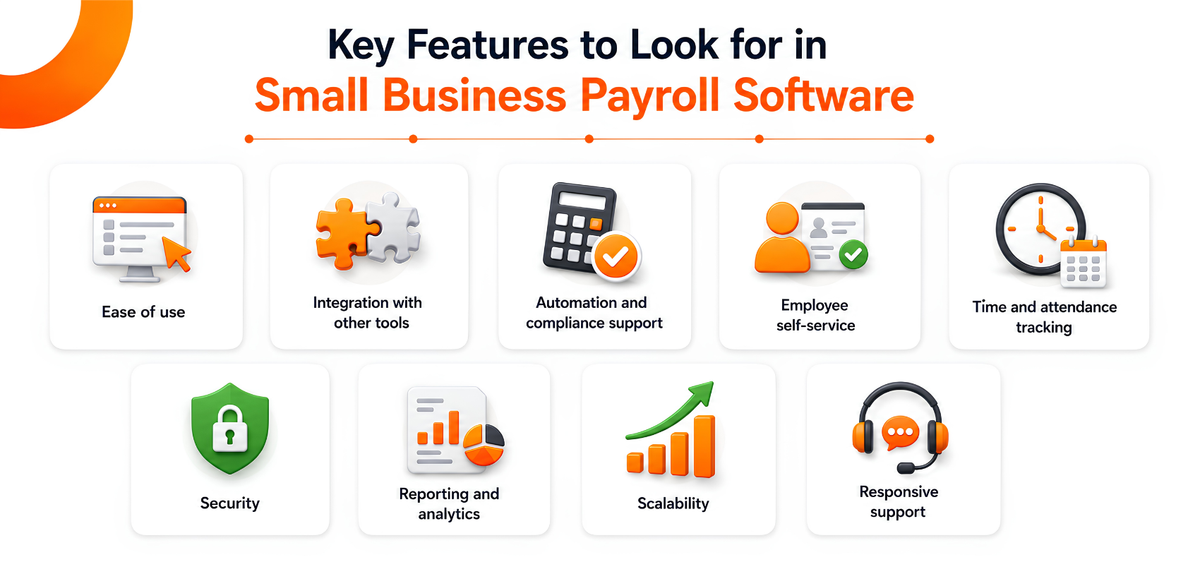
- Ease of use. A clear interface that your team can learn quickly, without extensive training.
- Integration with other tools. Payroll that connects to your accounting and other business systems reduces duplicate data entry.
- Automation and compliance support. Automatic tax calculations and up-to-date compliance rules.
- Employee self-service. A portal where staff can view payslips and update their own details.
- Time and attendance tracking. Especially important for hourly and shift-based teams in retail and food service.
- Security. Encryption and access controls to protect sensitive salary and personal data.
- Reporting and analytics. Reports that break down payroll costs by employee, department, or outlet.
- Scalability. A system that still works well as you add employees or open new locations.
- Responsive support. Help available when a payroll run does not go as planned.
Payroll Software Trends to Know in 2026
Payroll technology has moved quickly over the past couple of years, and a few shifts are worth understanding before you choose a system.
AI-Assisted Compliance and Error Checking
More payroll platforms are adding AI-assisted checks that flag unusual entries, such as a sudden spike in overtime or a duplicate payment, before a payroll run is finalized. This does not replace human review, but it catches mistakes earlier, which matters given how often payroll penalties trace back to small calculation or filing errors rather than deliberate mistakes.
Payroll Connected to Time and Attendance
For businesses with hourly or shift-based staff, which describes most restaurants and retail stores, payroll problems often start before payroll is even calculated. A missed clock-in, an unapproved overtime shift, or inconsistent scheduling data can throw off an entire pay run. Because of this, small businesses are increasingly choosing payroll systems that pull directly from attendance and shift records instead of relying on a standalone payroll calculator fed by manual timesheets.
Mobile and Self-Service Access
Owners and managers increasingly expect to review and approve payroll from a phone, not just a desktop, and employees expect the same for checking payslips or requesting leave. Self-service access also cuts down on the routine questions that would otherwise land on a manager's desk every pay cycle.
How PosBytz Approaches Payroll for Restaurants and Retail
PosBytz is a cloud-based POS and ERP platform built for restaurant and retail businesses, and payroll is one part of a wider system that also covers billing, inventory, accounting, and CRM. Rather than treating payroll as a standalone tool, PosBytz connects salary calculations to the attendance, shift, and role data already captured through its Employee Management features.
Core Payroll Capabilities
The PosBytz HR & payroll module handles the core building blocks of running payroll:
- Salary component and salary structure setup
- Income tax slab configuration
- Payroll period management and salary structure assignment
- Salary slip generation and payroll entry management
- Additional salary processing, incentives, and retention bonus tracking
You can read more about the full feature set on the PosBytz HR and payroll page.
Built-In Accounting and Reporting
Because payroll sits alongside PosBytz Accounting, payroll expenses post directly into your books instead of requiring a separate export and import step. This includes chart of accounts and cost center setup, payroll expense posting to the general ledger, and tax-ready reports. Restaurant operators can see this in practice in the restaurant accounting software guide, while retail businesses can find similar detail in the guide to accounting software for small retail businesses. For businesses operating in Saudi Arabia, the accounting module also supports VAT-ready reports and ZATCA-compliant e-invoicing, which helps keep payroll-related financial records audit ready. On the reporting side, you get payslip generation, employee payroll reports, and accounting payroll expense reports without switching between systems.
Comparing Payroll Software Options for Small Business
Here is how PosBytz compares with a few other payroll platforms commonly used by small businesses in 2026.
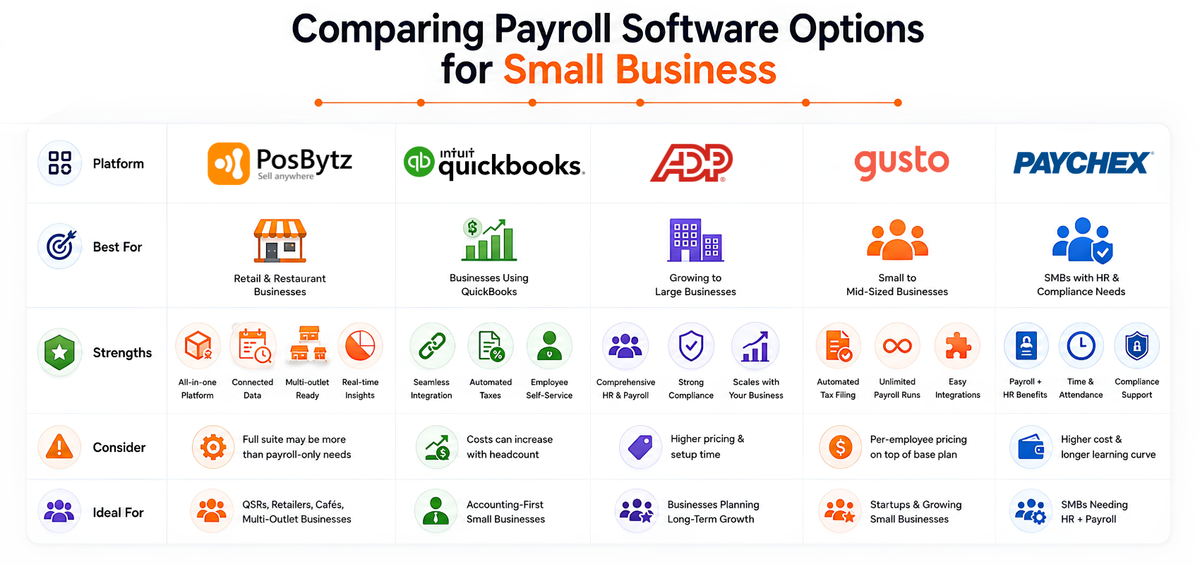
PosBytz
PosBytz combines payroll with POS, inventory, and accounting in one platform, aimed at restaurant and retail businesses.
Strengths: Payroll data connects directly to attendance, shift, and accounting records, so wages and payroll expense entries do not need to be re-entered manually. Works well for businesses already running PosBytz for billing and inventory, or managing staff across multiple outlets.
Consider: If you only need standalone payroll without POS or inventory tools, a dedicated payroll-only product may be simpler to set up on its own.
QuickBooks Payroll (QuickBooks Workforce)
QuickBooks Payroll is built to work closely with QuickBooks accounting software.
Strengths: Tight integration with QuickBooks bookkeeping, automated tax calculations and filings, and employee self-service access to pay stubs.
Consider: HR functionality is more limited than dedicated HR platforms, and costs can climb as your employee count grows.
ADP Workforce Now (ADP RUN)
ADP Workforce Now is a payroll and HR platform designed to scale from small teams into larger organizations.
Strengths: A broad HR and payroll feature set, strong compliance support, and a long track record across businesses of many sizes.
Consider: Pricing generally runs higher than small business focused tools, and the fuller feature set can take longer to configure.
Gusto
Gusto is a cloud-based payroll and HR platform built primarily for small businesses.
Strengths: Automated tax filing, unlimited payroll runs, multistate support, and integrations with accounting tools such as QuickBooks and Xero.
Consider: Reporting is less extensive than some enterprise-focused platforms, and pricing typically includes a per-employee fee on top of a base rate.
Paychex Flex
Paychex Flex is a cloud-based HR and payroll platform aimed at small to medium-sized businesses, with add-on modules for time tracking and benefits.
Strengths: Combines payroll with broader HR and benefits administration, plus support for time and attendance.
Consider: Costs can run higher than simpler payroll-only tools, and some users report a longer learning curve when setting up the full feature set.
How to Choose the Best Payroll Software for Your Business
There is no single best payroll for small business that fits every team, since the right choice depends on how your business actually operates. Work through these questions before you commit to a platform:
- How many employees do you have, and is that number likely to grow quickly? Make sure pricing and features still make sense as your team scales.
- Are most of your staff hourly and shift-based, or salaried? Hourly, shift-heavy teams benefit most from payroll connected to attendance and scheduling.
- Do you operate from one location or several? Multi-outlet businesses should look for centralized payroll and reporting across locations.
- What other systems does payroll need to connect to? Check whether the tool integrates with your existing accounting and POS software, or whether it can replace them with a unified platform.
- What compliance requirements apply to your business? Confirm the software supports the tax rules and reporting formats relevant to where you operate.
- What is your budget, including per-employee fees? Compare the full cost at your current headcount, not just the advertised starting price.
If payroll is just one part of a larger software decision, it can help to zoom out first. PosBytz has broader guides on choosing the right ERP system for a small business and how to choose a POS system for small business, alongside the dedicated guide to payroll solutions for small businesses.
Frequently Asked Questions
What features should small businesses look for in payroll software?
Look for ease of use, automated tax and compliance support, integration with your accounting and HR tools, employee self-service, time and attendance tracking, dependable security, and reporting that breaks down payroll costs clearly.
How does PosBytz handle payroll compliance and tax reporting?
PosBytz automates salary calculations and connects payroll to its built-in accounting module, which includes tax-ready reports, VAT return support, and ZATCA-compliant e-invoicing for businesses operating in Saudi Arabia. This keeps payroll and tax records aligned instead of managed in separate systems.
Can PosBytz payroll integrate with accounting and other business tools?
Yes. Payroll connects directly to PosBytz Accounting for expense tracking, general ledger entries, and payroll expense posting, and it draws on attendance and shift data from the Employee Management features, so information does not need to be re-entered across systems. See the full range of supported connections on the PosBytz integrations page.
What is the difference between payroll software and HR software?
Payroll software focuses on calculating wages, deductions, and tax filings. HR software covers a broader range of tasks, such as hiring, onboarding, and performance management. Many current platforms, including PosBytz, combine payroll with core HR functions like attendance and shift management in a single system.
How much does payroll software cost for a small business?
Pricing varies by provider and usually depends on team size, features, and whether tax filing is included. Many standalone payroll platforms charge a base monthly fee plus a per-employee fee on top. Since PosBytz bundles payroll with POS, accounting, and inventory rather than pricing it as a separate product, the most accurate way to estimate cost for your business is to check the PosBytz pricing page or request a quote directly.
Conclusion
For small businesses seeking the best payroll software for small business needs, the right choice depends on your team structure, growth plans, and how much you want payroll connected to the rest of your operations. Standalone tools like QuickBooks Payroll, Gusto, ADP Workforce Now, and Paychex Flex each work well for specific use cases. For restaurants and retail businesses that want payroll tied directly to attendance, shifts, and accounting instead of managed as a separate system, PosBytz offers an integrated alternative built for exactly that kind of operation.
If you are ready to see how automated, integrated payroll could work for your business, explore the PosBytz HR and payroll platform or get in touch for a walkthrough tailored to your outlets and team size.
Related Blogs
- Payroll Software 101: Essential Insights for Your Business, a plain-language look at how payroll software works and what to check for before you buy.
- Top Payroll Solutions for Small Businesses: Features & Benefits, a closer comparison of payroll solutions built for small teams.
- Restaurant Accounting Software: Complete Guide for 2026, for restaurant owners who want payroll and bookkeeping working from the same numbers.
- Best Accounting Software for Small Retail Businesses, the retail-focused version of the same question.
- 8 Strategies Saudi Restaurants Use to Control High Labor Costs, practical ways to keep payroll and staffing costs in check.
- The Ultimate Guide to Choosing the Right ERP System for Your Small Business, for owners weighing payroll as part of a bigger software decision.
About the author
The PosBytz Marketing Team
Editorial Team, PosBytz
The PosBytz Marketing Team shares practical insights on running smarter restaurants and retail stores from POS best practices to inventory management, online ordering, and customer loyalty strategies.



