Payroll Solutions for Small Businesses: Features & Benefits
Simplify payroll for your small business with expert solutions that enhance efficiency and ensure compliance with integrated ERP.


Payroll Solutions for Small Businesses: Features & Benefits
Managing payroll is one of the most time-consuming parts of running a small business. Between calculating wages, withholding the right taxes, and keeping up with changing labor regulations, it's easy for manual processes to lead to costly mistakes. Payroll software for small businesses automates these tasks, freeing up your time to focus on growing your operation instead of chasing spreadsheets.
This guide covers what payroll software does, the features that matter most, and how popular payroll systems for small businesses — including Posbytz — compare, so you can choose the right payroll program for your team.
What Is Payroll Software for Small Business?
Payroll software is a digital tool that automates the process of paying employees accurately and on time. Instead of manually calculating gross pay, deductions, and taxes, a payroll system for small businesses handles these calculations automatically and keeps records organized for compliance and reporting. For restaurants and retail stores in particular, payroll typically sits alongside POS, inventory, and accounting as one connected operating system, rather than a standalone tool.
Why Small Businesses Need Payroll Software
A dedicated payroll program for small businesses solves several recurring pain points:
- Time savings — Automating calculations and paperwork cuts down hours spent on manual payroll runs.
- Accuracy — Automated systems reduce the human error that comes with manual wage and deduction calculations.
- Compliance — Payroll software helps businesses stay aligned with tax laws and labor regulations, including ZATCA e-invoicing requirements in Saudi Arabia and GST rules in India.
- Employee self-service — Staff can access pay stubs, tax forms, and personal details without going through HR for every request.
Key Features to Look for in Payroll Software
When evaluating payroll software for small business use, prioritize the following capabilities.
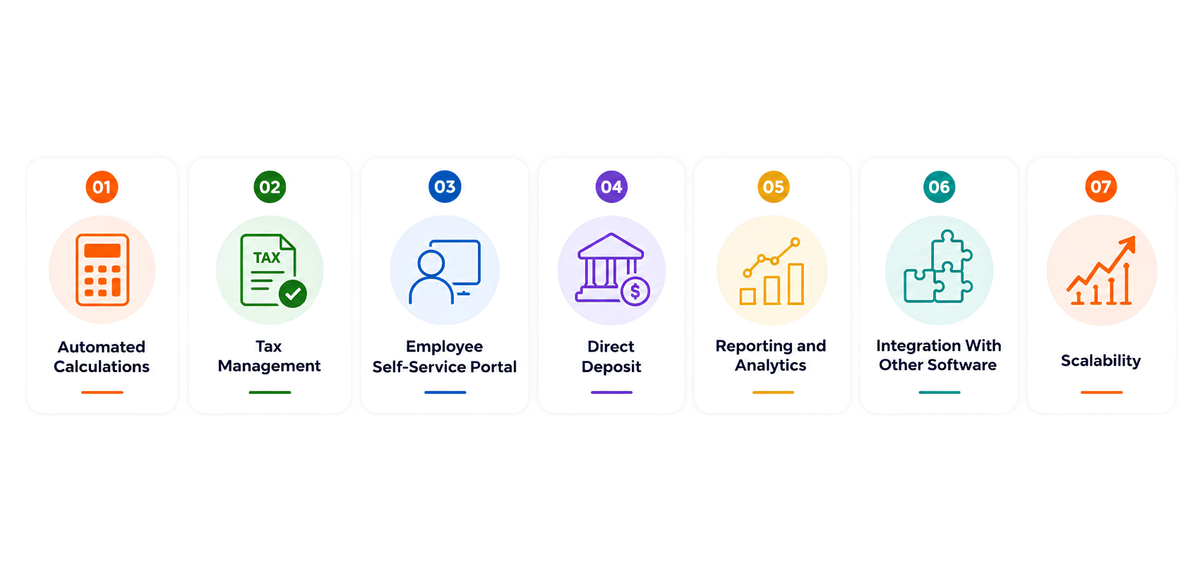
Automated Calculations
The software should automatically calculate gross pay, deductions, and net pay, reducing the risk of manual errors and helping you stay compliant with tax regulations.
Tax Management
Look for a payroll system for small businesses that calculates federal, state, and local taxes, files the required forms, and generates reports. This overlaps closely with your broader accounting setup, since payroll expenses flow directly into your books — see our comparison of accounting software for restaurants and accounting software for small retail businesses for more on this.
Employee Self-Service Portal
A self-service portal lets employees view pay stubs, download tax documents, and update personal information on their own, improving transparency and reducing your team's administrative load.
Direct Deposit
Direct deposit lets you pay employees electronically, ensuring on-time payments without relying on paper checks.
Reporting and Analytics
Reporting tools help you analyze payroll data, track labor costs, and plan budgets with accurate, up-to-date numbers. If labor cost control is a priority, our piece on strategies restaurants use to control high labor costs digs into this further, alongside broader POS reporting that ties labor data to sales performance.
Integration With Other Software
A payroll program for small businesses should connect with your accounting, HR, and attendance systems — including biometric terminals — so employee data flows through one connected system instead of being re-entered manually. This is where an integrated restaurant ERP or retail ERP has an advantage over a standalone payroll tool.
Scalability
As your team grows, your payroll software should scale with you, supporting more employees and additional features without requiring a full system change — particularly important if you're managing multiple outlets or a growing restaurant chain.
Benefits of Using Payroll Software
- Enhanced efficiency — Automation frees up time for core business operations.
- Improved accuracy — Automated calculations and tax management reduce payroll errors.
- Better compliance — Built-in tax rules help you stay current with changing regulations and avoid penalties.
- Higher employee satisfaction — Timely, accurate payments support employee retention.
- Cost savings — Reducing administrative overhead and avoiding tax penalties can lower costs over time.
Posbytz Payroll Software for Small Businesses
Posbytz is a cloud-based ERP built for small to mid-sized businesses, particularly in retail and restaurants. It combines payroll automation, tax compliance support, and employee self-service in one connected system, along with built-in accounting and POS tools.
Key features include:
- Automated payroll calculations — Salaries, wages, bonuses, and deductions are calculated automatically.
- Tax compliance management — Helps maintain compliance with applicable tax regulations, reducing manual errors.
- Employee self-service portal — Employees can view payroll details, submit leave requests, and manage personal information.
- Accounting integration — Payroll data flows directly into accounting for accurate financial reporting.
- Scalability — Designed to support businesses as they add locations and employees, whether that's a single cafe or a multi-outlet supermarket chain.
Comparing Payroll Software Options for Small Businesses
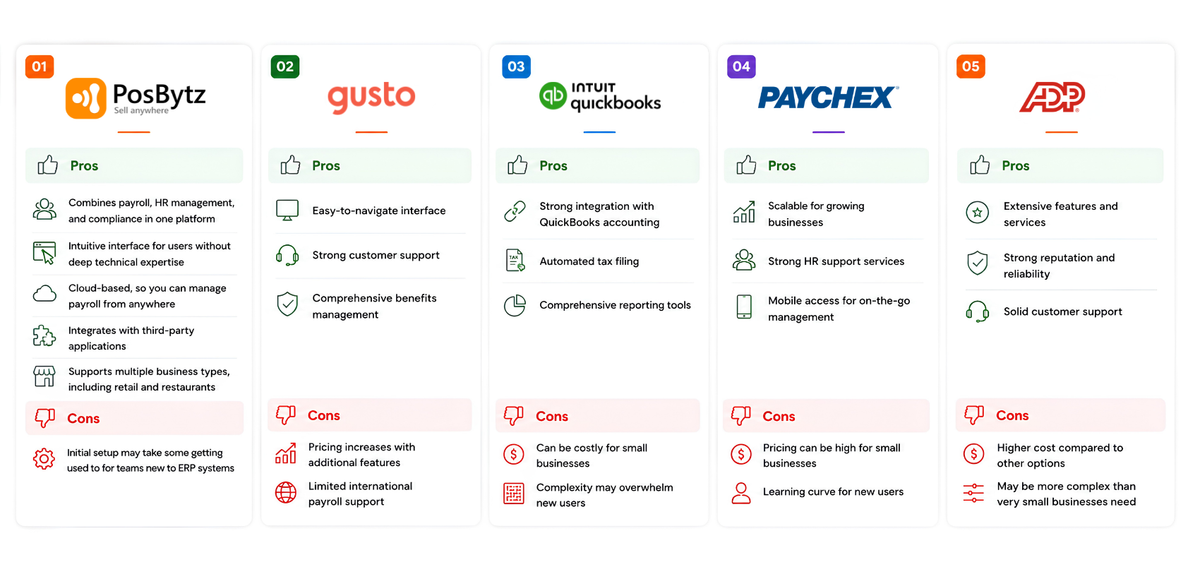
1. Posbytz
Posbytz combines payroll, HR, and accounting in a single cloud-based platform, making it a strong fit for small businesses — especially in retail and food service — that want an integrated system rather than separate tools for payroll, accounting, and attendance.
Pros:
- Combines payroll, HR management, and compliance in one platform
- Intuitive interface for users without deep technical expertise
- Cloud-based, so you can manage payroll from anywhere
- Integrates with third-party applications
- Supports multiple business types, including retail and restaurants
Cons:
- Initial setup may take some getting used to for teams new to ERP systems
2. Gusto
Gusto is known for its straightforward design, with automated tax calculations, employee onboarding, and benefits management, making it a solid fit for small businesses wanting a simple payroll solution.
Pros:
- Easy-to-navigate interface
- Strong customer support
- Comprehensive benefits management
Cons:
- Pricing increases with additional features
- Limited international payroll support
3. QuickBooks Payroll
QuickBooks Payroll integrates directly with QuickBooks accounting, making it a natural choice for businesses already using QuickBooks for financial management.
Pros:
- Strong integration with QuickBooks accounting
- Automated tax filing
- Comprehensive reporting tools
Cons:
- Can be costly for small businesses
- Complexity may overwhelm new users
4. Paychex
Paychex offers a scalable payroll solution with mobile access, HR support, and compliance assistance, suited to small businesses planning to grow their headcount.
Pros:
- Scalable for growing businesses
- Strong HR support services
- Mobile access for on-the-go management
Cons:
- Pricing can be high for small businesses
- Learning curve for new users
5. ADP
ADP is a well-established payroll provider offering comprehensive services, including tax filing and employee management tools.
Pros:
- Extensive features and services
- Strong reputation and reliability
- Solid customer support
Cons:
- Higher cost compared to other options
- May be more complex than very small businesses need
Choosing the Right Payroll Program for Your Business
The best payroll software for your small business depends on your priorities. If you want payroll, HR, and accounting managed in one connected system, an integrated platform like Posbytz is worth considering — particularly if you're already running POS and inventory through the same ERP. If you're already using a specific accounting tool, a payroll system that integrates with it — like QuickBooks Payroll — may be a better fit. For businesses planning rapid headcount growth, scalability and HR support, as offered by Paychex or ADP, may matter more than integration.
Frequently Asked Questions
1. What is payroll software for small business?
Payroll software for small businesses automates payroll processes, including wage calculations, tax management, and employee payments, reducing manual work and errors.
2. How does payroll software help with compliance?
It helps ensure compliance by automatically calculating taxes and generating the required tax forms, which reduces the risk of penalties from tax authorities. In regions like Saudi Arabia, this also extends to ZATCA e-invoicing compliance.
3. Can payroll software integrate with other business systems?
Yes. Many payroll programs for small businesses integrate with accounting, HR, and attendance systems, including biometric devices, so data doesn't need to be entered twice.
4. Is payroll software suitable for businesses of all sizes?
While especially useful for small businesses, most payroll systems are built to scale, so they can also support the needs of mid-sized organizations as they grow.
5. What features should I look for in payroll software?
Look for automated calculations, tax management, an employee self-service portal, integration with accounting software, and reporting tools.
6. How much does payroll software typically cost?
Pricing varies by provider and feature set. Most payroll systems for small businesses offer tiered plans, so it's worth comparing what's included at each tier against your specific needs.
Conclusion
Choosing the right payroll software for your small business comes down to matching features to your actual needs — whether that's tighter accounting integration, HR support for a growing team, or a single connected platform for payroll, accounting, and employee management. Investing in the right payroll system helps you save time, reduce errors, and stay compliant as your business grows.
Want to see how integrated payroll fits into a complete business system? Explore Posbytz HR & Payroll to learn how it connects payroll, accounting, and operations in one platform. You can also compare more options in our guide to the best payroll software for small businesses, read Payroll Software 101 for a deeper look at core payroll concepts, or see how payroll fits into a full restaurant ERP or retail ERP setup.
About the author

Saravana Damodaram
Co-Founder & CEO, PosBytz
Saravana Damodaram is the Co-Founder & CEO of PosBytz, a cloud-based POS-ERP platform built for F&B and retail businesses since 2018. He focuses on unified commerce, inventory, and multi-location operations, and has helped over 5,000 merchants across 25+ countries move off fragmented, disconnected tools and run their entire operation, billing, inventory, kitchen, and accounting on one platform.



