What Is a Retail POS System? Features & How to Choose
Learn what a retail POS system is, its key features like inventory, employee & customer management, and how to choose the best one for your retail store.


The retail industry is changing fast, and staying competitive means keeping pace. Global retail sales are projected to reach around 31.7 trillion US dollars by 2025, and today's shoppers move fluidly between online stores, WhatsApp, Instagram, and marketplaces like Amazon while expecting fast, personalized service. To keep up, most retailers now need an omnichannel retail POS system that brings online and in-store operations onto a single platform.
This guide covers what a retail POS system is, why it matters, how it works, the main types available, and what to look for when choosing one for your store.
What Is a Retail POS System?
A retail POS system is the combination of hardware and software that handles sales, payment acceptance, and customer checkout. Traditional systems were little more than cash registers, but modern retail point of sale software is cloud-based, works across devices, and gives staff the tools to serve customers faster and build loyalty over time.
Importance of a POS System for Retail Stores
Reduce Manual Errors and Manage Staff More Easily
Manual price entry is a common source of billing mistakes. Retail point of sale software removes that risk by pulling pricing directly from the system. It also lets you track employee shifts, monitor performance, and calculate commissions without extra paperwork.
Real-Time Data and Inventory Visibility
A retail POS system gives you one dashboard for both your online and outlet data. With PosBytz, for example, you can run a single inventory across online orders and physical stores, so stock counts stay accurate instead of being tracked separately in each channel.
Accept Payments From Anywhere
A cloud-based retail POS system lets customers pay by cash, card, or digital wallet, and staff can process payments from any counter or device with an internet connection, rather than being tied to one fixed terminal.
How Does Retail Point of Sale Software Work?
- Product selection: Staff check price and availability, then scan the item's barcode.
- Price calculation: The system totals the bill, applies any discounts, and updates inventory in real time.
- Payment: The customer pays using their preferred method, such as cash, card, or a digital wallet.
- Finalization: The system issues a digital or printed receipt to complete the sale.
4 Types of POS Systems for Retail Store
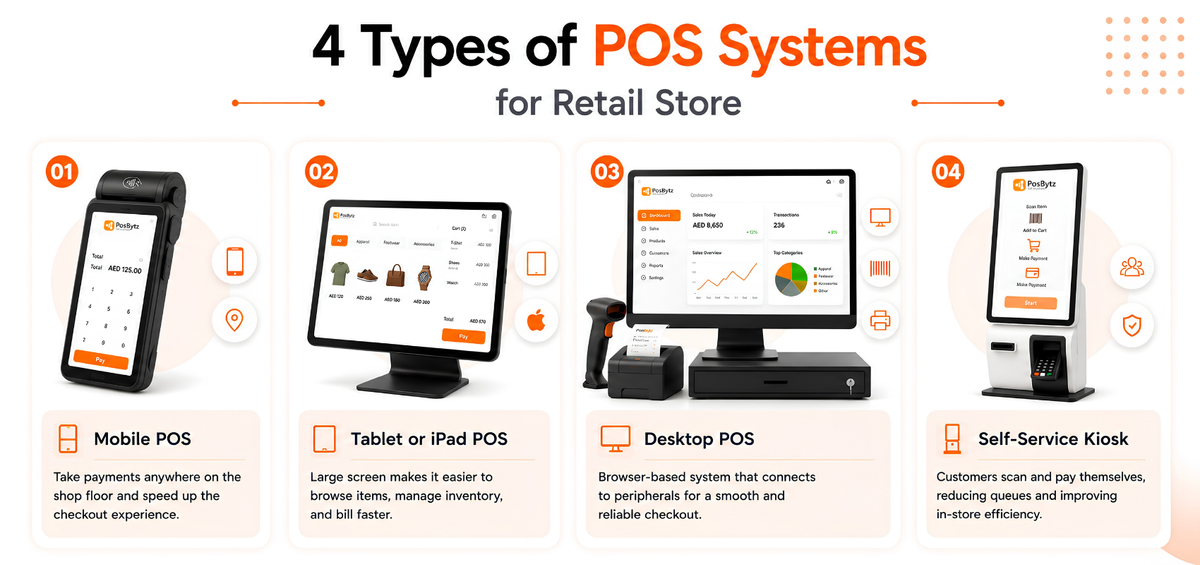
Mobile POS
A mobile POS lets staff take payments anywhere on the shop floor instead of queuing customers at a fixed counter. The PosBytz billing app is available on Android.
Tablet or iPad POS
Tablet-based systems suit stores with large catalogs, since a bigger screen makes it easier to search and manage inventory during billing. PosBytz also offers an iOS billing app.
Desktop POS
A desktop POS runs through a browser and connects to peripherals like barcode scanners, receipt printers, and cash drawers. It suits stores with a fixed checkout counter and steady transaction volume.
Self-Service Kiosk
Kiosks let customers scan and pay for items themselves, which is useful for high-traffic stores looking to reduce checkout queues while keeping transactions secure.
How to Choose the Best Retail POS System?
Sales Reporting
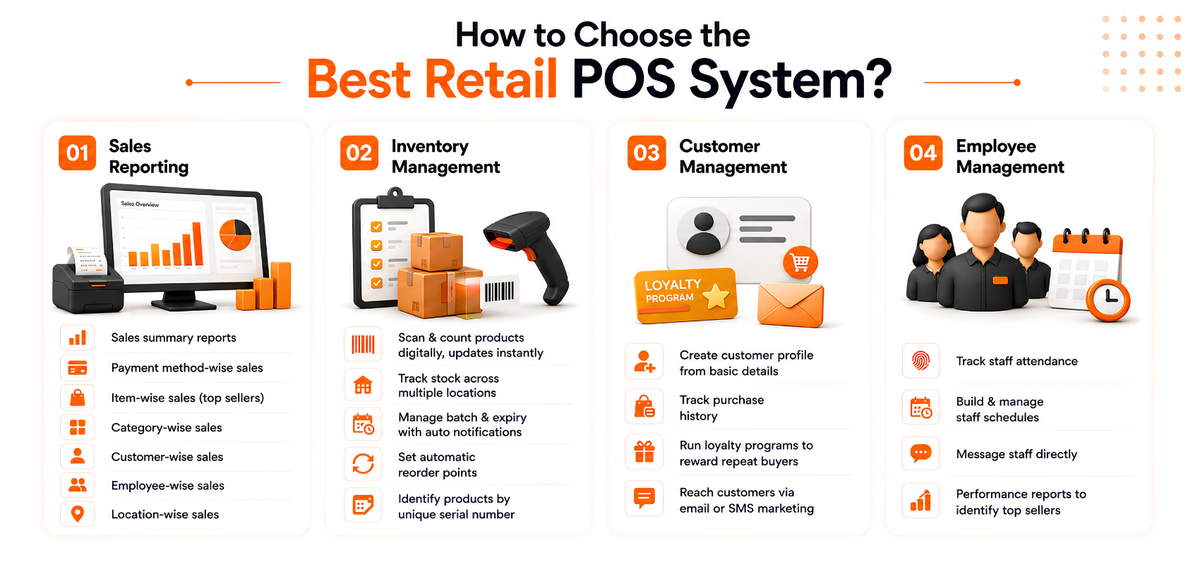
The best POS system for a retail store should give you clear analytics, not just raw transaction logs. At a minimum, look for retail point of sale software that can generate:
- Sales summary reports
- Payment method-wise sales
- Item-wise sales (top sellers)
- Category-wise sales
- Customer-wise sales
- Employee-wise sales
- Location-wise sales
You can read more about how POS reports work and what they should tell you about your business.
Inventory Management
Reliable inventory control is the backbone of a retail business, so check that your retail POS system can handle high-volume stock tasks without manual workarounds. Look for the ability to:
- Scan and count products digitally, with inventory updating instantly
- Track stock across multiple locations from one screen
- Manage batch and expiry tracking with automatic notifications
- Set automatic reorder points for suppliers
- Identify products by unique serial number
If you run multiple stores, this guide to POS inventory systems for small businesses breaks down what to prioritize.
Customer Management
A strong retail POS system should help you build relationships with shoppers, not just process their bills. Look for the ability to:
- Create a customer profile from basic contact details
- Track purchase history against each profile
- Run a loyalty program to reward repeat buyers
- Reach customers directly through email or SMS marketing
Employee Management
When your retail POS system also handles staff management, day-to-day operations get noticeably simpler. Look for tools to track attendance, build schedules, message staff directly, and pull performance reports that show your top sellers.
Scale Your Retail Business with PosBytz
PosBytz brings these capabilities together in one omnichannel retail POS system, built to work for anything from a single store to a multi-outlet chain. You can set up a free, branded online store with zero commission and connect it to the same PosBytz platform used at your counter, so inventory, sales, and customer data stay in sync everywhere you sell. Explore what PosBytz can do for your retail billing operations.
Frequently Asked Questions
How can a retail POS system improve staff productivity?
It lets you track employee shifts, monitor individual sales performance, and automate commission calculations, which makes it easier to spot top performers and plan schedules around actual demand.
Does PosBytz support omnichannel selling for retail stores?
Yes. PosBytz unifies your sales channels so you can manage online stores, apps, and physical outlets from a single dashboard, backed by one centralized inventory.
What sales reports should retail point of sale software provide?
At minimum, it should report on payment methods, item-wise sales, customer purchase frequency, location-based performance, and overall profit and loss, so you can see what's working at a glance.
Is a cloud-based retail POS system better than a traditional one?
A cloud-based system updates inventory and sales data in real time across every location and device, and typically keeps working offline with automatic sync once connectivity returns, which a traditional on-premise system usually can't match.
How much does a retail POS system cost?
Pricing varies by vendor and depends on the number of outlets, devices, and features you need, such as CRM, accounting, or delivery integrations. Most cloud-based providers, including PosBytz, offer tiered plans, so it's worth comparing what's included at each level against your store's actual requirements.
Final Thoughts
A retail POS system is no longer just a checkout tool. It's the platform that connects your inventory, staff, and customers across every channel you sell through. Choosing one with strong reporting, real-time inventory, and built-in customer and employee management will save time and reduce errors as your store grows, whether you're running a single shop or a multi-outlet chain.
Ready to see it in action? Get started with PosBytz and bring your retail operations onto one platform.
Related Resources
- READ MORE: Best POS Software for Restaurants in UAE
- READ MORE: Best Quick Service Restaurant (QSR) POS Systems
- READ MORE: What are Pos Reports?
- READ MORE: Best Cloud Kitchen POS Software
- READ MORE: What Is a Retail POS
- READ MORE: 8 Best POS Inventory Systems
About the author

The PosBytz Marketing Team
Editorial Team, PosBytz
The PosBytz Marketing Team shares practical insights on running smarter restaurants and retail stores from POS best practices to inventory management, online ordering, and customer loyalty strategies.



