How to Build, Launch, and Grow a Successful Online Store
Setting up an online store will double your profits and reduce your investment. Bring software to empower your eCom store.



Imagine sending a birthday gift to your grandmother in another city. A few years ago, that meant a trip to the shop, then a scramble to find a courier that could get it there on time. Today, browsing, paying, and tracking the delivery all happen on one screen.
That shift is why more businesses are moving online. In the US alone, online sales crossed an estimated $1.2 trillion in 2025, about 16% of all retail spending, according to a recent U.S. Department of Commerce report. Semrush research backs this up from the buyer's side too: 63% of shoppers say they shop online specifically to get items delivered straight to their doorstep. Convenience isn't a bonus feature anymore, it's the baseline customers expect.
This guide walks through building, launching, and growing an online store: choosing a niche, setting up the business side, picking a platform, designing for conversions, handling payments and delivery, selling on channels like WhatsApp and marketplaces, and marketing your store once it's live.
How to Build, Launch, and Grow a Successful Online Store?
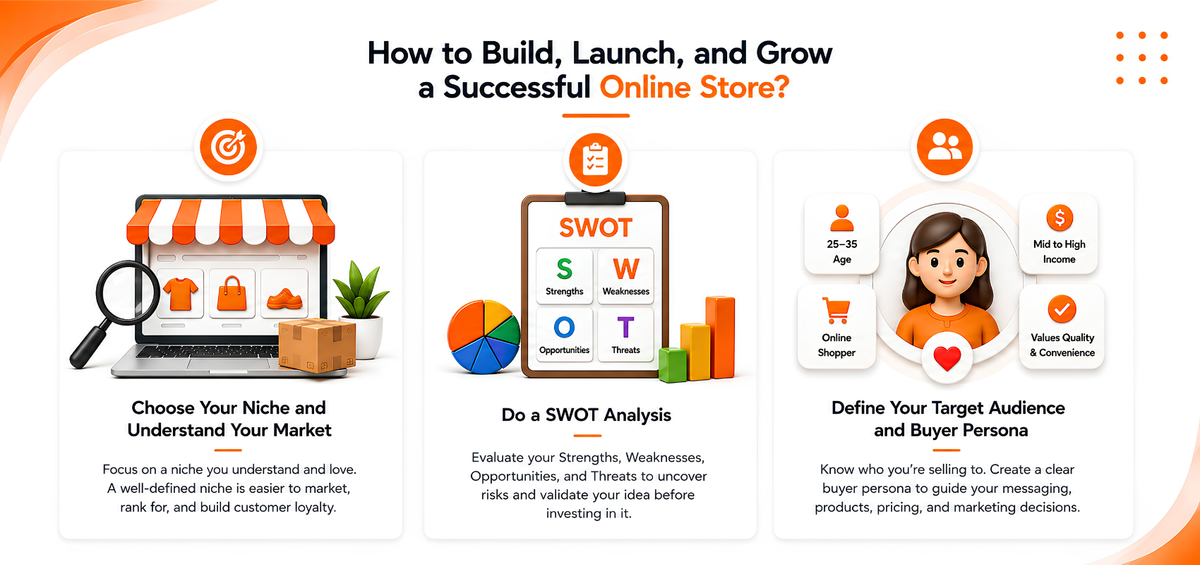
Choose Your Niche and Understand Your Market
Deciding what you'll sell is the first real decision in building an online store, and it shapes almost everything that follows, from your marketing angle to your delivery costs. eBay started as a niche online auction platform before expanding, and that early focus helped it understand its audience and build loyalty before scaling up. You don't need eBay's scale to benefit from the same approach: a narrower, well-understood niche is usually easier to market and easier to rank for than a broad, generic store.
Do a SWOT Analysis
Once you have a product idea, run a SWOT analysis, a look at your Strengths, Weaknesses, Opportunities, and Threats. It's a quick way to stress-test your idea before you spend money on it, and it often surfaces practical issues, like sourcing costs or a crowded market, that are easier to fix on paper than after launch.
Define Your Target Audience and Buyer Persona
A buyer persona is a semi-fictional profile of your ideal customer: their age range, income, shopping habits, and the specific problem your product solves for them. Building this out, using your SWOT analysis alongside basic demographic and behavioral data, helps you make sharper decisions on pricing, product photography, tone of voice, and which marketing channels are actually worth your budget.
Set Up the Foundations of Your Business
Name Your Business and Register Your Domain
Your business name should be short, easy to say out loud, and easy to remember, since customers will need to search for it later. Once you have a name, register a matching domain. The process is quick, and a domain that matches your business name makes your store easier to find and looks more credible to first-time visitors.
Handle Business Registration and Licensing
Before you start taking payments, check what your local and national regulations require. Depending on where you operate, this can include registering a business entity, applying for a trade or sales license, and setting up tax registration such as VAT or GST. Requirements vary by country, and even by state or emirate, so it's worth checking with a local accountant or your government's business portal early rather than after you've already started selling. Getting this right from day one also makes it easier to open a business bank account and get approved for a payment gateway, both of which usually ask for proof of registration.
Design Your Brand Identity
Your logo, color palette, and tagline are often a customer's first impression of your business, so keep them consistent across your website, packaging, and social channels. You don't need an expensive rebrand to get this right, consistency matters more than complexity.
Choose the Right eCommerce Platform
The number of online store builders available can be overwhelming, and most look similar on the surface. Before comparing pricing plans, get clear on the fundamentals: your budget, the size of your catalog, whether you also sell in person, and how much technical work you're willing to take on yourself.
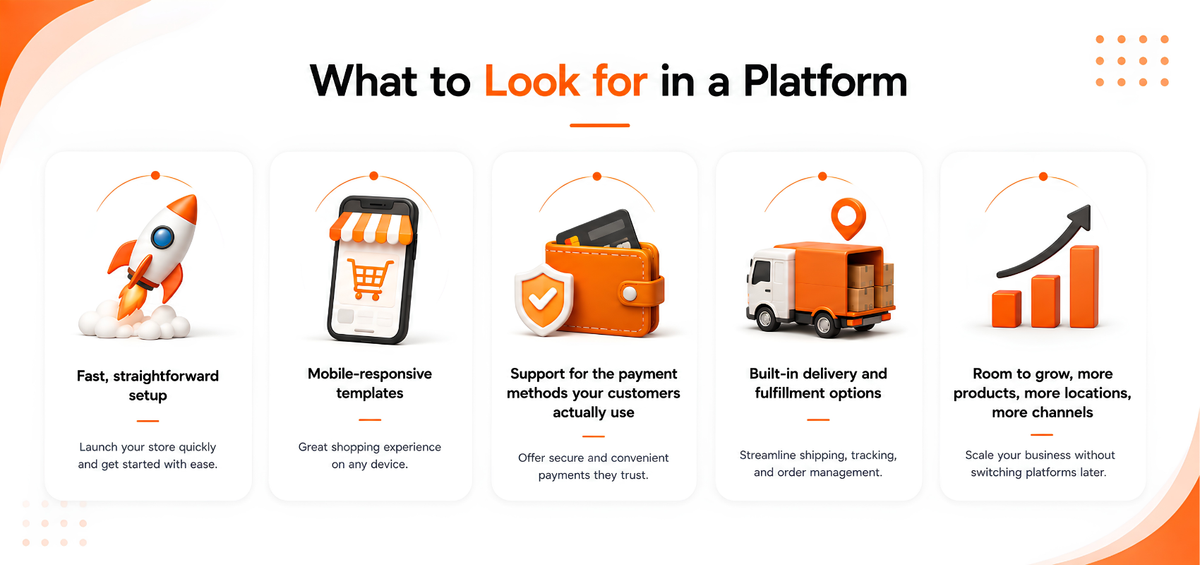
What to Look for in a Platform
- Fast, straightforward setup
- Mobile-responsive templates
- Support for the payment methods your customers actually use
- Built-in delivery and fulfillment options
- Room to grow, more products, more locations, more channels, without switching platforms later
If you're weighing your options against a platform you already know, it's worth comparing features side by side before you commit.
Features That Matter Once You're Live
If you already run a physical store, look for a platform that connects your online and in-store operations. A shared, real-time inventory view lets you see which products are moving and which are sitting in stock, so you're making restocking decisions based on data instead of guesswork. A unified commerce setup also means you're not keeping separate records for online and offline sales, which saves time at the end of every month. Some platforms, PosBytz included, let you generate a shareable product link you can send straight through WhatsApp, Instagram, or Facebook, so customers can buy without navigating a full storefront.
Design a Store That Converts
Build for Mobile First
Mobile shopping now accounts for the majority of online purchases during peak shopping periods, so your store needs to work well on a small screen before anything else. Test your own checkout on your phone: if you find yourself pinching to zoom, hunting for the buy button, or losing your cart on a slow connection, your customers will hit the same friction.
Make Product Pages and Checkout Easy
Clear photos, honest descriptions, and a visible price and buy button do more for conversions than a clever layout. At checkout, keep the number of steps as low as possible, avoid forcing customers to create an account before they can buy, and show shipping costs and taxes early rather than at the last step. Cart abandonment is largely a friction problem: the fewer surprises and clicks between browsing and paying, the more orders you'll close.
Set Up Payments, Shipping, and Delivery
Offer the Payment Methods Your Customers Expect
Support the payment methods your specific market actually uses. That usually means cards at a minimum, plus regionally relevant options such as UPI, mobile wallets, or cash on delivery. A payment or POS integration that connects directly to your store and your accounting saves you from manually reconciling transactions across multiple systems.
Decide Your Shipping and Delivery Policy
Your shipping policy affects both your margins and a customer's decision to buy, so it deserves real thought rather than a default setting. According to Narvar, 83% of online shoppers in the US expect regular updates on their order status, so proactive tracking notifications aren't optional anymore, they're part of the product experience. Decide early whether you'll offer a free shipping threshold, how you'll price domestic versus international orders, and which courier or delivery partner fits your order volume and delivery radius.
Sell Everywhere Your Customers Already Are
Social Commerce and WhatsApp Selling
Many customers now discover and buy products without leaving the app they're already browsing. Selling directly through WhatsApp lets you share product links, answer questions, and take orders in the same conversation, which works especially well for repeat customers and in markets where WhatsApp is already how people talk to businesses.
Marketplaces and Aggregators
Beyond your own store, marketplaces and aggregators can put your products in front of an audience that's already shopping. If you're deciding where to list your catalog, it's worth comparing the major online sales platforms and marketplaces available in your market first. In India, registering on ONDC gives smaller sellers a way to reach buyers across multiple apps through a single, government-backed network. Whichever channels you add, keep your inventory synced across all of them so you don't oversell a product that's already out of stock.
Market Your Store Before and After Launch
Build Pre-Launch Momentum
Don't wait until launch day to start talking about your store. A short pre-launch period, even just a few weeks of teaser content, an email waitlist, or early access for followers, creates the initial traffic that drives your first week of sales.
Combine Paid, Organic, and Influencer Marketing
- Comprehensive strategy: Plan a pre-launch calendar and identify which channel your audience actually uses, rather than trying to be everywhere at once.
- Influencer marketing: Partnering with creators who already have your audience's attention is often more cost-effective than broad advertising, especially for a new or small brand.
- Paid advertising: Targeted campaigns on Meta and Google can drive fast, measurable traffic once you know which channel converts.
- Organic strategies: SEO and email marketing take longer to pay off, but they compound. Personalized offers and abandoned-cart emails are consistently one of the highest-return channels available to a new store.
Track Performance and Keep Improving
Launch is the start of the work, not the end of it. Once your store is live, track which products sell, which pages people abandon, and where your traffic is actually coming from, then adjust. Many stores now use basic personalization, showing related or previously viewed products, to increase average order value without adding new traffic. A CRM built into your operations makes this easier by tying purchase history to marketing, so repeat customers get relevant offers instead of generic ones.
Frequently Asked Questions
How much does it cost to start an online store?
Costs vary depending on the platform, product catalog, and how much design or development help you need. At minimum, budget for a domain, hosting or a platform subscription, payment processing fees, and product photography. Many store builders, including free plans with 0% commission, let you launch with little to no upfront software cost, so your biggest early expense is usually inventory and marketing rather than the technology itself.
How long does it take to launch an online store?
A simple store with a small catalog can go live in a few days using a store builder. A more custom setup, with brand design, business registration, and payment gateway approval, typically takes two to six weeks. The platform setup itself is rarely the bottleneck; legal registration and payment gateway approval usually take the most time.
Do I need a business license to sell online?
In most countries, yes, especially once you're processing payments and paying taxes. Requirements depend on your location, product category, and revenue, so check with your local business registration authority or an accountant before you launch. Selling without proper registration can create tax and compliance issues later, even if the store itself runs fine.
Which platform should I use to build my online store?
It depends on your catalog size, budget, and whether you also sell in person. If you run or plan to run a physical location alongside your online store, a platform that unifies online orders, in-store POS, and inventory in one system will save you from reconciling separate records later. If you're online-only, prioritize ease of use, payment support, and the ability to add channels like marketplaces or social commerce as you grow.
How do I get my first sales after launching?
Start with people who already know you: email your existing contacts, post on your personal and business social accounts, and ask early customers for reviews. Pair that with one paid channel, usually Meta or Google Ads, to test what converts, and consider an early-access or launch discount to turn your first wave of visitors into paying customers.
Conclusion
It is important to visualize a clear roadmap before you launch your eCommerce business. The success of an eCommerce store depends on 4 major factors :
(1) Relevance of product and its quality
(2) Performance of website on desktop and mobile
(3) pricing strategy
(4) an optimum delivery/ return experience.
Clearly outlining your goals beforehand will help you create an incredible shopping experience for your customers. Posbytz’s omnichannel experience makes it the best choice for those who want to launch an eCommerce store quickly.
Related Resources
About the author

Saravana Damodaram
Co-Founder & CEO, PosBytz
Saravana Damodaram is the Co-Founder & CEO of PosBytz, a cloud-based POS-ERP platform built for F&B and retail businesses since 2018. He focuses on unified commerce, inventory, and multi-location operations, and has helped over 5,000 merchants across 25+ countries move off fragmented, disconnected tools and run their entire operation, billing, inventory, kitchen, and accounting on one platform.



