Liquor Inventory Software: Top 5 POS Systems for 2026
Do you want to know the Best Liquor Inventory Software? In this article, we listed the best ones in the market for your Liquor Inventory.



The best Liquor POS system service providers make life easier by removing daily obstacles you face in your business. POS system which makes it easy to run a liquor store without any hassle. The best 5 POS providers with free entry-level solution to help you get started.
The best part is where you can get started in just a few minutes using your phone, tablet, or computer.
Why Liquor Stores Need Dedicated Inventory Software
Liquor retail comes with challenges that a generic cash register cannot handle well: large SKU counts across spirits, wine, and beer, frequent case breaks and multi-pack pricing, age-restricted sales, and the need for accurate stock counts across one or more locations. A dedicated liquor store POS software solves these problems by combining billing with real-time inventory tracking in one system.
A good liquor POS system is a practical investment if your store needs to:
- Track stock accurately across hundreds of SKUs and multiple locations
- Reduce shrinkage and manual counting errors
- Keep billing fast during peak hours without losing accuracy
- Get alerted before an item runs out of stock
- Generate sales and profitability reports without manual spreadsheet work
What to Look for in Liquor Inventory Software
Before comparing providers, it helps to know which features actually matter for a liquor store's day-to-day operations.
Offline Billing and Automatic Sync
Internet outages should not stop checkout. Look for liquor POS software that keeps billing running offline and automatically syncs sales and stock data once the connection is back, so nothing is lost or double-counted.
Real-Time, Multi-Location Inventory
If you run more than one outlet, your inventory software should show live stock levels across all locations from a single dashboard, rather than requiring you to check each store separately.
Barcode Scanning and Case Break Support
Liquor stores frequently break cases into individual units or bundle items into combo pricing. Barcode scanning speeds up checkout, while the ability to manage case and unit-level stock keeps counts accurate.
Low Stock Alerts and Automated Purchase Orders
Automated stock alerts and purchase orders at defined reorder points help you avoid both overstocking and running out of fast-moving items.
Batch and Expiry Tracking
Some liquor and mixer products carry expiry dates. Batch-level tracking makes it easier to manage stock rotation and reduce waste.
Sales and Profitability Reporting
Item-wise and category-wise sales reports show which products are performing, so you can make faster decisions on pricing and reordering.
Top 5 Liquor Inventory Software and POS Providers for 2026
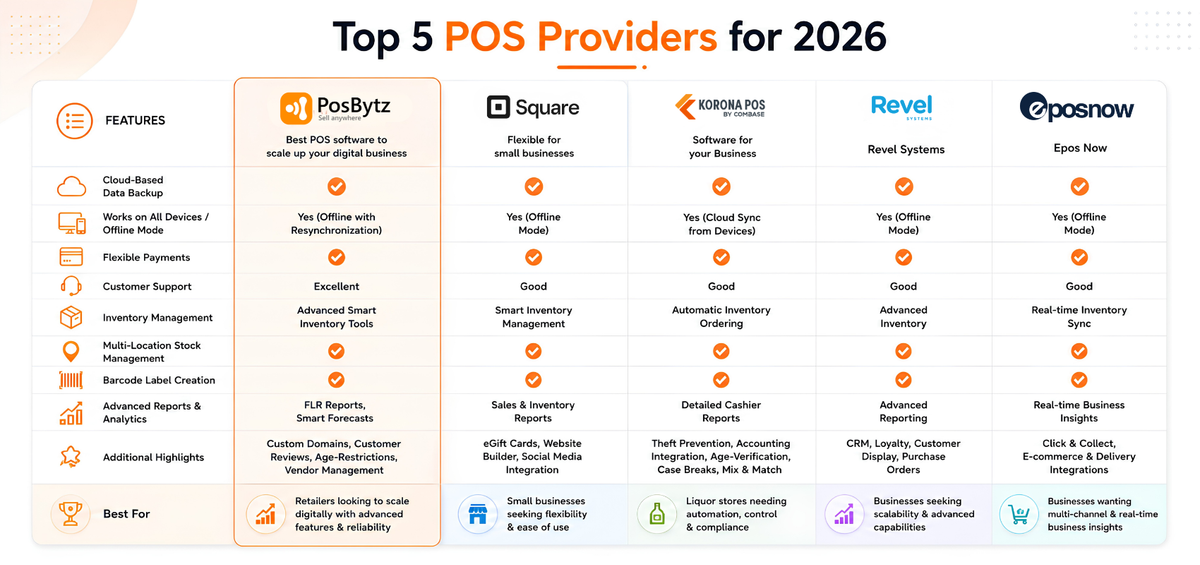
Posbytz – Best POS software to scale up your digital business
Posbytz is customized to suit any business needs. Liquor store POS software offers features like cloud-based data backup, compatibility on all devices, the ability to work offline thanks to the resynchronization of data, flexibility in payments, and amazing customer support.
Trusted brand by 5000+ businesses. Smart inventory management tools, custom domains, customer reviews integration, smart stock forecasts, automatic purchase orders, barcode label creation, multi-location stock management, and vendor management. Manage catalogs, pricing, taxes,age-restructions, FLR reports and their employees conveniently.
Square – Flexible for small businesses
Square has a POS with categories like in-store pickup or shipping features, a website builder, social media integration, automatic inventory syncing, and even eGift card capabilities
Square Professional suit ($12-26/month, billed annually + per-transaction fees, after a 30-day free trial)
Smart inventory management tools, custom domains, customer reviews integration, no Square ads, smart stock forecasts, automatic purchase orders, barcode label creation, multi-location stock management, and vendor management features.
Korona – Software for your Business
KORONA cloud-based Liquor POS is streamlined & many desired features for liquor stores. Inventory can be tracked using their system from handheld devices, and product trends can inform your future promotions.
Detailed cashier reports, theft prevention software, accounting integration, promotional capabilities, automatic inventory ordering, overstock warnings, employee time tracking and payroll, franchise scalability, age-verification reminders. Case Breaks and Mix & Match Features with regular software updates are automatically installed in each of your Liquor POS terminals.
Revel Systems
Software that can quickly adapt and even grow with you. Online Ordering and Mobile POS Solutions with Flexible Payment Options. Customer Relationship Management (CRM) and Customer Loyalty, Advanced Reporting, Customer Display Screen, Create Purchase Orders with Your Liquor POS
Epos Now
Online, delivery, collection, and multi-channel ready with access to business insights through any device. Real-time reporting on staff, customers, sales, margin, and stock.
Standalone connects to hundreds of apps including payment systems, accounting software.Synchronize your online and physical locations which connects to e-commerce, food delivery platforms. Offer safety and convenience with Click & Collect services
How to Choose the Right Liquor Inventory Software for Your Store
- List your must-have features first. Decide whether offline billing, multi-location inventory, or case-break pricing matters most for your operation.
- Check device compatibility. Confirm the software works with the hardware you already own or plan to buy, whether that's Windows, Android, or iPad.
- Review reporting depth. Make sure the system gives you item-wise and category-wise sales data, not just daily totals.
- Ask about support and onboarding. Liquor stores need reliable support during setup and at checkout, so confirm response times before committing.
- Start with a free trial. Test the actual checkout flow and inventory dashboard with your own product list before switching over fully.
Conclusion
Choosing the right liquor inventory software comes down to matching features to how your store actually runs: how many locations you manage, how often you break cases, and how much visibility you need into stock and sales. PosBytz, Square for Retail, KORONA POS, Revel Systems, and Epos Now each take a different approach, so the best pick depends on your priorities around inventory depth, reporting, and device compatibility.
If real-time inventory tracking, offline billing, and multi-location visibility are on your checklist, PosBytz's liquor store POS software is built to handle exactly that. Sign up for a free trial to see how it fits your store's day-to-day operations.
Frequently Asked Questions
What is liquor inventory software?
Liquor inventory software is a system that tracks stock levels, sales, and reordering for liquor stores, usually built into or connected with a point-of-sale (POS) system. It updates inventory automatically as sales happen, rather than requiring manual stock counts.
Why do liquor stores need dedicated inventory management software?
Liquor stores typically carry hundreds of SKUs with case breaks, multi-pack pricing, and age-restricted items. Dedicated software reduces manual counting errors, prevents overselling, and gives owners visibility into which products are moving fastest.
Can liquor POS software work without an internet connection?
Some liquor POS systems, including PosBytz, are built to continue billing offline and automatically sync sales and inventory data once the connection is restored. This is worth confirming with any provider you're evaluating, since not all systems support offline mode.
Does liquor inventory software support multiple store locations?
Yes, most modern liquor POS platforms offer multi-location inventory tracking, letting you view stock across all outlets from a single dashboard instead of checking each store individually.
What features should I prioritize when comparing liquor POS systems?
Focus on real-time inventory tracking, offline billing, barcode scanning, automated low stock alerts, and sales reporting. These directly affect daily operations and are the features that separate a liquor-ready system from a generic retail POS.
Related Resources
About the author

Saravana Damodaram
Co-Founder & CEO, PosBytz
Saravana Damodaram is the Co-Founder & CEO of PosBytz, a cloud-based POS-ERP platform built for F&B and retail businesses since 2018. He focuses on unified commerce, inventory, and multi-location operations, and has helped over 5,000 merchants across 25+ countries move off fragmented, disconnected tools and run their entire operation, billing, inventory, kitchen, and accounting on one platform.



