Zoho Books Integration with PosBytz: Key Benefits for Your Business
Zoho Books integration improves the client and customer relationship for your business thanks to the improved collaboration it brings to the table.


Managing sales, inventory, and accounting on separate systems creates duplicate work and raises the chance of errors. Zoho Books integration connects your point of sale system directly to Zoho's cloud accounting software, so every sale, purchase, and payment updates your books automatically instead of relying on manual entry at the end of the day.
For restaurants and retail businesses running on PosBytz, Zoho Books integration, sometimes referred to as Zoho POS integration or Zoho ERP integration, brings billing, inventory, and accounting onto one connected platform. This article covers what the integration does, the practical benefits it offers, how to set it up, and how it compares to PosBytz's own built-in accounting tools.
What Is Zoho Books Integration?
Zoho Books is cloud accounting software used for bookkeeping, invoicing, expense tracking, and tax reporting. When you connect Zoho Books to PosBytz, both systems share data continuously instead of your team re-entering the same information twice.
Once connected, Zoho Books integration typically keeps the following in sync:
- Items and pricing
- Sales invoices and sales orders
- Customer records
- Vendors and purchase orders
- Payments received and expenses recorded
- Bank ledger entries
This gives you one accurate financial picture, whether a sale happened in-store, through delivery, or online, without a finance team having to reconcile several spreadsheets by hand.
Key Benefits of Zoho Books Integration for Your Business
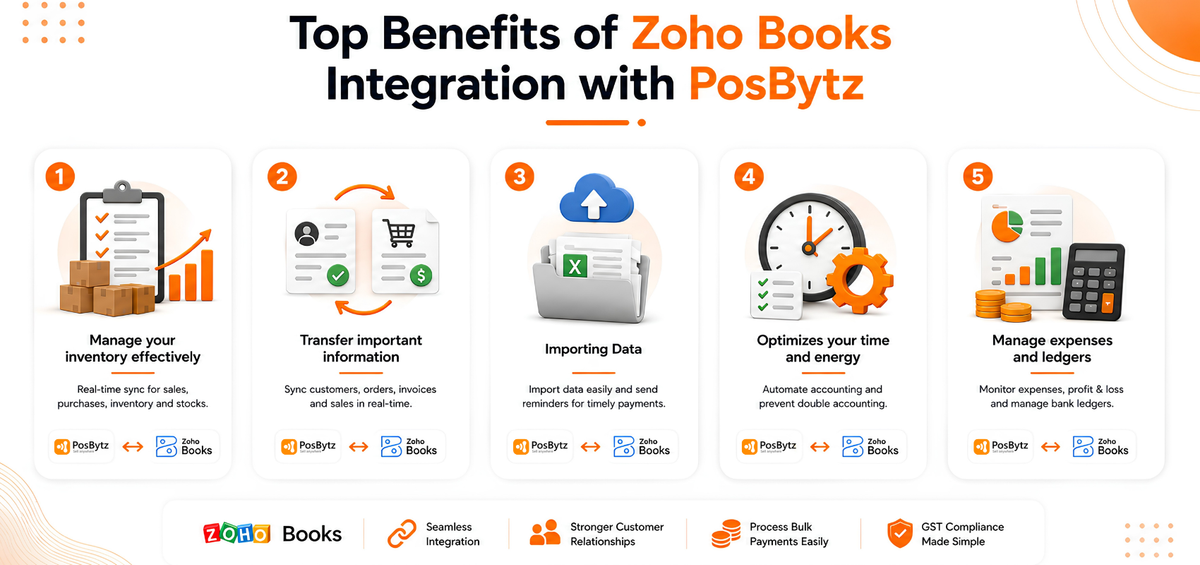
1. Real-Time Inventory and Sales Sync
Every sale processed through PosBytz updates stock levels and financial records in Zoho Books at the same time. This keeps your PosBytz inventory management accurate across all your outlets, so you know what is actually on hand rather than what a spreadsheet said yesterday.
2. Centralized Orders, Invoices, and Customer Data
Zoho Books integration synchronizes customer orders, invoices, and payment records between PosBytz and Zoho Books. Returns and exchanges are easier to process because both systems reflect the same transaction history, which helps you resolve customer queries faster and maintain a better customer relationship.
3. Simplified, Tax-Ready Bookkeeping
Zoho Books applies tax rules based on where your business operates, including GST and VAT. With Zoho Books integration, sales and purchase data flow into your books already tagged with the correct tax treatment, which reduces the manual work involved in preparing tax filings and lowers the risk of mismatched records at return time.
4. Time Savings Through Automated Accounting
Instead of manually recording each day's sales or duplicating entries across spreadsheets, Zoho Books integration automates the transfer of transaction data. This frees your finance team to focus on analysis and planning rather than data entry, and it reduces the double-accounting errors that are common with manual bookkeeping.
5. Clear Visibility into Expenses, Ledgers, and Profitability
With Zoho Books managing your general ledger, bank ledgers, and expense records, you get a clearer view of where money is going. Paired with PosBytz reporting on best-selling and underperforming items, this makes it easier to see which parts of your business are actually profitable.
How to Set Up Zoho Books Integration with PosBytz
Setting up Zoho Books integration with PosBytz takes a few steps:
- Log in to your PosBytz backend and go to Settings, then Accounting.
- Select Zoho Books and click Install.
- Choose Zoho Books as the integration mode.
- Enter your Zoho Books domain (such as .com, .in, or .co.za) and your Organization ID.
- Authorize the connection through your Zoho account.
- Accept the permissions and save.
Once authorized, PosBytz syncs your items, sales, and customer data with Zoho Books, and you can trigger a manual sync from the same settings page whenever you need updates pulled immediately.
If your business runs on Zoho Inventory instead of Zoho Books, PosBytz supports that mode as well, with item creation and stock adjustments maintained in Zoho and inventory levels updated back to PosBytz.
Zoho Books Integration vs Zoho POS Integration
These terms are often used interchangeably, but they cover slightly different scopes:
- Zoho Books integration focuses on accounting: invoices, payments, expenses, and ledgers.
- Zoho POS integration is the broader connection between your point of sale operations, such as sales, inventory, and purchase orders, and Zoho Books or Zoho Inventory.
In practice, connecting PosBytz to Zoho Books gives you both: your POS operations and your accounting stay in sync without separate setups.
For businesses that would rather keep accounting inside their POS platform, PosBytz's built-in accounting module is a direct alternative, covering bookkeeping and ledgers, along with ZATCA-compliant e-invoicing for businesses in Saudi Arabia, without needing a separate Zoho subscription. You can also browse PosBytz's full list of integrations, including CRM tools, to see what else connects with your POS.
Frequently Asked Questions
What is Zoho Books integration used for?
Zoho Books integration connects your POS system to Zoho's cloud accounting software so that sales, purchases, and payments update your books automatically instead of requiring manual entry.
What data syncs between my POS and Zoho Books?
Typically items, pricing, sales invoices, customer records, purchase orders, payments, and bank ledger entries sync between the two systems, keeping your accounting and operations aligned.
Can Zoho Books integration handle multiple outlets or brands?
Yes. PosBytz supports multi-location and multi-brand operations, and Zoho Books integration can consolidate sales and inventory data from each outlet into a single set of books for consistent reporting.
Does Zoho Books integration support VAT or GST compliance?
Zoho Books applies tax rules based on your business location, including GST and VAT, so transactions synced from your POS carry the correct tax treatment into your accounting records.
How long does setup take?
Most businesses can complete Zoho Books integration in PosBytz within a few minutes by authorizing their Zoho account and entering their organization details. A full sync of existing items and customers may take longer depending on the size of your catalog.
Conclusion
Zoho Books integration removes the manual work of keeping your POS and your accounting in sync. For restaurant and retail businesses running on PosBytz, it means sales, inventory, invoices, and expenses update automatically, giving your finance team accurate numbers without duplicate data entry.
Ready to connect your POS and accounting? Get started with Zoho Books integration on PosBytz today.
Related Resources
About the author

Kamalakannan
CTO, PosBytz
Kamalakannan is the CTO of PosBytz, where he leads product and engineering for the company's all-in-one POS and ERP platform. He writes about the technology decisions behind building reliable, scalable software for restaurants and retail businesses.



