15 Advantages Of POS System In Restaurant
PosBytz briefly discussed in this article about Advantages of restaurant POS software. Click here to read more about the benefits.


Running a restaurant today means juggling far more than good food. Owners now manage online orders, delivery partners, staff schedules, inventory, and customer expectations, often with the same size team they had years ago. It is a lot to handle with limited time and resources.
This is where a restaurant POS system earns its place. A modern restaurant POS software does more than process bills. It connects billing, kitchen operations, inventory, staff management, and reporting into one system, so you spend less time firefighting and more time running the business. Below are the real advantages of POS system in restaurant settings, and how each one shows up in day-to-day operations.
List Of The Advantages of Restaurant POS Software:
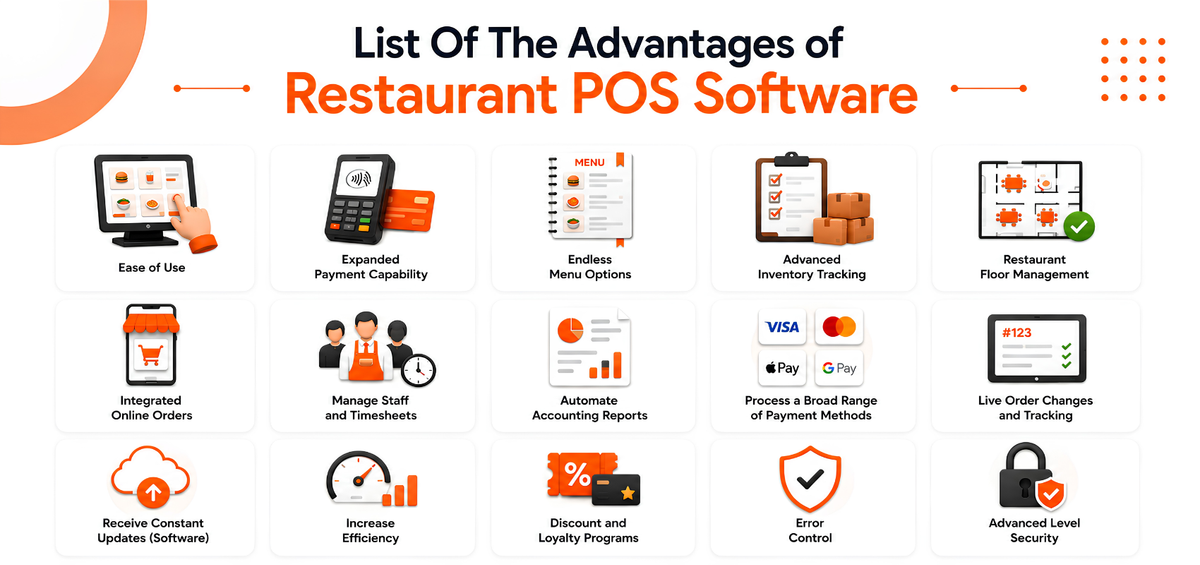
1. Ease of Use
It’s beneficial always to have easy access to crucial components of your organization. The benefit of restaurant POS software is that it allows you to view your establishment’s current sales and stock levels even when you’re not there.
You may connect to your admin dashboard on any PC, laptop or tablet and view your actual restaurant data. In addition, restaurant operators may get sales and inventory statistics on their cell phones thanks to POS companies for making easy access through mobile applications.
2. Expanded Payment Capability
Although many restaurant management POS systems include proprietary software capabilities, these functions are frequently broader. For example, it calls for a greater emphasis on distinctive payment methods, including the power to accept NFC and digital wallet payments or card readers to facilitate payments.
While these are unquestionably valuable resources, it’s also critical to consider what a restaurant software POS can provide for your business.
When thinking about contemporary restaurant management POS systems, it’s crucial to remember that they do more than just process transactions. These systems must carry out extra tasks created for specific sectors to satisfy modern business owners’ demands.
3. Endless Menu Options
Utilize your POS data to develop menu engineering that affects customer spending through menu design. Feature high-margin products prominently. The admin section of your POS may provide all the information you want.
For instance, your POS could include capabilities for ABC analysis in addition to dashboards with raw data that help you quickly find the meals that bring in the most money.
Analyze the benefits of point-of-sale systems by considering how easy it is to incorporate the most common procedures into its user interface and how well it can deliver actionable insights from statistics. As a result, it might alter the dynamic for both your workforce and revenue.
4. Advanced Inventory Tracking
Be the store manager aware of what is stocked and when it was ordered. Your POS computes the quantities of each item needed to prepare the requested food based on your formulas and portion sizes for each new order and subtracts those quantities from your inventory.
You’ll understand how much of each product you should have utilized for each period under evaluation if you keep track of all your stock in your POS system.
By performing routine inventory checks, you may determine how your anticipated and actual numbers differ and take action to reduce spoilage, waste, and other issues. Also, you may set up low stock alerts in your POS to receive warnings when your inventory is running low and make timely purchases.
However, inventory management also lets you track when product prices increase. It’s a fantastic technique to notice variations in seasonal pricing trends and to decide when to look for a new source.
To see how inventory and recipe management work together in PosBytz, check out our restaurant POS software.
5. Restaurant Floor Management
Maintaining your bookings might be challenging if you manage a dine-in restaurant during busy periods. Thankfully, restaurant management POS systems let you create a physical map of your establishment and take bookings online.
As a result, your crew of hosts will find it much easier to manage your restaurant’s floor. To know about the Restaurant management system, sign-up now
6. Integrated Online Orders
It’s essential that your online order platform can interface with your restaurant POS software if you currently use one for your takeout food service. You may combine external ordering sites with many restaurant software POS systems, automating the payment process and starting the preparation stage for online orders.
Don’t forget to look at a POS system’s capabilities to integrate your Online ordering system with delivery options. For instance, you start your online ordering portal and apps to increase sales and customer loyalty to order more. Check out Posbytz restaurant’s Online ordering system.
7. Manage Staff and Timesheets
Nowadays, many restaurant POS systems let you handle your personnel timesheets electronically. Additionally, you may set up “clock in” and “clock out” features that keep track of employee hours for compensation. It’s a fantastic approach to consolidating employee management under one roof.
A restaurant system POS can monitor employee attendance and compute balance automatically. One of the features that make a POS such a helpful management tool is this function.
8. Automate Accounting Reports
Performance indicators and reports with real-time data must be expected from a POS with an online admin interface. Before acquiring a POS, you and your management team might not have had the opportunity to produce these reports. Each system differs slightly, and ease of use of the interface is crucial when working with data.
Although high-level understanding will always require a human eye, you may quickly and easily extract the most helpful information from this data if it is provided in basic visual representations.
POS system benefits the management teams with the knowledge they need to choose actions that boost productivity. Get to know more about all the reports for your restaurant with Posbytz
9. Process a Broad Range of Payment Methods
Consumers are shifting to contactless EMV payments even though many POS systems accept cash, credit cards, and check purchases.
Therefore, a new restaurant POS system could be necessary if you accept any other contactless payment methods. It applies primarily to quick-service eateries.
10. Live Order Changes and Tracking
Orders to the kitchen are often placed using outdated POS systems, which print tickets. Although this is a somewhat effective way to communicate with your cooks, you can’t track the food’s status or amend orders or modification requests using this approach.
In addition, employees won’t need to walk back to the kitchen to manually correct client requests or mistakes with today’s POS systems, allowing you to make changes immediately from your POS site.
11. Receive Constant Updates (Software)
Updates to brand-new restaurant POS systems frequently include new functions, advantages, and connectors. Therefore, you may anticipate regular upgrades for the duration of your subscription if you purchase a restaurant POS.
Furthermore, it implies that you will profit from contemporary restaurant software regardless of when you initially downloaded your system.
12. Increase Efficiency
There is one primary benefit connected to restaurant POS systems which is efficiency. Therefore, you can ensure that your business works as smoothly as possible by using the fundamental advantages of a restaurant POS.
You may concentrate on other aspects of your business with the help of crucial features like timesheet management, floor management, inventory monitoring, and contactless payments. They also provide workers with the resources to work more efficiently and reduce errors.
13. Discount and Loyalty Programs
Keep in mind the features for client retention while weighing the benefits and drawbacks of a new POS system. First, check to see if your chosen POS is an easy-to-use tool for managing a loyalty program; if not, you’ll need to purchase an additional module or hunt for another software solution.
Next, utilize a POS to increase client retention by implementing a system-hosted loyalty program, expanding your clientele, offering discounts for loyalty programs, point awards, or hosting incentives for repeat visitors. Additionally, you may rely on additional system features like automated discounts for particular goods or times.
Finally, using the data from your loyalty program, sales, and discount codes, you can rapidly determine if you have a positive ROI from a marketing campaign. Manage various types of Discount and start your own loyalty program with Posbytz
14. Error Control
We could list reducing the possibility of someone handling credit cards, change, or refunds improperly as one of the POS benefits. Additionally, it lessens the chance of staff canceling transactions or providing gifts.
Finally, to reduce expenses and maximize product consumption, your POS should assist you in determining shrinkage and determining if your sales reports and stock reports match.
Order mistakes are decreased as orders are sent immediately to the kitchen when the complete order is taken at the table. There will be fewer mistakes than converting handwritten tickets to permanent terminals.
15. Advanced Level Security
A restaurant POS iPad’s and Android POS perceived lack of security compared to a traditional POS system is one of the factors some restaurateurs have been cautious about adopting iPad and Android-based POS. And while no operating system is entirely safe, Android point-of-sale systems are as secure.
Android guards against software and firmware accessing and stealing some elements of your device’s information directly by using a high-quality mix of hardware and data encryption techniques.
Choosing the Right POS for Your Restaurant
Not every restaurant needs every feature listed above on day one. A single-location cafe has different priorities than a multi-outlet cloud kitchen. Before choosing a system, it helps to map out which of these advantages matter most for how you currently operate, and which ones you will need as you grow.
Frequently Asked Questions
1. What is the main advantage of a POS system in a restaurant?
The biggest advantage is bringing billing, inventory, kitchen operations, and reporting into one connected system. Instead of managing these separately, restaurant owners get real-time visibility into sales and stock, which reduces errors and saves time on day-to-day operations.
2. Can a restaurant POS system work without internet access?
Many modern restaurant POS systems, including cloud-based ones, are built to work offline and automatically sync data once the connection is restored. This means billing and order-taking are not interrupted by a temporary internet outage.
3. Does a POS system help reduce food costs?
Yes. By tracking ingredient usage against recipes and comparing expected versus actual stock consumption, a POS system helps identify waste, over-portioning, and pricing changes early, which supports better food cost control over time.
4. Is a restaurant POS system suitable for small restaurants and cafes?
Yes. Most restaurant POS systems are built to scale, so a small cafe can start with core features like billing and inventory, and add modules like loyalty programs, online ordering, or multi-outlet reporting as the business grows.
5. How does a POS system improve the customer experience?
Faster billing, accurate orders, and support for multiple payment methods all contribute to shorter wait times and fewer mistakes. Features like QR ordering and loyalty programs also give customers more convenient ways to order and get rewarded for repeat visits.
Conclusion
Investing in the right restaurant POS system is less about ticking off a feature list and more about matching the software to how your restaurant actually runs. From faster billing and accurate inventory tracking to better staff management and cleaner reporting, the advantages of POS system in restaurant operations touch nearly every part of the business.
Take time to review what matters most for your restaurant today, and choose a system that can grow with you.
At PosBytz, we work with restaurant owners to build POS solutions that match the real demands of running a food service business. Explore PosBytz for restaurants to see how it fits your operations.
Related Resources
About the author

Saravana Damodaram
Co-Founder & CEO, PosBytz
Saravana Damodaram is the Co-Founder & CEO of PosBytz, a cloud-based POS-ERP platform built for F&B and retail businesses since 2018. He focuses on unified commerce, inventory, and multi-location operations, and has helped over 5,000 merchants across 25+ countries move off fragmented, disconnected tools and run their entire operation, billing, inventory, kitchen, and accounting on one platform.



