How to Build an eCommerce Store: A Step-by-Step Guide
eCommerce stores that effectively focus on delivering an exceptional shopping experience have a better chance of retaining their customers.


Online shopping has moved from a convenience to the default way people buy. Companies like Amazon and Flipkart built their strategies around a homebound economy where customers expect fast, personalized shopping from any device, and businesses that want to compete now need a store built around that expectation rather than an afterthought website.
Most shoppers also research on their phones before they buy, whether they end up purchasing online or in a physical store. That shift is one reason a well-planned eCommerce store matters more than ever: it needs to work as well on a small screen as it does on a desktop.
This guide walks through the practical steps for building an eCommerce store that customers can actually use, from early research through launch and ongoing marketing.
What Is an eCommerce Store?
An eCommerce store is a website or app where a business lists products, accepts payments, and fulfills orders without requiring an in-person visit. It typically includes a product catalog, shopping cart, checkout and payment system, and order management tools connected to inventory. A well-built store also connects to marketing, customer data, and, for businesses with a physical location, in-store sales and stock.
5 Different Ways to Set Up An Online Store
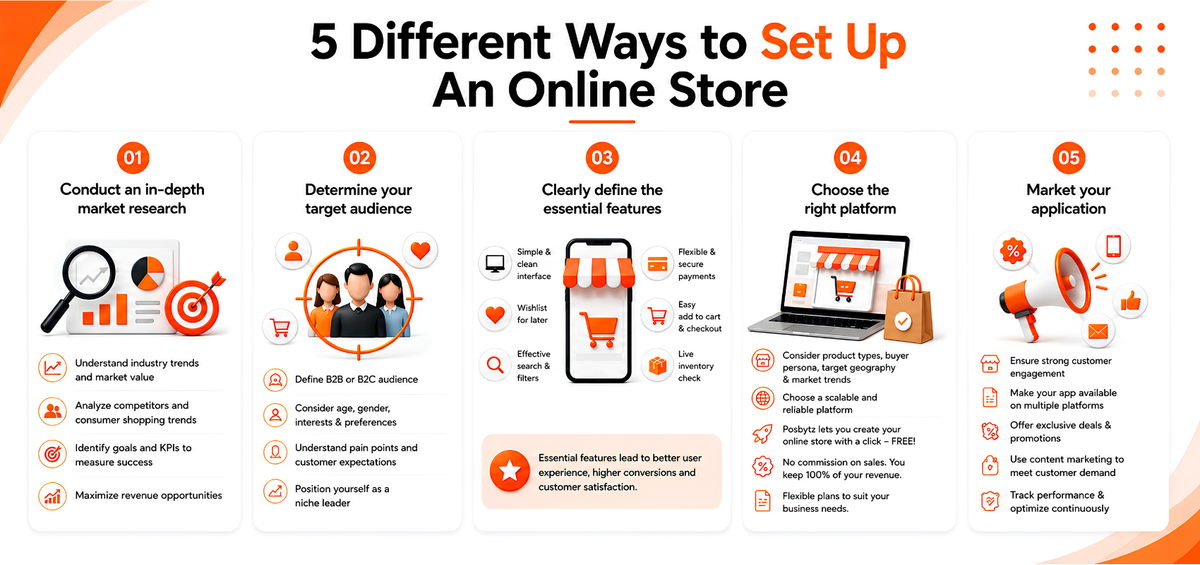
1. Conduct an in-depth market research
Before developing an eCommerce store, it is vital to understand the current industry trends and the market value of each industry. You should conduct a competitor analysis to see how you stand in the digital space. You also need to understand consumer shopping trends to stay ahead of your competitors.
For example: The pandemic has encouraged users to prefer eco-friendly products and choose companies that embrace sustainability as a strategy.
Another important factor to consider while conducting your market research is to identify your goals and what KPIs to consider to measure your success. Identifying the KPIs will help you in the development process and also help you create innovative conversion strategies. Thus, you need to develop an eCommerce store that maximizes your revenue opportunities.
2. Determine your target audience
The next step after your competitor analysis is to map out who your audience is. B2B customers desire a different experience as compared to B2C customers. You need to factor in age, gender, interests while defining your marketing strategy. Finding answers to these questions will help you solve their pain points and showcase you as a niche leader in the industry.
3. Clearly define the essential features.
While developing your shopping application, you need to include a few essential features that are a must-have for your eCommerce application. These include-
Simple and clean interface –
Your users should find the layout uncluttered and straightforward to navigate. Having a clear homepage helps your users update the latest promotions and plan out their purchases immediately.
Ability to create a wishlist for your products-
During the early stages of developing your online store, you need to perceive your customers’ thoughts. Most customers use their time to scroll through the shopping applications when they are bored. They may not intend or be in a position to make the purchase immediately. Thus, it is good to provide the option of a wishlist to the shoppers so that they can come back later and decide without having to browse to search for the product they had liked previously.
Millennial-focused retailers like Forever 21 have noticed a huge success after the provision of this option as most of their customers may require parental permission before they can make the purchase.
Effective Search Engine-
Most shoppers are now increasingly aware of what they would like to purchase. Thus, it is important to provide them with the option of directly visiting the product they want rather than making them browse through the whole product catalog. A convenient filtering and sorting option would mean faster checkouts and better sales for the business.
Flexible and secure payment options-
You must integrate different payment options to make the checkout process seamless for the customer. The pandemic has led customers to use different modes of payment according to their convenience. Customers also need to feel that the transaction gateway is secure and fast for them to continue to make purchases in the future.
Convenient Checkout/Add cart feature-
Your customer should not face any hassle while adding the product to the cart or checking out, as this is the final step in the buyer’s journey. Providing too many forms during the checkout process may lead to a loss of potential sales.
Inventory check: Ensure live check of inventory. If the customer adds the products to the cart and is not available during payment, they are more than likely to switch brands.
4. Choose the right platform
There are few factors to consider while choosing the right eCommerce platform, such as-
- Types of products to be sold
- The buyer persona,
- Your target geography,
- The current market trends.
Posbytz’s platform allows you to create a powerful online shopping experience for your customer. You can create your online store with a click of a button, and what’s more, it is free!
Posbytz ensures that no commission is collected on the sales of the products. Thus, the entire revenue the business generates can be solely collected by the owner. We offer a variety of plans that are suited for your business requirements.
5. Market your application
You need to ensure that there is good customer engagement in your business. Marketing your application is even more important than building a stunning eCommerce application. You need to make sure your application is available and easy to download on different platforms. You can provide better prices for mobile users, offer promotional discounts for credit card users, and work on content marketing strategies that are sensitive to the customer’s demand.
Conclusion
Proper techniques are essential when it comes to building an exceptional eCommerce store. The online business world is changing rapidly. As a business, if you do not have the technical expertise to build a simple online store, you may get hidden despite having a fantastic product to offer.
PosBytz ensures that you can create a powerful digital footprint thanks to our built-in analytic tools.
Frequently Asked Questions
What are the essential steps to build an eCommerce store?
The core steps are researching your market, defining your target audience, choosing an eCommerce platform, building key features like search, payments, and checkout, setting up shipping and security, testing thoroughly, and marketing the store after launch.
How much does it cost to set up an online store?
Costs vary based on platform choice, but typically include domain registration, hosting or platform subscription fees, payment processing fees, and marketing spend. Hosted platforms with free or low-cost plans, such as PosBytz's free online store, can significantly reduce upfront costs compared to custom-built sites.
Do I need coding skills to build an online store?
Not necessarily. Most modern hosted eCommerce platforms use drag-and-drop builders and pre-designed templates, so you can launch a functional store without writing code. Custom development is only needed if you want highly specific design or functionality beyond what a platform offers out of the box.
How is an eCommerce store different from selling on a marketplace?
An eCommerce store is your own branded website where you control design, customer data, and pricing, while a marketplace listing (such as on Amazon or a food delivery aggregator) puts your products alongside competitors on a platform you don't own. Many businesses use both: a marketplace for discovery and reach, and their own store for building direct customer relationships and avoiding per-order commissions.
Can I manage online orders and in-store sales from the same system?
Yes. Platforms that connect your online store to your point-of-sale system keep inventory, pricing, and order data in sync across both channels, which prevents overselling and reduces manual reconciliation work.
Related Resources
About the author

Saravana Damodaram
Co-Founder & CEO, PosBytz
Saravana Damodaram is the Co-Founder & CEO of PosBytz, a cloud-based POS-ERP platform built for F&B and retail businesses since 2018. He focuses on unified commerce, inventory, and multi-location operations, and has helped over 5,000 merchants across 25+ countries move off fragmented, disconnected tools and run their entire operation, billing, inventory, kitchen, and accounting on one platform.



