Best POS Systems to Integrate with WooCommerce in 2026
Looking for Best POS Systems to Integrate in WooCommerce? PosBytz reviewed and listde the best ones in the online.



If you run a retail business on WooCommerce, a WooCommerce POS integration lets you sell in-store and online from one system, with orders, stock, and customer data staying in sync. Out of the world's 8 billion people, an estimated 2.14 billion shop online, and more retailers are running physical counters alongside their WooCommerce store to capture both audiences.
Open-source platforms like WooCommerce and Shopify have made it easier to launch and manage an online store. But once you're selling both online and in person, you need one of the best e-commerce solutions paired with a reliable WooCommerce point of sale system, so stock levels, pricing, and orders don't have to be updated twice.
Before choosing a provider, it helps to know what to look for in a WooCommerce POS integration and how the top plugins compare. This article covers five of the best WooCommerce POS plugins on the market, along with their pros and cons, so you can match a plugin to how your retail business actually operates.
Why Retail Businesses Need a WooCommerce POS Integration
A retail POS for WooCommerce connects your physical checkout counter to your online store's backend. Instead of manually updating stock counts after every in-store sale, the POS pushes updates to WooCommerce automatically, and vice versa.
This matters most for:
- Real-time inventory sync: stock levels update across your website and store the moment an item sells, so you don't oversell or run out unexpectedly.
- Unified order management: view and process orders from your counter, website, and any connected retail channels in one place.
- Consistent pricing: price or promotion changes made once apply everywhere, instead of being edited separately in two systems.
- Centralized reporting: see combined sales performance across online and offline channels without reconciling two sets of numbers.
How to Choose the Best WooCommerce POS Plugin
Not every plugin fits every retail setup. Before you commit, check a plugin against these criteria:
- Offline mode: can staff keep billing during an internet outage, with sales syncing back once you're reconnected?
- Real-time inventory sync: does stock update immediately across channels, or on a delay?
- Payment support: does it support the card, UPI, wallet, and cash options your customers actually use?
- Device compatibility: does it work on the hardware you already own, such as Android tablets, iPads, or desktop terminals?
- Multi-store support: if you operate more than one location, can the plugin manage them from a single dashboard?
- Setup and pricing: how much technical work does integration require, and does the pricing model fit your transaction volume?
5 Best POS Systems to Integrate with WooCommerce
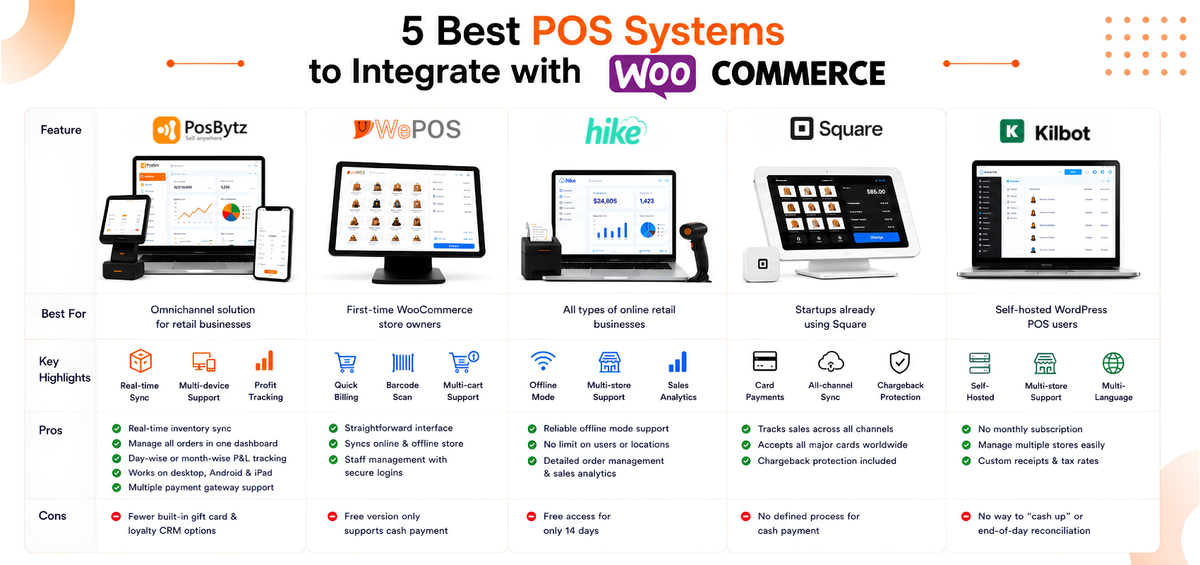
1. PosBytz: Best Omnichannel Solution for Retail Businesses
PosBytz is a cloud-based POS for WooCommerce built to run in-store and online sales from a single platform. Inventory, orders, and customer data live in one dashboard, so managing stock and reviewing performance takes a few clicks rather than a manual reconciliation.
Once connected, PosBytz can sync WooCommerce with POS items and push sales transactions back to WooCommerce automatically, without manual data entry. You can review the full feature set on the retail POS features page.
Reporting is one of the stronger parts of the platform for measuring performance across channels. PosBytz also works across devices, including Android POS, iPad POS, and desktop setups, so your WooCommerce point of sale runs on whatever hardware your store already has.
Pros:
- Real-time inventory sync across in-store and online channels
- Manage orders across all retail channels from one dashboard
- Day-wise or month-wise profit and loss tracking
- Works across desktop, Android, and iPad devices
- Accepts multiple payment methods through integrated payment gateways
Cons:
- Fewer built-in gift card and loyalty CRM options compared to specialist CRM tools
2. WePOS: Easiest Option for First-Time WooCommerce Store Owners
WePOS suits retailers who are new to running a physical counter alongside a WooCommerce store and want a straightforward interface. It manages the physical shop and online store together without a steep setup curve.
Sales staff can select product variations, process orders quickly, scan barcodes and QR codes, and manage multiple carts using a tab-based layout.
Pros:
- Straightforward interface that works across devices
- Syncs your online and offline retail store
- Staff management with secure cashier logins
Cons:
- The free version only supports cash payment.
3. Hike POS: Robust Solution for All Types of Online Retail Businesses
Hike POS is a standalone multi-store WooCommerce POS built for retailers running more than one location. It's cloud-based and pairs an intuitive customer database with a full billing system.
It syncs inventory, orders, and customer profiles across locations, and one of its most useful WooCommerce POS integration features is offline mode, so billing continues even when the internet drops.
Pros:
- Reliable offline mode support
- No limit on the number of users or store locations
- Detailed order management and sales analytics
Cons:
- Free access for only 14 days.
4. WooCommerce Square: Good Fit for Startups Already Using Square
Square POS is another cloud-based POS for WooCommerce, built for retailers who already process payments through Square. It lets you sync WooCommerce with POS data across your Square account and web store without extra manual work.
Pros:
- Tracks sales across all retail channels on one platform
Accepts all major cards worldwide
Chargeback protection built into the WooCommerce POS integration
Cons:
- No defined process for cash payment.
5. WooCommerce POS by Kilbot: Best Self-Hosted WordPress POS Plugin
WooCommerce POS by Kilbot is a self-hosted plugin that runs directly on your store's existing WordPress database. Because it doesn't depend on a separate cloud service, real-time inventory sync stays active without an added monthly subscription fee.
Pros:
- Worldwide language support and browser compatibility.
- Manage multiple stores with seamless integration.
- Easy to set custom receipts and tax rates.
Cons:
- No way to “cash up” or end-of-day reconciliation.
Optimize Your WooCommerce Sales with PosBytz
Sync your online and offline stores from one dashboard with real-time inventory, order, and payment visibility.
Frequently Asked Questions
Can I sync my retail shop inventory with WooCommerce in real time?
Yes. With the right WooCommerce POS integration, stock levels update automatically across your physical store and your WooCommerce website, so you get real-time inventory sync without manual updates.
Does a WooCommerce POS integration work if my internet goes down?
It depends on the plugin. Solutions like PosBytz and Hike POS support offline billing, letting you keep processing sales during an outage, with data syncing back to WooCommerce once you're reconnected.
Can I manage multiple retail store locations with one WooCommerce POS plugin?
Several of the plugins above, including PosBytz and Hike POS, support multi-store management from a single dashboard, so you can view inventory and sales across all locations without switching systems.
What should I check before choosing a WooCommerce POS plugin?
Look at offline support, how quickly inventory syncs, which payment methods it accepts, whether it works with your existing hardware, and whether the pricing model fits your sales volume.
Is a cloud-based POS better than a self-hosted one for WooCommerce?
A cloud-based POS, such as PosBytz or Hike POS, usually offers easier updates and remote access to reports. A self-hosted plugin, such as WooCommerce POS by Kilbot, can reduce ongoing subscription costs but places more of the maintenance work on you.
Conclusion
Choosing a WooCommerce POS integration comes down to matching a plugin to how your retail business actually runs, whether that's offline reliability, multi-store management, or real-time inventory sync. Once you've picked a plugin, a reliable omnichannel provider can help you set up your store to sell across social media, marketplaces like Amazon and Flipkart, and direct-to-consumer channels.
Related Resources
WooCommerce POS Integration Guide
A complete walkthrough on connecting your WooCommerce webstore to a physical POS for unified inventory.
WhatsApp eCommerce & POS Sync
Learn how to leverage WhatsApp as a sales channel alongside your WooCommerce store.
Understanding Retail POS Reports
Master the data from your integrated store to drive better business decisions.
About the author

The PosBytz Marketing Team
Editorial Team, PosBytz
The PosBytz Marketing Team shares practical insights on running smarter restaurants and retail stores from POS best practices to inventory management, online ordering, and customer loyalty strategies.



