How to Do Chopda Pujan on a Laptop, Tablet or POS: A Modern Trader's Guide
A step-by-step guide to Chopda Pujan on your laptop, tablet, or POS. Prepare your device safely, perform the puja, and start Samvat 2083 with digital books.



Quick Answer: How Do You Do Chopda Pujan on a Laptop?
To do Chopda Pujan on a laptop, tablet, or POS:
- Close the old year in your software and back up your data.
- Clean the device and shut it down, or close it, before the puja.
- Place it on a red cloth beside idols or pictures of Lakshmi, Ganesha, Saraswati, and Kuber.
- Put a swastik and "Shubh Labh" sticker on the lid or a paper card beside the device, instead of applying kumkum or water directly to the screen or keyboard.
- Perform the usual Chopda Pujan vidhi: Ganesh puja, Lakshmi and Kuber puja, and Sharda puja on the device and pens.
- Write a symbolic first entry, such as "Shree Ganeshay Namah", in a new-year note or ledger in your software.
- Make your first new-year bill on Bestu Varas or Labh Pancham.
Chopda Pujan 2026 falls on Sunday, 8 November. For dates, muhurats, and the full traditional vidhi, see our Chopda Pujan 2026 guide.
Why Traders Now Do Chopda Pujan on a Laptop or POS
For generations, the chopda was a red cloth-bound ledger. It held every sale, every purchase, every rupee of credit, and every supplier payment. Worshipping it on Diwali meant honouring the record of the business itself.
Today that record lives somewhere else. Your GST bills come from a billing screen. Your stock updates on a tablet. Your customer credit sits in a CRM. Your sales reports open on your phone.
So many business owners now place the device that holds their accounts in front of the deities: the shop laptop, the billing tablet, the POS terminal at the counter. They draw a swastik and "Shubh Labh" on the lid, and perform Chopda Pujan exactly as their families always have.
Is It Acceptable to Do Chopda Pujan on a Laptop?
Families and communities follow different customs, and there is no single rule. Many priests and families see the laptop as today's chopda, because what is being honoured is the business's accounts, not the paper they are written on.
Some families combine both. They keep a small physical chopda for the ritual first entry and place the laptop or POS alongside it. If you are unsure, ask your family priest or elders and follow your tradition.
Before the Puja: Prepare Your Digital Chopda
A paper chopda only needed a fresh page. A digital chopda needs a little more preparation, both for your accounts and for the device itself.
Get Your Accounts Ready
Do this in the days before Diwali so the new year starts clean:
- Reconcile cash with the sales recorded in your software
- Record or collect customer credit (udhaar) so outstanding balances carry forward correctly
- Settle or confirm supplier dues
- Do a stock count and correct any differences in the system
- Save or export year-end reports for the old Samvat year: sales, purchases, tax, and stock
- Back up your data, or confirm your cloud software backs it up automatically
- Install pending software updates so nothing interrupts billing during the festive rush
Prepare the Device Safely
Electronics and puja materials don't always mix well. A few simple precautions keep both your device and your puja safe:
- Don't apply water, gangajal, milk, or panchamrit directly to the device. Sprinkle near it or on the cloth instead.
- Avoid kumkum, haldi, or chandan on the screen, keyboard, ports, or vents. Use a swastik and "Shubh Labh" sticker on the lid, or draw them on a paper card placed on top.
- Keep diyas, incense, and camphor away from the device, especially the vents and the charger.
- Shut down or close the laptop during the puja, or lock the tablet screen, so nothing is tapped by accident.
- Charge the device beforehand so you don't need a cable running across the altar.
- Clean the device with a soft, dry cloth before placing it on the red cloth.
Step-by-Step: How to Do Chopda Pujan on a Laptop, Tablet, or POS
The vidhi below follows the traditional sequence, adapted for a digital chopda. Where your family's practice differs, follow your family's practice.
Step 1: Set Up the Altar
Place a chowki facing east or north and cover it with a red or yellow cloth. Arrange idols or pictures of Goddess Lakshmi, Lord Ganesha, Goddess Saraswati, and Lord Kuber. Place a kalash with water, mango leaves, and a coconut.
Step 2: Place Your Digital Chopda
Put the laptop, tablet, or POS on a separate clean red cloth in front of or beside the deities. Place new pens, a stylus if you use one, the cash box or drawer keys, and a few coins next to it.
If your POS is fixed at the counter, perform the puja at the counter instead. Decorate the counter with flowers and a small rangoli, place the deity pictures beside the terminal, and include the cash drawer and receipt printer in the puja.
Step 3: Mark the Device With Auspicious Symbols
Place the swastik and "Shubh Labh" sticker on the lid, or the paper card on top of the device. Many families also write "Shree" on the card, along with the new year, Vikram Samvat 2083.
Step 4: Ganesh Puja
Light the diya at a safe distance. Offer flowers, akshat, kumkum, and sweets to Lord Ganesha and pray for a year free of obstacles.
Step 5: Lakshmi and Kuber Puja
Worship Goddess Lakshmi with flowers, coins, and sweets, and recite the Lakshmi mantras or Sri Suktam if that is your practice. Pray to Lord Kuber for the protection of the business's wealth.
Step 6: Sharda Puja on the Device and Pens
Worship Goddess Saraswati. Offer akshat and flowers on the red cloth around the device. Apply kumkum to the sticker or paper card rather than to the device itself, and on the pens.
Step 7: Write the First Digital Entry
After the puja, open the device and make a symbolic first entry for the new year. You could:
- Create a note titled "Shree Ganeshay Namah – Samvat 2083"
- Write "Shubh Labh" and the date in the description of a symbolic opening entry
- Add a festive greeting to your receipt footer for the new year
Many traders then keep the business closed and make the first real sale (bohni) on Bestu Varas or Labh Pancham.
Step 8: Aarti, Prasad, and Staff Blessings
Perform aarti with family and staff. Distribute prasad, sweets, and Diwali bonuses or gifts.
Traditional Chopda vs Digital Chopda: The Ritual Mapped
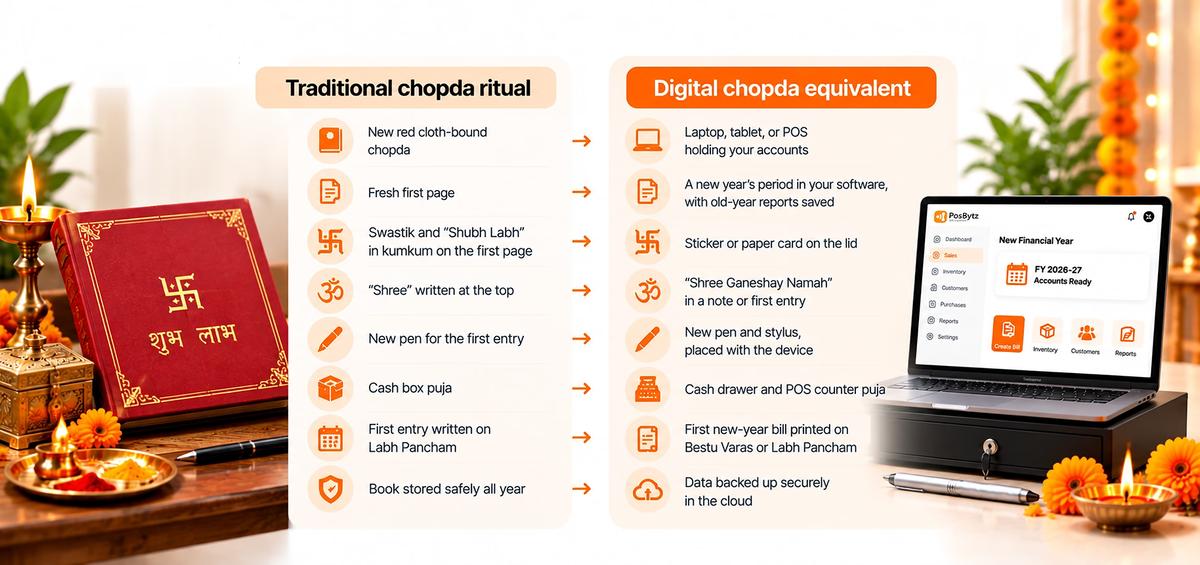
- The new red cloth-bound chopda becomes the laptop, tablet, or POS holding your accounts.
- The fresh first page becomes a new year’s period in your software, with old-year reports saved.
- The swastik and “Shubh Labh” in kumkum on the first page become a sticker or paper card on the lid.
- “Shree” written at the top becomes “Shree Ganeshay Namah” in a note or first entry.
- The new pen for the first entry becomes a new pen and stylus, placed with the device.
- The cash box puja becomes a cash drawer and POS counter puja.
- The first entry written on Labh Pancham becomes the first new-year bill, printed on Bestu Varas or Labh Pancham.
- The book stored safely all year becomes data backed up securely in the cloud.
Chopda Pujan for Shops With Multiple Outlets or Staff
If you run more than one store, branch, or restaurant, Chopda Pujan can bring the whole team together.
- Puja at each outlet. Many owners ask each branch manager to perform Chopda Pujan at the counter POS during the same muhurat.
- Puja at the head office. The owner performs the main puja on the laptop that holds consolidated accounts.
- Watch the first bills come in. With cloud POS software, owners can see the first new-year sale at every outlet in real time from their phone.
- Thank your staff. The puja is also a good moment to thank cashiers and managers who handled the Diwali rush.
After the Puja: Start the New Year Right in Your Software
Once the puja is done, use the first days of the new year to set up your digital chopda properly:
- Check opening balances for cash, bank, customers, and suppliers.
- Carry forward customer credit and send polite reminders for old dues.
- Update prices and the product list for the new season.
- Set up New Year offers or loyalty rewards for repeat customers.
- Review last year's reports: best-selling items, slow movers, and margins.
- Set staff logins and permissions so every bill is recorded against the right person.
Common Mistakes to Avoid
- Applying water or kumkum directly on the screen or keyboard. Use stickers or a paper card instead.
- Placing the diya too close to the device or its charger.
- Doing the puja before closing the old year. Reconcile and back up first.
- Starting the new year in software with wrong opening balances. Check cash, credit, and stock carefully.
- Forgetting the POS at the counter when the laptop is worshipped at home. If billing happens at the counter, that is where your chopda really lives.
Make PosBytz Your Digital Chopda for Samvat 2083
PosBytz is a cloud-based POS and ERP for retail stores and restaurants. It runs on Android, iPad, Windows, and web browsers, so the laptop, tablet, or counter POS you place on the red cloth this Diwali can hold your entire business.
What your digital chopda can include:
- GST-compliant billing for fast checkout during the festive rush
- Inventory that updates as you sell and buy
- Accounting for sales, purchases, and expenses, with Zoho Books and QuickBooks integrations
- CRM and loyalty to keep customer records and reward repeat buyers
- HR and payroll for staff, attendance, and salaries
- Multi-outlet control with one dashboard for every branch
- Real-time reports you can check from your phone during family visits
- VAT and e-invoicing support for Indian business owners in the UAE, Saudi Arabia, Qatar, Bahrain, and Oman
It works for retail stores, grocery stores, supermarkets, boutiques, restaurants, cafés, and sweet shops.
Set it up before Diwali, place it before Lakshmi on 8 November, and print your first new-year bill on Bestu Varas.
Start your 14-day free trial, check pricing, or contact the PosBytz team for a demo.
Frequently Asked Questions About Chopda Pujan on a Laptop
Can Chopda Pujan be done on a laptop?
Yes. Many business owners now perform Chopda Pujan on the laptop, tablet, or POS that holds their accounts, since that is today's chopda. Customs vary, so follow your family's tradition or ask your priest.
How do I put a swastik on my laptop for Chopda Pujan?
Use a swastik and "Shubh Labh" sticker on the lid, or draw them in kumkum on a paper card placed on top of the device. Avoid applying kumkum directly to the screen, keyboard, or vents.
Should the laptop be on or off during Chopda Pujan?
It is safest to shut it down or close the lid during the puja, and to keep it away from diyas and liquids. Open it after the puja to make a symbolic first entry.
What should I write as the first entry in a digital chopda?
Many traders write "Shree Ganeshay Namah", "Shubh Labh", and the new Samvat year in a note or a symbolic opening entry. The first real sale is often made on Bestu Varas or Labh Pancham.
Can I do Chopda Pujan on a POS machine?
Yes. If billing happens at the counter, perform the puja there. Decorate the counter, place the deity pictures beside the POS terminal, and include the cash drawer in the puja.
Can I do Chopda Pujan on a mobile phone?
If your business runs on a phone or tablet, you can include it in the puja the same way. Use a sticker or paper card for the auspicious symbols, and keep the device away from liquids and flames.
What should I do in my software before Chopda Pujan?
Reconcile cash, record customer credit, settle supplier dues, count stock, save year-end reports, and back up your data, so the new year starts with clean books.
When is Chopda Pujan in 2026?
Chopda Pujan 2026 is on Sunday, 8 November 2026. See our Chopda Pujan 2026 guide for muhurats and the full vidhi.
Can a business with many outlets do one Chopda Pujan?
Many owners perform the main puja on the head-office laptop and ask each branch to do a puja at its counter POS. With cloud software, the owner can see the first new-year bills from every outlet in real time.
Is it okay to keep both a paper chopda and a laptop in the puja?
Yes. Many families keep a small paper chopda for the ritual first entry and place the laptop or POS alongside it.
Final Thoughts
The chopda has changed form, but its meaning hasn't. Whether your accounts live in a red cloth-bound ledger or on a POS at the counter, Chopda Pujan is a moment to close the old year with gratitude and begin the new one with clean books and good intentions.
Prepare your device carefully, keep the puja safe, and make sure your digital chopda is set up to serve you well through Samvat 2083.
Shubh Deepavali and Saal Mubarak from the PosBytz team.
About the author

Saravana Damodaram
Co-Founder & CEO, PosBytz
Saravana Damodaram is the Co-Founder & CEO of PosBytz, a cloud-based POS-ERP platform built for F&B and retail businesses since 2018. He focuses on unified commerce, inventory, and multi-location operations, and has helped over 5,000 merchants across 25+ countries move off fragmented, disconnected tools and run their entire operation, billing, inventory, kitchen, and accounting on one platform.