Different Types of POS Systems for Restaurants
Are you curious to learn about Different Types of POS Systems for Restaurants? Then dive into this article and learn everything about it.


Introduction
The global restaurant POS market has grown steadily over the past several years, and industry research from GM Insights points to continued expansion in the years ahead as more restaurants move away from manual billing.
That growth is not accidental. Running a restaurant today means juggling dine-in orders, takeaway, delivery, and online ordering, often all at once. A POS system is what ties these moving parts together, and picking the right type of system for your restaurant can be the difference between smooth service and a chaotic floor.
Modern restaurants rarely rely on a single POS type. It is common to find one restaurant using a countertop terminal at the billing counter, a tablet for tableside ordering, and a branded app for online orders, all working together.
This guide breaks down the main restaurant POS system types, their pros and cons, and how to decide which one fits your business.
What Is a Restaurant POS System?
A restaurant POS (Point of Sale) system is the software and hardware combination that restaurants use to take orders, process payments, and track sales. Beyond billing, most modern systems also handle inventory, send orders to the kitchen, and generate sales reports, replacing the need for separate manual processes at each step.
Types of POS Systems for Restaurants
Here are the main types of POS systems restaurants use today, along with where each one works best.
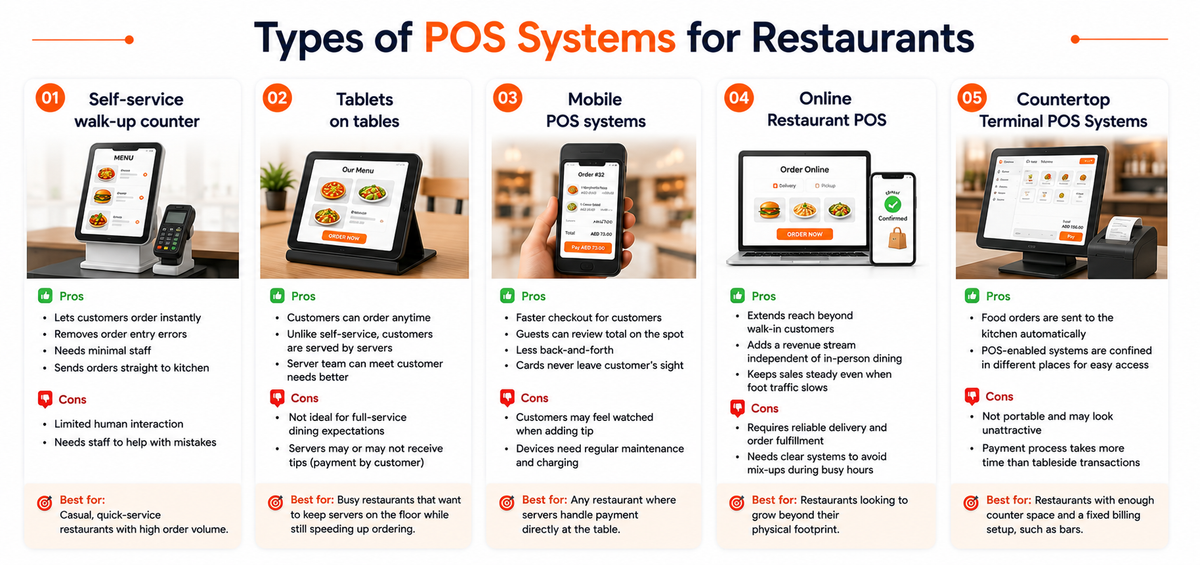
Self-service walk-up counter
A self-service setup lets customers order, pay, and sometimes even collect their own food without a server involved. Orders are placed on countertop terminals, tablets, or smartphones running the restaurant's POS software, and customers typically pay with EMV chip cards, online payments, or digital wallets.
Pros:
- Lets customers order instantly, cutting down wait times
- Removes server-side order entry errors
- Needs minimal staff, lowering labor costs
- Sends orders straight to the kitchen without a middleman
Cons:
- Limited human interaction, which some customers may not prefer
- Still needs a staff member nearby to help with mistaken orders
Best for: Casual, quick-service restaurants with high order volume.
Tablets on tables
Here, customers order directly from a tablet running the restaurant's POS system, either fixed at the table or passed around by staff. This is a common setup for a restaurant online ordering system, and it speeds up service by letting guests place and pay for orders without waiting on a server.
Pros:
- Customers can order food whenever they want
- Unlike self-service, customers are served by the servers
- The server team can work together to meet the need of the customers
Cons:
- This system doesn’t suit customers who expect a full-service dining experience.
- Servers may or may not receive customer tips because payment is made directly by the customer.
Best for: Busy restaurants that want to keep servers on the floor while still speeding up ordering.
Mobile POS systems
Mobile POS is one of the most widely adopted types of POS systems for restaurants today. It lets staff take orders and process payments tableside using a smartphone, tablet, or handheld device, cutting out the back-and-forth of dropping a check and returning for payment.
Most mobile POS systems, including Android POS and iPad POS setups, also support tip adjustment at the table.
Pros:
- Faster checkout for customers
- Guests can review and confirm their total on the spot
- Less back-and-forth between server and customer
- Customers feel more secure since cards never leave their sight
Cons:
- Customers may feel rushed or watched when adding a tip
- Handheld devices need regular maintenance and charging
Best for: Any restaurant where servers handle payment directly at the table.
Online Restaurant POS
Online ordering has become a core part of restaurant revenue, not just an add-on. A restaurant using an online POS accepts and processes orders from customers who want food delivered or ready for pickup, without a physical visit.
This type is especially useful for small chains, since it helps track orders and transactions consistently across multiple locations.
Pros:
- Extends reach beyond walk-in customers
- Adds a revenue stream independent of in-person dining
- Keeps sales steady even when foot traffic slows
Cons:
- Requires a reliable process for delivery and order fulfillment
- Needs clear systems in place to avoid mix-ups during busy hours
Best for: Restaurants looking to grow beyond their physical footprint.
Countertop Terminal POS Systems
This is the traditional, wired POS setup, usually stationed at a fixed billing counter. Staff use it to process payments, send orders to the kitchen, and print receipts or checks.
Pros:
- Food orders are sent to the kitchen on a computer system automatically.
- POS-enabled systems are confined in different places, which enables them to be easily accessible.
Cons:
- Countertop terminals are not portable and may look unattractive in restaurant settings.
- The payment process takes much more time than tableside transactions.
Best for: Restaurants with enough counter space and a fixed billing setup, such as bars using bar and restaurant software.
How to Choose the Right POS Type for Your Restaurant
There is no single "best" POS type. The right choice depends on your service style:
- Match it to your service model. Quick-service and self-service formats benefit from counter or kiosk-style ordering, while full-service restaurants usually need mobile or tableside options.
- Account for order channels. If you take delivery, takeaway, or online orders alongside dine-in, look for a POS that consolidates all channels on one screen instead of managing them separately.
- Think about staff and space. Countertop terminals need dedicated counter space; mobile and tablet POS work better in tighter or high-traffic floor plans.
- Check for offline reliability. Restaurants can't afford billing downtime during a power or internet outage, so offline support with automatic sync matters.
- Plan for growth. If you run, or plan to run, more than one outlet or brand, choose a system built for multi-location management from the start.
What Type of POS System Does PosBytz Support?
PosBytz is a cloud-based, device-agnostic POS, which means it fits nearly every model covered above, including self-service ordering, tableside tablets, mobile billing, and online ordering, all from one system. It works on Windows, Android, and iPad devices, functions offline with automatic sync, and lets restaurants take dine-in, takeaway, delivery, and online orders from a single screen.
The one category it does not apply to is the traditional wired countertop terminal, since PosBytz runs on standard tablets, phones, and computers rather than dedicated hardware terminals.
Frequently Asked Questions
What is the most common type of POS system used in restaurants?
Mobile and tablet-based POS systems are among the most widely used today, since they let staff take orders and payments directly at the table, reducing wait times without needing a fixed terminal.
Can a restaurant use more than one type of POS system at once?
Yes. Many restaurants combine POS types, for example, a countertop terminal at the billing desk alongside mobile POS for table service and an online ordering system for delivery, all connected through the same backend.
Is a cloud-based POS better than a traditional countertop POS?
A cloud-based POS generally offers more flexibility since it works across devices, supports multiple locations, and can be accessed remotely for reporting. Traditional countertop terminals are more fixed but can still suit restaurants with a stable, single-location setup.
Does a restaurant POS system work without internet access?
It depends on the system. Some cloud-based POS systems, including PosBytz, are built to work offline and automatically sync data once the connection is restored, so billing does not stop during an outage.
How do I decide which POS system type is right for my restaurant?
Start with your service style: quick-service restaurants usually do well with self-service or counter setups, while full-service restaurants benefit more from mobile or tableside POS. From there, factor in your order channels, floor space, and whether you plan to expand to multiple outlets.
Final Thoughts
Restaurants today rarely rely on a single way to take orders. Understanding the strengths of each POS type, from self-service counters to mobile and online ordering, makes it easier to build a setup that matches your service style instead of forcing your operations around the system.
If you are evaluating options, look for a POS that can flex across these formats rather than locking you into just one.
Related Resources
About the author

Saravana Damodaram
Co-Founder & CEO, PosBytz
Saravana Damodaram is the Co-Founder & CEO of PosBytz, a cloud-based POS-ERP platform built for F&B and retail businesses since 2018. He focuses on unified commerce, inventory, and multi-location operations, and has helped over 5,000 merchants across 25+ countries move off fragmented, disconnected tools and run their entire operation, billing, inventory, kitchen, and accounting on one platform.



