Cash Register vs POS Software: What's the Real Difference?
Cash Registers for small businesses compared to POS software for choosing the right option based on day to day operations and expansions


Introduction
In today’s fast-paced world, businesses are constantly looking for ways to improve their operations and streamline processes. One area that has seen significant advancements in recent years is the point-of-sale (POS) system. POS systems are used by businesses of all sizes to process sales transactions and manage inventory. However, there are still some businesses that rely on traditional cash registers. In this blog post, we will explore the differences between cash registers and POS software, and help you determine which option is best for your business.
What is a Cash Register?
A cash register is a mechanical or electronic device used to record and total transactions at checkout. It's a fixture in small retail stores, restaurants, and any business that primarily handles cash. Cash registers for small business are built to be simple: ring up a sale, calculate the total, print a receipt, and open the drawer. That's about the extent of what they do.
Because they're standalone machines, cash registers don't connect to your inventory, your accounting, or any other part of your business. Every register operates in isolation, which is fine for a single counter but becomes a real limitation once a business grows past one location or one till.
What is POS System?
A point of sale (POS) system is software that performs the same core job as a cash register, ringing up sales, but with a much wider set of capabilities layered on top. It typically runs on a computer, tablet, or mobile device and connects to hardware like barcode scanners, card readers, and receipt printers.
Beyond processing transactions, a POS system can manage inventory across locations, track sales in real time, and generate detailed performance reports. Many POS platforms also include CRM features, so you can hold onto customer purchase history and preferences instead of losing that data at the till. For a full breakdown of what modern POS software can do, see our guide on choosing the best POS software.
Differences Between Cash Registers POS and POS Software
Functionality
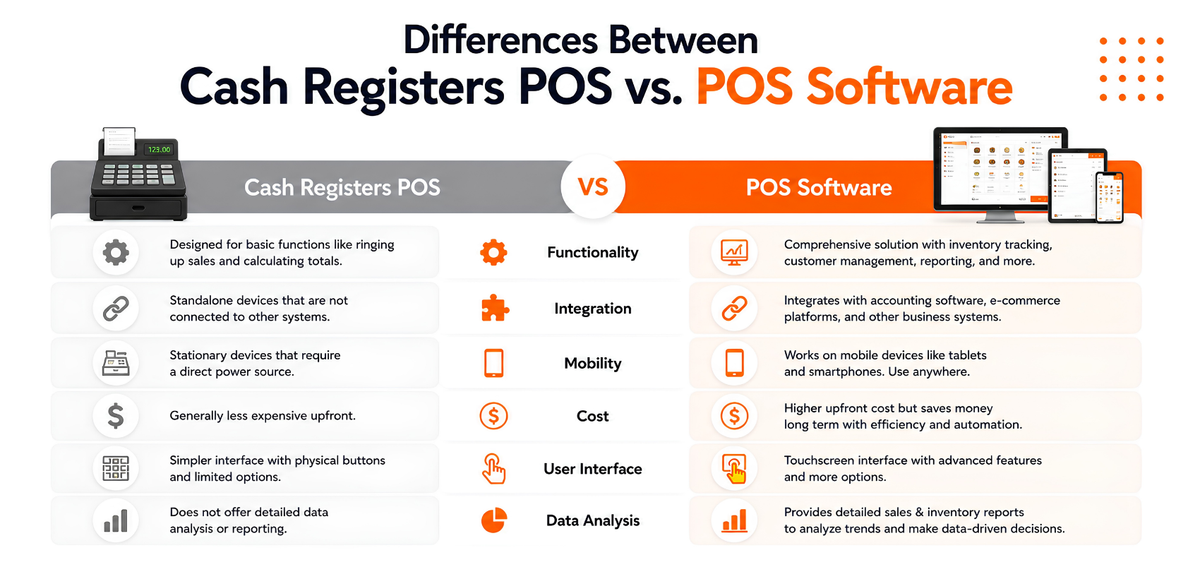
Cash register POS are designed to perform basic functions, such as ringing up sales and calculating totals. They are not equipped with advanced features such as inventory tracking or customer management. POS, on the other hand, is designed to be a comprehensive solution for managing sales and inventory. It includes features such as inventory tracking, customer management, and reporting.
Integration
Cash registers POS are typically standalone devices that are not connected to other systems. POS, on the other hand, can be integrated with other business systems such as accounting software and e-commerce platforms. This allows businesses to streamline their operations and improve efficiency.
Mobility
Cash register POS are typically stationary devices that require a direct power source. POS , on the other hand, can be used on mobile devices such as tablets and smartphones. This allows businesses to process sales transactions in a variety of locations, such as trade shows and pop-up shops.
Cost
Cash registers for small businesses are generally less expensive than POS machine. However, the exact cost depends on the features and capabilities of each system. POS can be more expensive upfront, but it can also save businesses money in the long run by streamlining operations and improving efficiency.
User Interface
Cash registers typically have a simpler interface with physical buttons and limited options. POS devices, on the other hand, offers a more complex user interface with touchscreen displays and more advanced functions. This can make it more difficult for some users to learn and use.
Data Analysis
Point of sale provides businesses with detailed sales and inventory reports, allowing them to analyze trends and make informed decisions. Cash registers do not offer this type of data analysis.
Which Option is Right for Your Business?
When it comes to choosing between a cash register and POS , there are several factors to consider.
Benefits of POS as Cash register Alternative
There are a lot of benefits of POS that make businesses choose them.
- POS are user friendly thus making it easier for employees to use it.
- POS are equipped to accept all sorts of payment like cash, credit and debit cards and so on.
- POS software have menu management, table management, employee management, cash management, can be used in all sorts of devices like ipad, mobiles, computer and is extremely user friendly.
PosBytz is one of the best cloud based Point of Sales software with complete solution to manage billing , inventory , sales , vendors , customers , Accounting, reports and dashboard.
Frequently Asked Questions (FAQs)
Why is a POS better than a cash register?
When it comes to managing a business, it is better to choose a POS System than a cash register machine as POS systems help you manage the entire business and not just tracking the transactions.
Why is a cash register POS also called a POS?
Point Of Sales or POS helps you deal with all things related to the sales that you carry out in your business. It helps you with things like recording transactions, managing the tables ,managing the employees, creating the menu, inventory management and so on.,,
How much does a POS system cost?
On average, a POS System costs anywhere between 250 to 2000 dollars depending upon the brand and the features you choose
What is the best cash register alternative?
A cloud based POS would be the best alternative to cloud based POS to manage inventory , real time sales reports, stocks , reports and many more
Can POS software be deployed in all types of Devices?
Yes mostly we can deploy in any Android POS , Windows POS and IPAD POS from mobile phones, Laptops, Tablets and many more
Can POS software be deployed for small businesses?
Yes POS software can be deployed for any small business from Cafe shop, QSR , retail shops, cloud kitchens etc..,
Conclusion
A cash register can still handle basic transactions for a very small, single-till business, but it stops there. A POS system takes on inventory, reporting, staff management, and customer data alongside billing, which is what most growing businesses actually need. If your operations are outgrowing what a register can track, a cloud based POS is the more practical long-term choice.
Looking to move beyond a cash register? Explore PosBytz's cloud POS software and see how billing, inventory, and reporting come together in one system.
About the author

Saravana Damodaram
Co-Founder & CEO, PosBytz
Saravana Damodaram is the Co-Founder & CEO of PosBytz, a cloud-based POS-ERP platform built for F&B and retail businesses since 2018. He focuses on unified commerce, inventory, and multi-location operations, and has helped over 5,000 merchants across 25+ countries move off fragmented, disconnected tools and run their entire operation, billing, inventory, kitchen, and accounting on one platform.



