Best QSR POS Systems in 2026: How to Choose the Right One
Discover the best Quick service restaurant POS to Speed up orders, reduce wait times, and boost revenue with PosBytz.



A quick service restaurant lives and dies by seconds. Every extra tap at the register, every order that goes to the wrong station, and every crash during a lunch rush shows up directly in your line length and your revenue. The right quick service restaurant POS fixes that: it speeds up order entry, routes tickets to the kitchen automatically, and keeps working even when the internet doesn't.
The wrong one does the opposite: slow screens, disconnected online orders, and reports you have to piece together manually. This guide compares the best QSR POS systems for 2026, walks through the features that actually matter for counter-service and drive-thru operations, and gives you a straightforward way to evaluate any system before you sign a contract.
What Is a QSR POS System?
A QSR POS system is point-of-sale software built for high-volume, fast-paced ordering: counter service, drive-thru, self-service kiosks, and mobile or online orders. Its job is to get an order from the customer to the kitchen and back as a finished item in the shortest possible time, with the fewest possible errors.
That's a different job from a full-service restaurant POS, which is built around table management, course timing, and split checks for guests who sit down for 45 minutes. A POS system for a QSR is judged on order speed, kitchen routing, and how well it holds up during a 90-second rush window, not on how well it handles a five-course tasting menu.
Key Features to Look for in a QSR POS System in 2026
The baseline features (billing, receipts, basic reporting) are table stakes now. What separates a POS built for quick service in 2026 from a repurposed retail checkout is how it handles speed, digital ordering, and the flood of channels a QSR now has to serve at once.
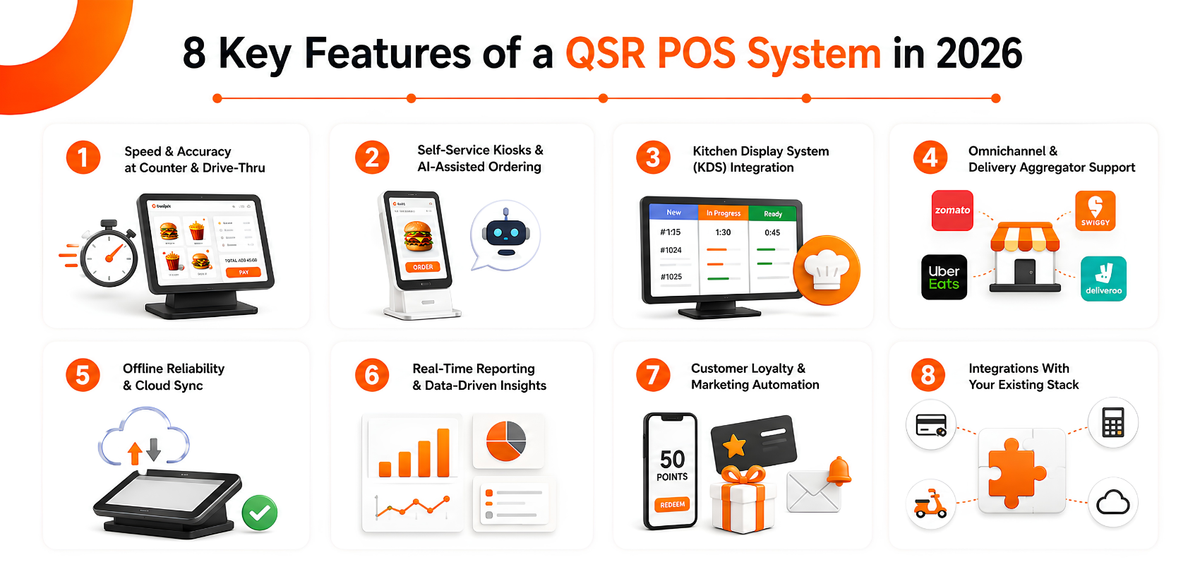
Speed and Accuracy at the Counter and Drive-Thru
Order entry needs to be a handful of taps, not a maze of menus. Look for a touchscreen interface designed for the order-taker's workflow, quick modifiers, and combo handling that doesn't slow the line down. When you demo a system, time it yourself: how long does it take from "next customer" to a printed kitchen ticket?
Self-Service Kiosks and AI-Assisted Ordering
Self-service kiosks have moved from a nice-to-have to standard equipment at most quick service chains, largely because they let customers build and review their own order without adding headcount at the counter. Voice-AI ordering at the drive-thru is following the same path: several major chains are piloting or rolling it out to cut order-taking time and keep the line moving during peak hours. Even if you're not deploying voice AI yet, choosing a POS with an open, kiosk-ready architecture means you won't have to switch platforms when you're ready to add it.
Kitchen Display System (KDS) Integration
A Kitchen Display System that's tied directly into the POS routes tickets by station or prep time, shows live order timers, and lets kitchen staff bump, recall, or rush an order without leaving their station. This is where most QSR bottlenecks actually get solved, not at the register, but between the register and the pass.
Omnichannel and Delivery Aggregator Support
Dine-in, takeaway, drive-thru, your own online ordering site, and aggregators like Swiggy, Zomato, Uber Eats, Talabat, and Deliveroo all need to land in the same order queue. A POS that syncs menu, pricing, and stock availability automatically across every channel prevents the classic QSR headache of selling an item online that's already out of stock in the kitchen.
Offline Reliability and Cloud Sync
QSRs can't afford downtime during a rush. A cloud POS that keeps billing running locally during an internet outage, and syncs everything automatically once the connection returns, protects you from the single worst thing that can happen at the counter: a system that stops taking orders.
Real-Time Reporting and Data-Driven Insights
Live dashboards, item-level profitability, and waste-tracking reports let you see which combos are moving, which items are dragging down your food cost, and which daypart is underperforming, without waiting for an end-of-day export. This is also where staffing and menu decisions get sharper over time, as more chains lean on real-time data to plan labor and prep around actual demand.
Customer Loyalty and Marketing Automation
Points, stamps, tier-based rewards, and automated campaigns (birthday offers, win-back messages) turn one-time drive-thru visits into repeat customers. A CRM built into the POS means loyalty data updates automatically with every order, instead of living in a separate system nobody checks.
Integrations With Your Existing Restaurant Stack
Payment terminals, accounting, delivery platforms, and third-party marketplaces all need to talk to your POS without manual reconciliation. The fewer disconnected tools your team has to log into, the fewer places an order can get lost.
Best QSR POS Systems in 2026, Compared
Here's how the platforms most commonly shortlisted for quick service restaurants stack up.
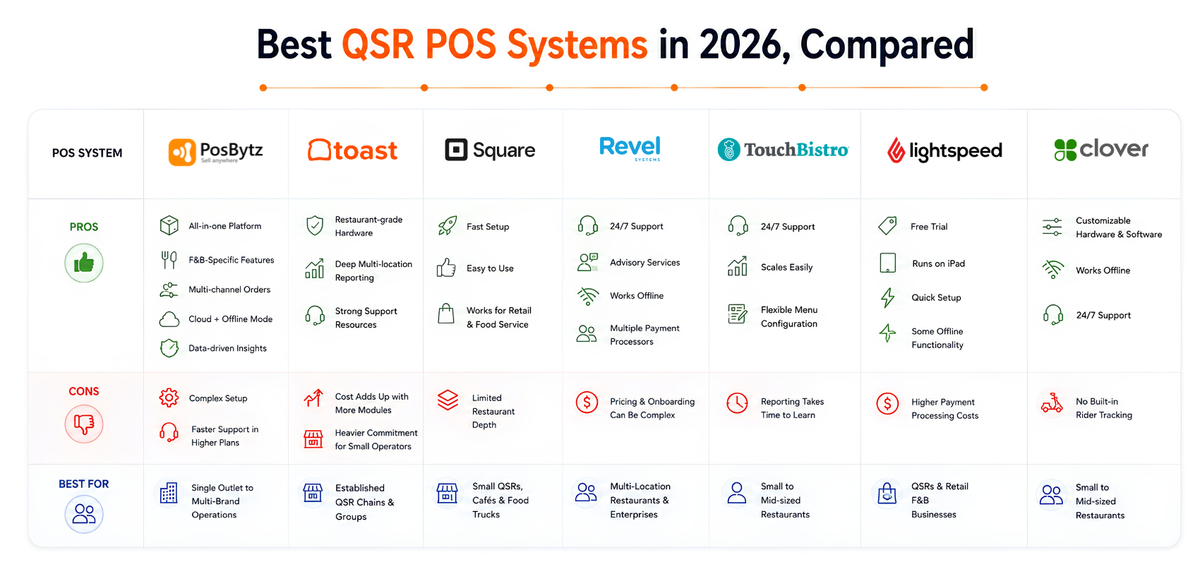
1. PosBytz
PosBytz is a cloud-based POS-ERP platform built to handle the transaction bursts that quick service restaurants see during peak hours, whether that's a lunch rush at a single counter or simultaneous orders across dozens of outlets.
Its order-entry flow is built around the cashier-customer exchange that defines quick service, which shortens training time for new hires and keeps order accuracy high. It runs on Windows POS, Android POS, and iPad POS, so you're not locked into specific hardware.
Pros:
- All-in-one platform: combines POS, inventory, accounting, CRM, online ordering, and delivery aggregator integrations, reducing the number of separate tools you have to manage.
- F&B-specific features: ingredient-level inventory, recipe costing, and a kitchen display system built for restaurants, café POS setups, and cloud kitchens.
- Multi-channel by default: dine-in, takeaway, delivery, and aggregator orders (Talabat, Careem, Uber Eats, Zomato, Deliveroo, and others) land in one unified order view.
- Cloud-based with offline mode: real-time updates when connected, uninterrupted billing during outages.
- Scales with you: works for a single counter or a multi-outlet, multi-brand operation from one dashboard.
- Data-driven insights: live dashboards, waste-tracking reports, and item-level profitability to help control food cost and spot demand patterns.
Cons:
- The breadth of features can feel like a lot to configure for a single-location operator without dedicated staff to manage setup.
- Faster support response is typically tied to higher-tier plans.
2. Toast
Toast is one of the most widely deployed restaurant-specific POS platforms in the US, with hardware and software built specifically for food service rather than adapted from general retail.
Pros:
- Restaurant-grade hardware built to survive a busy kitchen and counter environment.
- Deep multi-location reporting and a large marketplace of add-on integrations.
- Strong day-to-day support resources given its scale.
Cons:
- Costs can climb quickly once you add the modules a growing QSR actually needs.
- Contract terms and hardware costs can be a heavier commitment for a single-location operator just getting started.
Compare it directly on our Toast alternatives page.
3. Square
Square is a common starting point for independent QSRs, food trucks, and cafés that want to get up and running fast without a lengthy setup process.
Pros:
- Fast to set up, with integrated payment processing out of the box.
- Familiar, easy-to-use interface for new staff.
- Works across both retail and food service, which suits hybrid concepts.
Cons:
- Restaurant-specific depth (recipe costing, ingredient-level inventory, multi-brand management) is thinner than platforms built specifically for F&B.
Compare it directly on our Square alternatives page.
4. Revel Systems
Revel was one of the earliest POS platforms built on the iPad, and it now covers both retail and restaurant use cases.
Pros:
- 24/7 customer support.
- Advisory services to help you configure the platform for your operation.
- Continues operating through internet outages.
- Supports multiple payment processors.
Cons:
- Pricing and onboarding complexity can be a hurdle for smaller QSRs.
Compare it on our Revel alternatives page.
5. TouchBistro
TouchBistro is a cloud-based POS designed around the iPad, with the same interface usable as a self-service kiosk or a staff-facing terminal.
Pros:
- 24/7 customer support.
- Scales from a single location to a multi-restaurant group.
- Flexible menu configuration.
Cons:
- Reporting can take time to learn, according to user feedback.
Compare it on our TouchBistro alternatives page.
6. Lightspeed Restaurant
Lightspeed started as a retail-first platform and has since built out dedicated restaurant functionality, including features aimed at fast-service operations.
Pros:
- Free trial available.
- Runs on standard iPad hardware.
- Quick to set up.
- Some offline functionality.
Cons:
- Payment processing costs are on the higher end.
Compare it on our Lightspeed alternatives page.
7. Clover
Clover offers a range of hardware, from large touchscreen terminals to handheld devices, aimed at busy, high-volume restaurants of different sizes.
Pros:
- Customizable hardware and software configuration.
- Continues running during internet outages.
- 24/7 customer support.
- Works well for both small and mid-sized restaurants.
Cons:
- No built-in in-house rider or driver tracking.
Compare it on our Clover alternatives page.
How to Choose the Right QSR POS System
Every platform above will look reasonable in a sales demo. Here's how to actually tell them apart:
- Map your order channels first. List every way customers order: counter, drive-thru, kiosk, app, aggregators. Confirm the POS handles all of them in one order queue before you look at anything else.
- Test offline mode for real. Turn the Wi-Fi off during the demo and place an order. If the system stalls, that's exactly what will happen during your Friday night rush.
- Time the order-to-kitchen handoff. Place a test order and watch the clock from "tap to submit" to the ticket appearing on the KDS. A few seconds per order adds up fast across hundreds of daily transactions.
- Check the full integration list, not just the headline ones. Confirm your payment processor, accounting tool, and delivery aggregators are natively supported. See how restaurant POS integrations typically factor into this decision.
- Price the total setup, not just the monthly fee. Hardware, per-location costs, and add-on modules (KDS, kiosk, loyalty) can change the real monthly cost significantly.
- Confirm it scales with you. If you plan to open more locations or add a second brand, ask specifically how multi-outlet reporting and centralized menu control work, not whether they're "possible."
Frequently Asked Questions
What is a QSR POS system?
A QSR POS system is point-of-sale software built for fast, high-volume ordering environments like counter service, drive-thru, and kiosks. It focuses on quick order entry, kitchen routing, and handling multiple order channels at once, rather than table management or course timing.
How is a QSR POS different from a regular restaurant POS?
A full-service restaurant POS is built around table management, seat-level ordering, and course timing for guests who dine in for an extended period. A QSR POS is built around speed: fast order entry, kitchen display integration, and support for drive-thru, kiosk, and delivery channels running simultaneously.
Does a QSR POS system work if the internet goes down?
A cloud-based QSR POS with offline mode continues taking orders and processing payments locally during an outage, then syncs everything automatically once the connection is restored. This is worth testing directly during any demo rather than taking on faith.
How much does a POS system for a quick service restaurant cost?
Cost depends on the number of terminals, outlets, hardware (kiosks, KDS screens, printers), and which modules you add, such as CRM, accounting, or delivery integrations. Because pricing varies by setup, it's best to get a quote based on your specific outlet count and hardware needs. You can see how PosBytz pricing is structured.
Can one POS system manage multiple QSR outlets or brands?
Yes. Platforms built for multi-location operators offer centralized menu and pricing control, consolidated inventory, and outlet-level reporting from a single dashboard, so you're not managing each location's system separately.
Conclusion
Speed is the whole business model in quick service, so your POS can't be the thing slowing you down. Whatever system you choose, prioritize order speed, reliable kitchen routing, offline stability, and the ability to manage every order channel (counter, kiosk, drive-thru, delivery) from a single screen.
PosBytz brings POS, KDS, inventory, CRM, and delivery aggregator integrations together on one cloud platform, which is worth a look if you're trying to replace several disconnected tools with one system that scales as you add outlets or brands. For a broader look at what these platforms cover beyond the POS itself, see our guide to the restaurant management system.
Ready to see it running on your own menu? Get a PosBytz quote built around your outlet count and hardware needs.
Related Reading:
About the author

The PosBytz Marketing Team
Editorial Team, PosBytz
The PosBytz Marketing Team shares practical insights on running smarter restaurants and retail stores from POS best practices to inventory management, online ordering, and customer loyalty strategies.



