Restaurant POS Software Features: The Complete Feature List for 2026
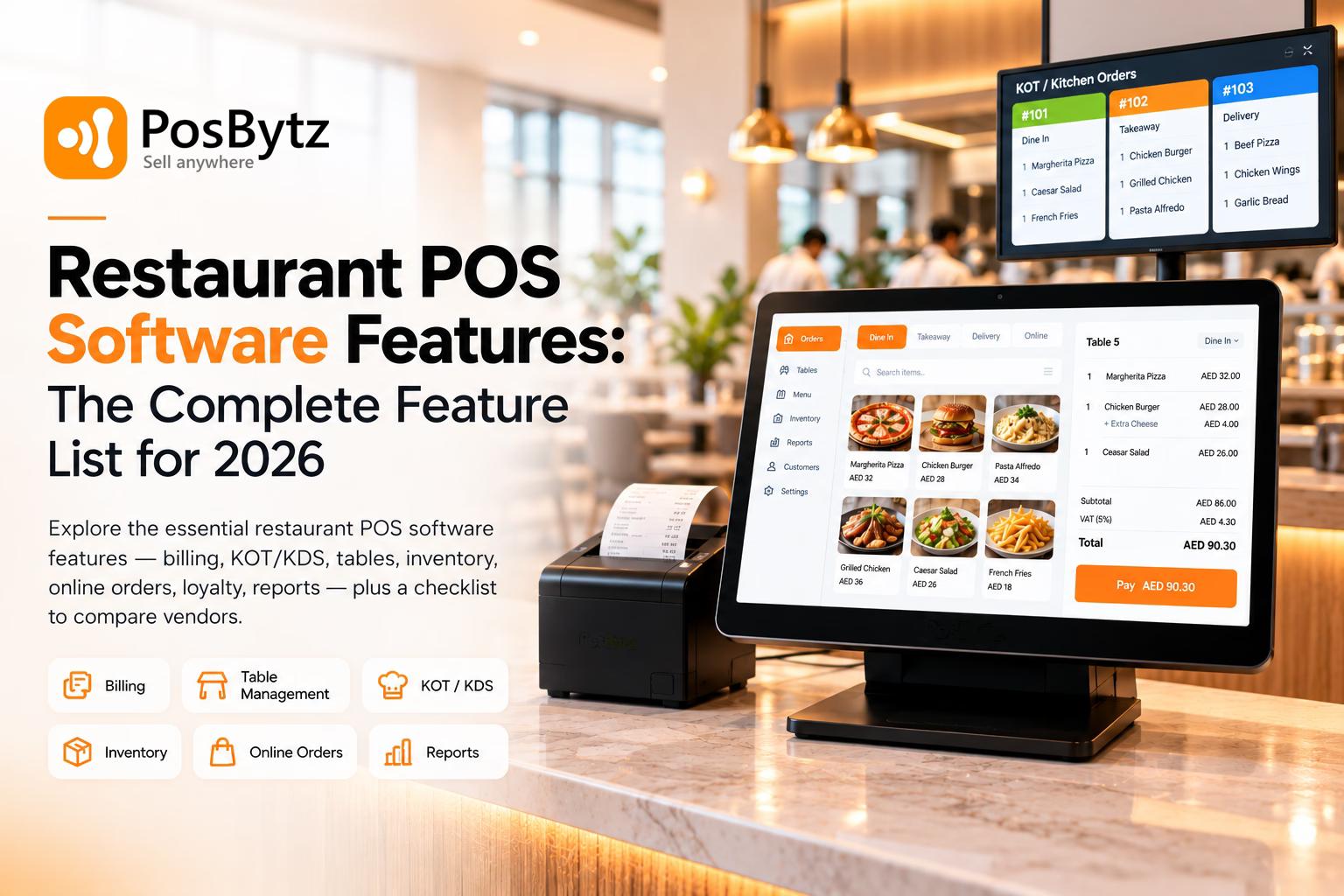
Explore the essential restaurant POS software features - billing, KOT/KDS, tables, inventory, online orders, loyalty, reports - plus a checklist to compare vendors.


Quick Answer: What Are the Key Restaurant POS Software Features?
The key restaurant POS software features are fast billing and order taking, menu and modifier management, table management, kitchen order tickets (KOT) or a kitchen display system (KDS), multiple payment options with split bills, inventory and recipe tracking, sales reports, staff roles and permissions, offline mode, and tax or e-invoicing compliance. Growing restaurants usually add online ordering, delivery aggregator integration, QR table ordering, CRM and loyalty, multi-outlet management, and accounting integration.
The right mix depends on how you serve guests. A quick-service counter needs speed and token management, a fine-dining room needs tables and course timing, and a cloud kitchen needs online order handling more than a floor plan.
What Is Restaurant POS Software?
Restaurant POS (point of sale) software is the system a restaurant uses to take orders, send them to the kitchen, generate bills, accept payments, and record every sale. Unlike a basic retail billing tool, restaurant POS software is built around food-service workflows: menu modifiers ("no onion", "extra cheese"), dine-in tables, kitchen routing, takeaway and delivery orders, and recipe-level stock usage.
A complete restaurant POS system has two parts:
- Software - the billing screen, back-office dashboard, reports, and connected modules such as inventory, CRM, or online ordering.
- Hardware - a terminal (desktop, tablet, Android or iPad device), receipt and kitchen printers, a cash drawer, a card payment terminal, and optionally a kitchen display screen or customer-facing display.
If you're still deciding between deployment types, our guide to different types of POS systems for restaurants explains the options.
How Restaurant POS Features Work Together: One Order, Start to Finish
The easiest way to understand restaurant POS system features is to follow a single order:
- Order type is selected - dine-in, takeaway, delivery, or online.
- Items are added - with sizes, modifiers, add-ons, and special notes.
- Order goes to the kitchen - printed as a KOT or shown on a KDS, routed to the right station (grill, bar, tandoor, desserts).
- Stock is updated - if recipes are mapped, ingredients are deducted as items are sold.
- Bill is generated - with taxes, service charges, discounts, and any loyalty redemption.
- Payment is recorded - cash, card, wallet, or a split across several methods.
- Data flows to reports - sales, item performance, staff activity, and tax summaries update for the manager.
Every feature below supports one or more of these steps. When features are disconnected - for example, online orders that staff re-type into the POS - errors and delays creep in.
Core Restaurant POS Software Features (Must-Haves)
These are the features of POS software for restaurants that almost every food business needs, regardless of size.
1. Fast Billing and Order Taking
Billing speed is the feature your staff and guests feel first. During a rush, every extra tap slows the queue.
What to look for:
- Support for dine-in, takeaway, delivery, and online order types in one screen
- Quick item search, favourites, and category buttons
- Modifiers, add-ons, combos, and special instructions
- Item-level and bill-level discounts with manager approval
- Hold, recall, edit, and void orders (with a reason logged)
- Reprint and digital receipts (SMS, WhatsApp, or email where supported)
Ask the vendor: "How many taps does it take to bill a combo meal with two modifiers?"
2. Menu Management
Your menu changes more often than you think - seasonal items, price updates, sold-out dishes, happy-hour pricing. A good restaurant POS lets you change these centrally without calling support.
What to look for:
- Categories, sub-categories, variants (half/full, small/large), and add-on groups
- Time-based or channel-based pricing (dine-in vs delivery vs happy hour)
- Mark items "out of stock" instantly so staff stop selling them
- Bulk import and export of menu items
- Multi-language item names if your staff or guests need them
3. Table Management and Floor Plan
For dine-in restaurants, table management is one of the most important restaurant POS features. It shows who is seated, what they ordered, and which bills are still open.
What to look for:
- A visual floor plan that matches your actual layout (indoor, outdoor, sections)
- Table status at a glance - free, occupied, bill printed, paid
- Move, merge, and transfer tables
- Split bills by item, seat, or equal share
- Assign tables or sections to specific waiters or captains
Tip: Don't accept a screenshot of a floor plan as proof. Ask to see a table transfer and a bill split live in the demo.
4. Kitchen Order Tickets (KOT) and Kitchen Display System (KDS)
The kitchen connection is where many order mistakes happen. A KOT prints the order at the right station; a KDS replaces paper with a screen that shows order queues and status.
What to look for:
- Automatic KOT routing by station (kitchen, bar, bakery)
- Clear display of modifiers and special notes
- New items added after the first send are clearly marked as additions
- Order status updates - new, preparing, ready, served
- Order timers so delays are visible
- A fallback when a printer or screen fails
Learn more about how an automatic KOT system improves restaurant efficiency.
5. Payment Processing and Split Bills
Guests expect to pay the way they want. Your restaurant POS should record every payment type and reconcile them at day end.
What to look for:
- Cash, debit and credit cards, mobile wallets, and QR/UPI payments (depending on your country)
- Split payments across multiple methods on one bill
- Tips, service charges, and rounding rules
- Refunds and partial refunds with permissions
- Integrated card terminals where available, so amounts aren't keyed in manually
- A day-end cash-up or shift close report
Important distinction: Some POS systems only record that a card payment happened on a separate terminal, while others process the payment through an integrated terminal or gateway. Ask which one you're getting.
6. Inventory and Recipe Management
Food cost is one of a restaurant's biggest controllable expenses. Inventory management connects what you sell with what you use.
What to look for:
- Recipe mapping - link each menu item to its ingredients and quantities
- Automatic stock deduction as items are sold
- Purchase orders, goods received, and supplier records
- Low-stock alerts and reorder levels
- Wastage tracking
- Stock counts with variance (expected vs actual)
- Stock transfers between outlets or from a central kitchen
Ask the vendor: "Can you show me selling one burger and then show the bun, patty, and cheese stock reducing?" A simple item quantity counter is not the same as recipe-based inventory.
Read our detailed guide on restaurant inventory management and managing inventory across multiple outlets.
7. Sales Reports and Analytics
Reports turn every bill into decisions - what to promote, what to remove from the menu, and when to add staff.
Reports a restaurant POS should offer:
- Daily, weekly, and monthly sales summaries
- Item-wise and category-wise sales
- Sales by order type and channel (dine-in, takeaway, delivery, online)
- Payment method summary
- Discounts, voids, and refunds by staff member
- Hourly sales to identify peak times
- Tax summaries for filing
- Outlet-wise comparison for multi-location businesses
Real-time access from a phone or laptop is a major advantage of cloud systems. See how POS reports work and which restaurant KPIs to track.
8. Staff Management, Roles, and Permissions
Most POS-related losses come from unchecked discounts, voids, and cash handling. Role-based access closes those gaps.
What to look for:
- Individual logins (PIN or password) for every staff member
- Role-based permissions - cashier, captain, kitchen, manager, owner
- Approval required for voids, discounts, and refunds
- Activity logs showing who did what and when
- Staff performance reports (sales per waiter, upsells)
- Optional attendance, shifts, and payroll integration
9. Offline Mode
Internet outages happen - usually at the worst time. Offline mode lets your team keep billing and sync data when the connection returns.
What to check carefully:
- Which functions work offline (billing, KOT printing, payments) and which don't (online orders, live reports, gateway payments)
- How long the system can run offline
- How conflicts are handled when multiple devices sync
- Whether offline mode works on all your devices or only the main terminal
Offline capability varies widely between products, so test it during your demo by actually disconnecting the internet.
10. Tax and E-Invoicing Compliance
A restaurant POS must calculate taxes correctly and produce invoices that meet local rules.
What to look for:
- Configurable tax rates, tax-inclusive or tax-exclusive pricing, and item-level tax overrides
- Service charge settings
- Tax-compliant invoice formats with your registration number
- Tax summary reports for filing
- Country-specific compliance where applicable - for example, in Saudi Arabia, businesses subject to ZATCA e-invoicing must use a compliant solution, and Phase 2 requires integration with ZATCA's Fatoora platform, rolled out in waves
Note that a POS applies the tax settings you configure - it doesn't decide your legal obligations. Confirm requirements with your accountant. If you operate in KSA, read our guide to ZATCA e-invoicing Phase 2.
Advanced Restaurant POS System Features for Growth
Once the basics are covered, these restaurant POS system features help you grow revenue, reduce manual work, and scale to more outlets.
Online Ordering and Delivery Aggregator Integration
If you take orders from your website, app, WhatsApp, or delivery platforms, those orders should flow straight into the POS and kitchen - not be re-typed by staff.
What to look for:
- Your own commission-free online ordering page or app
- Integration with delivery aggregators used in your market (for example, Talabat, Zomato, Swiggy, HungerStation, or Jahez - availability varies by POS and region)
- Menu and item availability sync across channels
- A single queue for all orders, with order source clearly labelled
- Delivery management for your own riders
Watch out: A "delivery" label on an order is not the same as a real integration. Ask whether aggregator orders are imported automatically and whether menu changes sync back.
Related reading: restaurant online ordering systems, how to integrate your POS with Talabat, and managing multiple online orders.
QR Code Menu and Table Ordering
QR ordering lets guests scan a code at the table, view the menu, place orders, and sometimes pay - without waiting for a server.
What to look for:
- Orders land directly in the POS and KDS, tagged with the table number
- Real-time menu and availability updates
- Optional staff approval before an order goes to the kitchen
- Ability to add to an existing table bill
- Online payment option at the table
Learn more about the benefits of QR code table ordering.
CRM, Loyalty Programs, and Customer Feedback
Repeat guests are the backbone of most restaurants. A POS with built-in CRM captures customer data at billing and uses it to bring guests back.
What to look for:
- Customer profiles with visit history and favourite items
- Points, cashback, or visit-based loyalty rules
- Gift cards and vouchers
- Feedback collection after a visit
- SMS, WhatsApp, or email campaigns (check channel availability and costs)
See our guide to choosing the best CRM for your restaurant.
Mobile POS and Captain/Waiter App
Handheld devices let staff take orders at the table and send them to the kitchen instantly, cutting walking time and transcription errors.
What to look for:
- Works on Android or iOS phones/tablets you already own
- Real-time sync with the main POS and KDS
- Table-side ordering and, where supported, table-side payment
Compare device options: Android POS, iPad POS, and Windows POS.
Multi-Outlet and Central Kitchen Management
For restaurant chains and franchises, central control is essential.
What to look for:
- One dashboard for all outlets with outlet-wise reports
- Central menu management with outlet-level price overrides
- Central kitchen production and stock transfers to outlets
- Consolidated purchasing and inventory
- Role-based access by outlet
Accounting, HR, and Payroll Integration
When sales, purchases, and expenses flow automatically into accounting, month-end becomes far simpler.
What to look for:
- Built-in accounting or integration with tools like Zoho Books or QuickBooks
- Automatic posting of sales, taxes, and payment methods
- Purchase and expense entries linked to inventory
- Staff attendance and payroll if you want one system
Read about restaurant POS software with an accounting system.
Integrations and Open APIs
No POS does everything. Integrations let you connect payment providers, e-commerce stores, accounting software, and delivery platforms. Ask for a current integrations list rather than a roadmap promise. Explore common restaurant POS integrations.
Self-Order Kiosks and Customer-Facing Displays
Kiosks let guests order and pay on their own, which suits quick-service and high-volume counters. Customer-facing displays show items and totals as they're entered, which builds trust and reduces billing disputes.
Restaurant POS Features by Restaurant Type
Not every restaurant needs every feature. Use this table to prioritise.
Restaurant type
Top-priority features
Nice to have
Quick-service / fast food
Fast billing, combos, token numbers, KDS, payment speed
Self-order kiosk, loyalty, online ordering
Casual dining
Table management, captain app, KOT routing, split bills
QR ordering, CRM, feedback
Fine dining
Floor plan, course timing, modifiers, table-side service
Reservations, guest profiles
Café / coffee shop
Quick modifiers (milk, size, shots), loyalty, fast checkout
Online pre-orders, QR ordering
Bar and pub
Open tabs, happy-hour pricing, liquor inventory, split bills
Age/ID checks (where required), table ordering
Cloud kitchen
Aggregator integration, multi-brand menus, KDS, online order queue
Own ordering site, delivery management
Food truck
Mobile POS, offline mode, quick billing
Online pre-orders, loyalty
Multi-outlet chain
Central menu, outlet-wise reports, central kitchen, stock transfers
Franchise controls, API integrations
Explore type-specific solutions: cafe billing software, bar and restaurant POS, cloud kitchen software, food truck POS, and quick service restaurant POS.
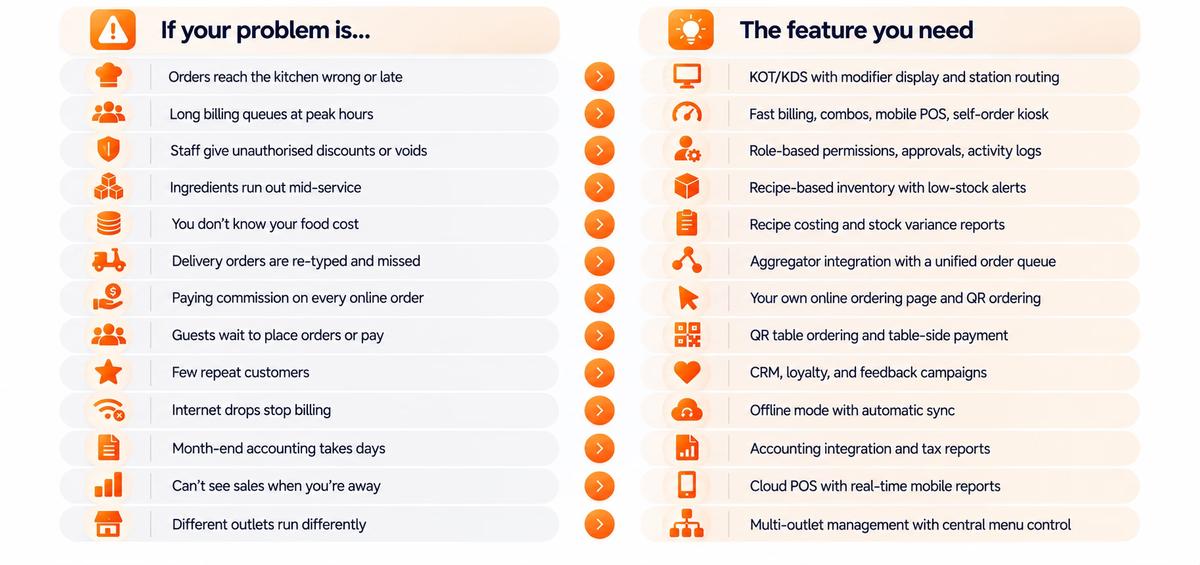
Restaurant POS Feature List: Problem-to-Feature Guide
Most restaurant owners don't search for features - they search for solutions to problems. Here's which restaurant POS feature solves each common issue.
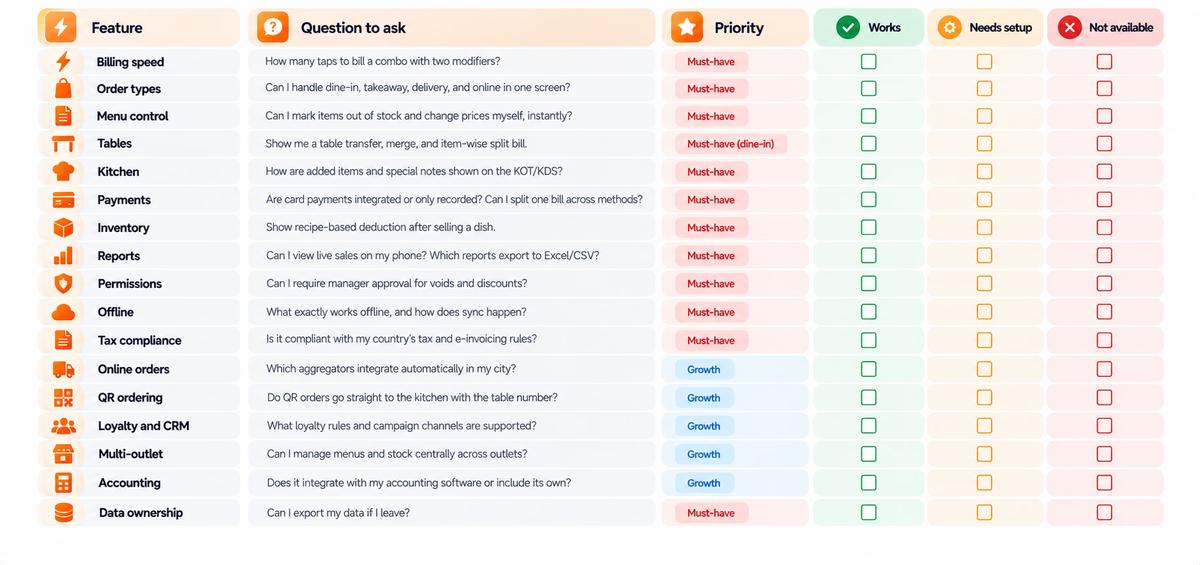
Restaurant POS Feature Checklist: Questions to Ask Before You Buy
Use this checklist during vendor demos. Mark each item as Works, Needs setup, or Not available.
Ready to compare vendors? Our buyer's guide on how to choose the best restaurant POS system covers budget, compliance, support, contracts, and a full demo test script.
Cloud-Based vs On-Premise Restaurant POS: How Features Differ
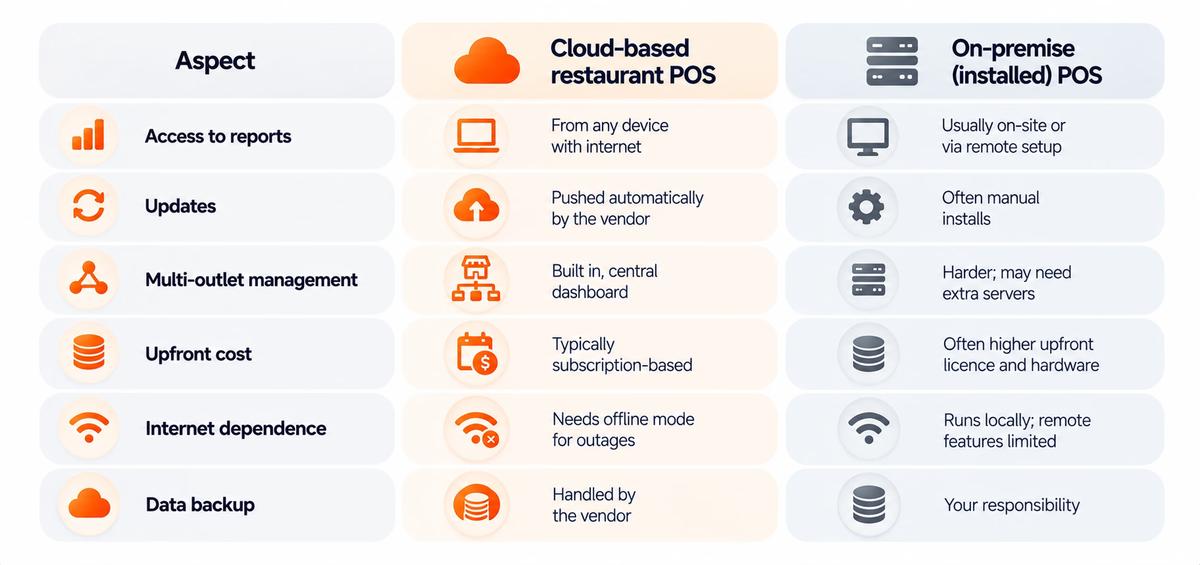
Neither option removes the need for a backup plan. Learn more about cloud POS systems for restaurants.
Restaurant POS Feature Gaps to Watch For
Some features sound the same on a vendor's website but work very differently in practice:
- "Records" vs "integrates." Recording a card or delivery order is not the same as an integrated payment terminal or automatic aggregator order import.
- Item counts vs recipe inventory. A simple stock counter doesn't deduct ingredients the way recipe-based inventory does.
- "Works offline." Some systems only keep billing running offline, while others also support KOT printing and multi-device sync.
For the full evaluation process, including costs, contracts, and vendor questions, see how to choose a restaurant POS system.
How PosBytz Covers Restaurant POS Software Features
PosBytz restaurant POS software is a cloud-based platform that brings billing, KOT, table and QR ordering, inventory, CRM and loyalty, online ordering, accounting, and HR and payroll into one system. It runs on Android, iPad, Windows, and web browsers.
Built for Every Type of Restaurant and F&B Business
PosBytz fits a wide range of food and beverage operations — quick service restaurants (QSRs), casual and fine dining, cafés and coffee shops, bars and pubs, cloud kitchens, food trucks, bakeries, and multi-outlet chains. Because the same platform also supports retail, businesses that run both a restaurant and a retail counter can manage everything from one system.
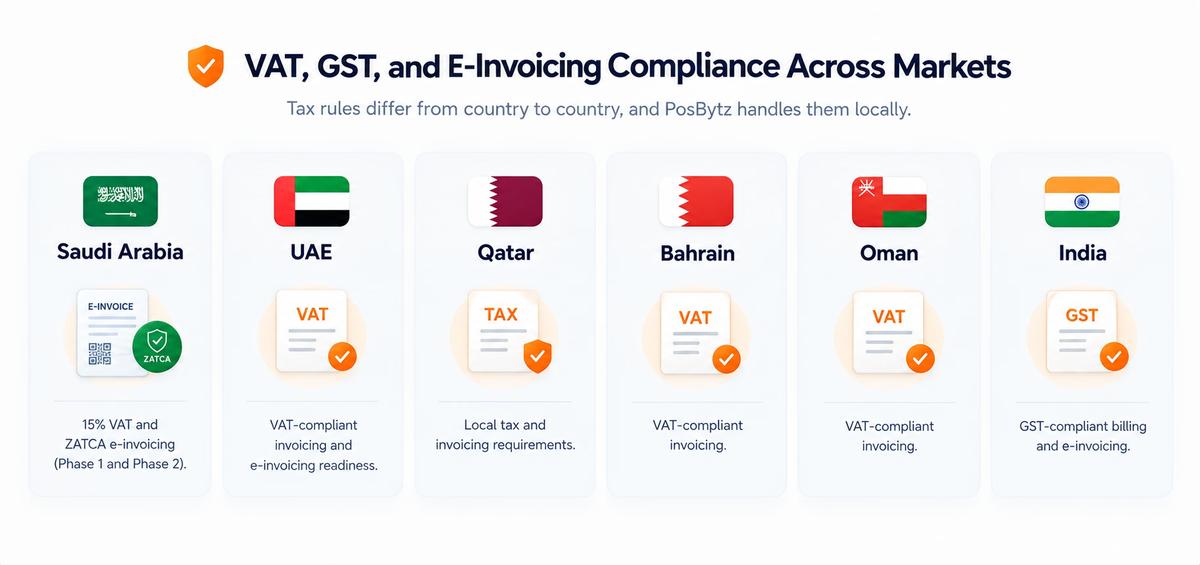
VAT, GST, and E-Invoicing Compliance Across Markets
Tax rules differ from country to country, and PosBytz handles them locally:
Integrations With the Tools You Already Use
PosBytz connects your POS with accounting, e-commerce, and delivery platforms so data flows automatically instead of being re-entered:
- Accounting: Zoho Books, QuickBooks
- E-commerce: Shopify, WooCommerce
- Food delivery aggregators: Talabat, Careem, Swiggy, Zomato, Jahez, Deliveroo, HungerStation, and more
See the full list of PosBytz integrations.
Try PosBytz for Your Restaurant
The best way to judge any POS is to test it with your own menu and workflow. Start your free trial, check pricing, or contact the PosBytz team for a demo.
Frequently Asked Questions About Restaurant POS Software Features
What are the most important features of POS software for restaurants?
The most important features are fast billing, menu and modifier management, table management, KOT or KDS kitchen integration, multiple payment methods with split bills, recipe-based inventory, sales reports, staff permissions, offline mode, and tax compliance. These cover the full order-to-payment workflow.
What features should a small restaurant POS have?
A small restaurant should prioritise fast billing, simple menu management, KOT printing, basic inventory, sales reports, staff logins, and offline mode. A cloud POS that runs on an existing tablet or phone keeps costs low, and you can add online ordering or loyalty later. See our guide on how to choose a POS for small business.
What is the difference between a restaurant POS and a retail POS?
A retail POS focuses on barcode scanning, product variants, and stock-keeping units. A restaurant POS adds food-service features such as table management, kitchen order routing (KOT/KDS), menu modifiers, recipe-based ingredient tracking, course timing, and dine-in, takeaway, and delivery order types.
What is the difference between a KOT and a KDS?
A KOT (kitchen order ticket) is a printed slip sent to a kitchen printer. A KDS (kitchen display system) shows orders on a screen in the kitchen, with status updates and timers. A KDS removes lost or unreadable tickets and makes delays visible, while KOT printing is simpler and cheaper to set up.
Does a restaurant POS work without the internet?
Many cloud restaurant POS systems offer an offline mode that lets you keep billing and printing KOTs during an outage, then sync when the internet returns. Online orders, live remote reports, and gateway payments usually need connectivity. Ask the vendor exactly which functions work offline.
Can restaurant POS software manage inventory automatically?
Yes, if it supports recipe mapping. You link each menu item to its ingredients, and the system deducts stock as items are sold. You can then set low-stock alerts, track wastage, and compare expected stock with physical counts to spot leakage.
Can a restaurant POS integrate with delivery apps?
Many can, but integrations vary by POS and country. Check whether orders from your delivery platforms are imported automatically into the POS and kitchen, and whether menu or availability changes sync back to the platform.
What hardware do I need for a restaurant POS system?
Typically a POS terminal or tablet, a receipt printer, one or more kitchen printers or a KDS screen, a cash drawer, and a card payment terminal. Handheld devices for waiters, a customer display, and self-order kiosks are optional. Many cloud POS systems run on Android, iPad, or Windows devices you already own.
Which restaurant POS features help reduce food cost?
Recipe-based inventory, recipe costing, wastage tracking, stock variance reports, purchase order management, and item-wise sales reports. Together they show which dishes are profitable and where stock is being lost.
Which restaurant POS features help prevent staff theft?
Individual staff logins, role-based permissions, manager approval for voids and discounts, activity logs, cash drawer reports, and stock variance reports. These create accountability for every transaction.
Is cloud-based restaurant POS software secure?
Reputable cloud POS providers use encrypted connections, access controls, and regular backups. For card payments, check that the payment component meets PCI DSS (Payment Card Industry Data Security Standard) requirements, and use individual staff logins rather than shared accounts. Read more about POS security.
Can I add features to my restaurant POS later?
Most cloud-based restaurant POS systems are modular, so you can start with billing and add inventory, online ordering, CRM, or multi-outlet management as you grow. Confirm upgrade options and pricing with the vendor before you buy.
Do I need a restaurant POS with e-invoicing in Saudi Arabia?
If your business is subject to ZATCA e-invoicing regulations, you must issue invoices through a compliant e-invoicing solution, and Phase 2 requires integration with ZATCA's systems as your wave is notified. Choose a POS that supports these requirements or works alongside a compliant solution. Confirm your obligations with your tax advisor.
How do I choose the right restaurant POS features for my business?
List your service type (QSR, dine-in, café, cloud kitchen, bar), your order channels, the number of outlets, and your biggest daily problems. Map each problem to a feature using the table above, separate must-haves from nice-to-haves, and test those exact workflows in a live demo.
Final Thoughts
The best restaurant POS software isn't the one with the most features - it's the one whose features match how your restaurant actually runs. Start with the core features that keep orders, kitchen, payments, and stock connected. Then add growth features like online ordering, QR ordering, loyalty, and multi-outlet control as your business expands. Test every critical workflow live before you commit, and choose a system that can grow with you.
About the author

The PosBytz Marketing Team
Editorial Team, PosBytz
The PosBytz Marketing Team shares practical insights on running smarter restaurants and retail stores from POS best practices to inventory management, online ordering, and customer loyalty strategies.