9 Ways to Promote Restaurant Contactless Ordering with QR Codes
Restaurant Contactless Ordering, ways to promote QR code based table ordering system using simple techniques to streamline your operations


If you have set up restaurant contactless ordering but customers still aren't scanning the code, the problem usually isn't the technology. It's visibility. Below are nine practical ways to promote your QR code ordering system, plus what changes for your kitchen, staff, and customers once it catches on.
What Is Restaurant Contactless Ordering?
Restaurant contactless ordering lets a customer scan a QR code at their table, on a receipt, or on a flyer to browse the menu and place an order directly from their phone, without downloading an app or waiting for a server. The order goes straight from the customer's device to the kitchen or POS system, cutting out the manual step of a waiter writing it down and re-entering it.
This is different from simply having an online ordering website. Contactless ordering for restaurants is typically tied to a specific table, order, or visit, and is designed for use inside the restaurant rather than for delivery from home.
9 Ways to Promote Restaurant Contactless Ordering
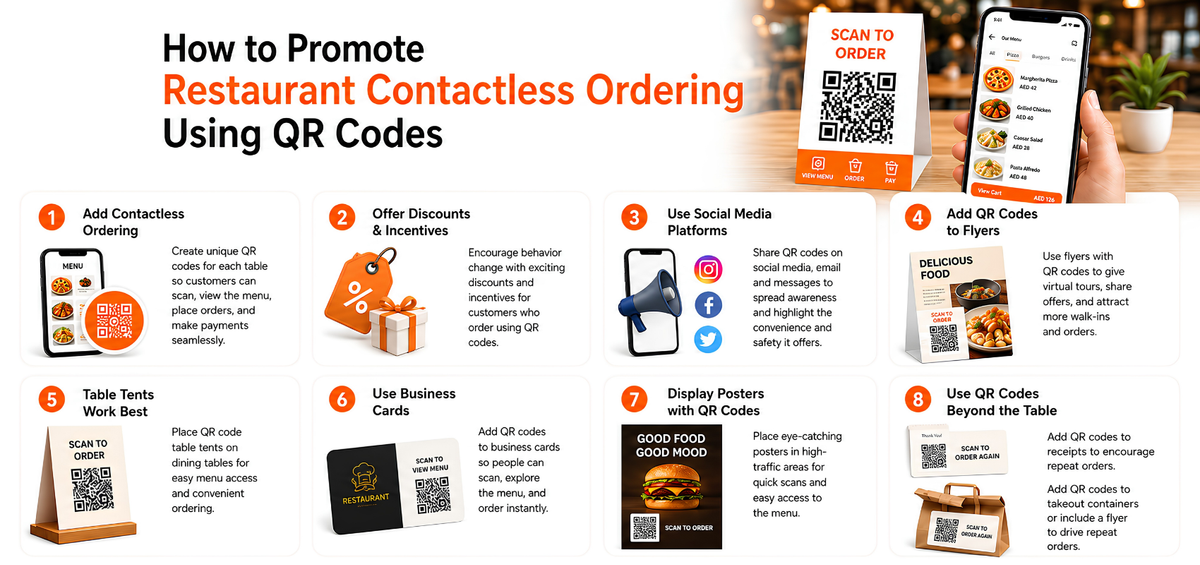
Add Contactless ordering for Restaurants
By integrating QR codes into your restaurant’s table ordering by creating unique QR codes for each tables. So your customers can scan to access the entire menu and place the orders.
It is also worth noting that this solution can be combined with payment options. Thus your customer can get a more seamless experience.
Offer discounts Incentives
Offer incentives to your customers on contactless restaurant ordering through QR codes from Table as this would be definitely a behavior change for your customers and once he is comfortable he will order by scanning. This will definitely optimize and also reduce cost for restaurants.
Use social media platforms for contactless restaurant ordering
Create a QR code for contactless restaurant ordering, display it on your website, and share it on social media such as Twitter, Instagram, and Facebook. Also, include QR codes in email and text message promotions. So, customers will get to know that this concept exists.
What if your customers aren’t aware of this contactless ordering for restaurant? You can use the QR code in social media campaigns to help your customers understand its benefits, like increased safety and convenience.
To promote your contactless ordering for restaurants, offer incentives, such as discounts or prizes, for customers who use QR codes for contactless ordering.
Add QR codes to flyers to promote your contactless restaurant ordering feature
You may think that distributing flyers is old school. But the fact is, flyers are still potent in bringing brand awareness and collecting leads.
QR codes on flyers can be a powerful tool to create a more engaging and interactive experience for your customers.
You can give a virtual tour of your restaurant via the QR codes given on the flyers. This will give customers a sense of what to expect before they visit in person.
Table tents are the best
Tables are highly used at a point of sale to promote product offerings and business services. You can add the QR code to table tents and place them on the dining table. So customers can scan, view the menu, and order food from the comfort of their place. However, ensure that the table tents aren’t touched or taken down. If not can stick the QR codes for restaurant contactless ordering option as would be visible to all customers to try.
Business cards
Similar to flyers, business cards are also traditional marketing ways. However, you can still find people sharing their business cards at networking events.
Though you have to get in touch with a person to give the card, the other person can again scan and access the menu on the spot and order food. This promotes immediate action and increases the chance for your contactless restaurant ordering brand awareness.
Posters
Posters cost less to design and print. So, get a poster created with a QR code and paste them on potential areas where your customers can quickly scan, access the menu, and use the menu. Ensure the QR code printed is large enough for customers can scan it in a go.
You can also add a QR code to receipts
By including a QR code on their receipts, Menu Drive restaurants can encourage repeat orders from current customers. It can be achieved by adding an image, such as a logo or QR code, to the receipt.
Takeout containers
This is similar to receipts, where you can get QR codes on the food containers or simply add a flyer with a QR code while delivering it to the customers. This can allow your customers to order again from your restaurant via the QR codes.
How contactless restaurant ordering can benefit your business?
For Customers
- Customers can browse the menu and order from a smartphone, tablet, or smartwatch without waiting for a server.
- Payments can be completed with a quick tap, without handing over cash or a card.
- Orders can be customized directly, adding or removing items without a back-and-forth with staff.
- Multiple orders can be placed from the same table across courses, starters, mains, and dessert, without waiting for a server to return.
For Restaurant Operations
- Less physical contact between staff and customers during ordering and payment.
- Orders arrive at the kitchen with fewer manual entry errors, since there's no handwritten ticket to transcribe.
- Order and customer data (what people order, when, and how often) can inform menu and marketing decisions.
- Faster table turnover during peak hours, since customers aren't waiting on a server to take or confirm an order.
How to Get Started with Restaurant Contactless Ordering
To launch restaurant contactless ordering, you need a system that can generate a unique QR code per table, takeaway counter, or online ordering page, and route each order straight to your kitchen or POS. Restaurant POS software like PosBytz handles this end to end: QR code generation, menu management, and order routing all run from one dashboard, so you're not stitching together separate tools for ordering, billing, and the kitchen.
Wrapping up
By reducing wait times and increasing order volume via contactless ordering. You can increase revenue, lead to a higher customer turnover rate, and increase sales.
In short, contactless restaurant ordering is the ultimate convenience for food lovers everywhere. So, the next time your customers are craving their favorite dish. Provide quick and easy service with contactless ordering and show them how simple and hassle-free it can be.
How do you get started with contactless ordering in your restaurant with QR codes? Here is a quick way.
Get robust restaurant POS software such as PosBytz. This software can generate a unique QR code for each dine-in table or Take-aways or Online ordering website. So, customers can scan the code using their smartphones and place their order through your restaurant’s mobile app or website. Start you restaurant contactless ordering system with PosBytz now.
FAQs
1. How does Restaurant contactless ordering work?
Customers scan a QR code at their table, browse the digital menu, place their order, and make a payment online. The order is then sent directly to the kitchen.
2. Is an app required for QR ordering?
No, most contactless ordering for restaurants work via a web-based platform, so customers only need to scan a QR code to access the menu.
3. Can I customize my order?
Yes, the system allows you to customize orders, such as adding extra toppings or addons
4. Can I order multiple times from the same table?
Yes, you can place additional orders multiple times from same table like starters, main course and desserts without waiting for staff, and they will be sent to the kitchen directly.
5. How do I know if my order has been received?
After placing an order, you will receive a confirmation notification on your phone and POS system will also be notified for cashiers
6. What payment methods are available?
Most systems accept online payments using credit/debit cards and online payment gateway options
7. Can I split the bill with my friends?
Yes, some systems allow multiple users to contribute to a bill or split payments among the group.
Related Resources
- How QR Code Table Ordering Enhances The Customer Experience
- Automating Restaurant Operations: The Best ERP for Restaurants to Boost Efficiency and Growth
- Revolutionizing Restaurants with ERP Systems: Boost Efficiency and Success
- Streamlining Restaurant Operations with Restaurant ERP: A Comprehensive Guide for Small Restaurants
- How To Optimize Dine-In With QR Code Menu Ordering
- How QR Code Ordering Can Streamline Services at Your Restaurant
About the author

Saravana Damodaram
Co-Founder & CEO, PosBytz
Saravana Damodaram is the Co-Founder & CEO of PosBytz, a cloud-based POS-ERP platform built for F&B and retail businesses since 2018. He focuses on unified commerce, inventory, and multi-location operations, and has helped over 5,000 merchants across 25+ countries move off fragmented, disconnected tools and run their entire operation, billing, inventory, kitchen, and accounting on one platform.