Sell on WhatsApp: A Complete Guide to WhatsApp Ordering
Sell on Whatsapp, manage your whatsapp online orders, synchronize your inventory and increase your sales with Posbytz.



WhatsApp has become one of the fastest ways for restaurants and retail businesses to take orders, answer questions, and close sales without asking customers to leave a chat window. This guide walks through why WhatsApp works as a sales channel, how to set it up step by step, and how to keep orders organized once they start coming in.
WhatsApp remains the most widely used messaging app across roughly 180 countries, with more than 3.3 billion active users worldwide — well ahead of Telegram, Facebook Messenger, and WeChat. For a restaurant, cafe, or retail brand, that reach means your customers are very likely already on the platform, checking it multiple times a day.
WhatsApp Business adds the tools that make selling possible: a catalogue, quick replies, labels, and automated greetings. You can turn product photos, descriptions, and prices into a browsable catalogue and send it to a customer with a single tap, which is why more small businesses are treating WhatsApp as a genuine sales channel rather than just a support line.
Why should your business sell on WhatsApp?
Customer behavior has shifted toward conversational commerce, people would rather message a business directly than browse a full website or app. That shift favors WhatsApp for a few practical reasons:
Traditionally, promoting your business was expensive and tedious. However, there is an alternative marketing tactic that involves minimal investment and a smart strategy.
WhatsApp is the perfect tool to use for your business advantage. You can communicate with your customers in real-time and send out various promotional messages. You can also offer personalized support and strengthen your brand persona. Your business can leverage the fact that the majority of your customer base is present on this platform.
That’s not all. The WhatsApp catalogue feature enhances the customer experience and provides transparency on the products offered. WhatsApp ordering has become a convenient option to integrate all your digital platforms in a post-pandemic world.
The automated messaging system is a proactive tool for WhatsApp order management that connects your audience in a targeted manner. WhatsApp also has a broadcast feature that allows you to send the same message to many contacts—useful for shipping updates, appointments, or festival sale offers. WhatsApp for business allows you to create groups for focused networking or beta testing.
Another reason businesses should sell on WhatsApp is the ability to send content in different formats for free without restrictions. This is essential as customers can decide based on the rich media available.
So how do you make the most of WhatsApp ordering as a small business owner? Let us help you increase your business revenue with five easy steps.
Sell on WhatsApp: 5 Easy Steps
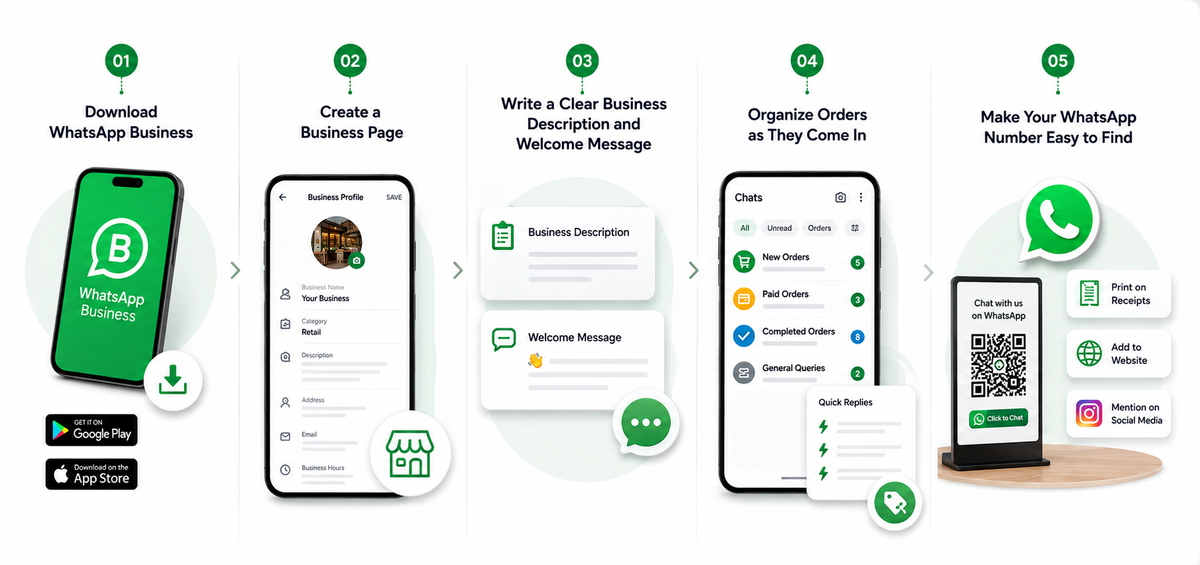
Step 1: Download WhatsApp Business
The WhatsApp Business application can be downloaded from the Play Store or App Store. You can easily create a business profile as the functionality and user-interface are similar to the traditional WhatsApp application.
Step 2: Create a Business Page
Use a phone number that's separate from your personal WhatsApp account so business messages don't get mixed in with personal ones. To edit your business name and details:
- Open WhatsApp Business and go to Settings > Business Settings > Profile.
- Tap Edit to update your details.
- Fill in the relevant fields and tap Save.
Step 3: Write a Clear Business Description and Welcome Message
Setting your business timings, creating catchy welcome messages, and providing personalized answers to your customer’s messages helps you quickly sell on WhatsApp as it broadens your potential customer base.
Effective WhatsApp order management starts with a clear business description. Ensure your customers know exactly what you offer the moment they view your profile. High-quality communication in 2026 is the key to converting a simple chat into a confirmed sale.
Step 4: Organize Orders as They Come In
Once messages start arriving, structure matters. Use labels to sort chats into categories like new orders, paid orders, or completed orders, and save quick replies for questions you get often — return policy, delivery times, payment options. This is where a dedicated WhatsApp order management system, like the one built into PosBytz, helps: it centralizes conversations, lets customers order straight from your catalogue, and confirms purchases without you juggling multiple chat threads manually.
Step 5: Make Your WhatsApp Number Easy to Find
WhatsApp doesn't let customers search for a business by name or location, so visibility depends on you. Print your number on receipts, add a click-to-chat button to your website, and mention it on social media. The easier it is to find, the more likely someone is to start a conversation instead of looking elsewhere.
How can PosBytz simplify your WhatsApp order management?
Manually tracking WhatsApp orders works for a handful of daily messages, but it breaks down once volume grows — inventory falls out of sync, orders get missed, and it's hard to see which items are actually selling. PosBytz addresses this by connecting WhatsApp ordering directly to your point-of-sale and inventory system, so stock updates in real time across every channel a customer might order from — WhatsApp included.
With WhatsApp order management built into PosBytz, incoming orders sync automatically, sales data feeds into your existing reports, and you don't need separate tools to reconcile what sold where. That's useful whether you're running a single storefront or managing orders across multiple online channels.
Frequently Asked Questions
How can I start selling on WhatsApp in 2026?
Download WhatsApp Business, set up a profile with your business name, hours, and description, build a product catalogue, and use quick replies and labels — or a tool like PosBytz — to manage orders as they come in.
What is WhatsApp order management?
It's the process of tracking customer requests, confirming payments, and keeping inventory accurate as orders arrive through WhatsApp, either manually or through an integrated system like PosBytz.
Is WhatsApp Business free to use?
Yes. WhatsApp Business is free to download and use for messaging, catalogues, and basic automation. Costs typically only come in if you connect it to a paid order-management or CRM platform for higher order volumes.
Can I sell on WhatsApp without a separate ordering app?
Yes — many small businesses take orders entirely through chat and the built-in catalogue. As order volume grows, though, a dedicated system helps prevent missed messages and stock mismatches.
Do I need a separate phone number for WhatsApp Business?
It's recommended. A dedicated business number keeps customer conversations separate from personal messages and makes it easier to maintain consistent hours, replies, and branding.
Turn Every WhatsApp Chat Into a Sale
Selling on WhatsApp doesn't require new hardware or a steep learning curve — just a clear setup and a system to keep orders organized as they grow. If you're ready to move beyond manually tracking chats, PosBytz brings WhatsApp ordering into the same platform as your inventory, reporting, and other sales channels.
WhatsApp Selling Resources
READ MORE: WhatsApp eCommerce Integration Guide
Learn how to integrate WhatsApp API for bulk messages, templates, and auto-replies.
READ MORE: Complete Guide to WhatsApp Ordering
A masterclass on digitizing your catalogue and boosting sales through conversational commerce.
READ MORE: Retail Multi-Channel Sales Management
Sync your WhatsApp orders seamlessly with your physical store and online shop.
About the author

Saravana Damodaram
Co-Founder & CEO, PosBytz
Saravana Damodaram is the Co-Founder & CEO of PosBytz, a cloud-based POS-ERP platform built for F&B and retail businesses since 2018. He focuses on unified commerce, inventory, and multi-location operations, and has helped over 5,000 merchants across 25+ countries move off fragmented, disconnected tools and run their entire operation, billing, inventory, kitchen, and accounting on one platform.