Best Retail POS System for Small Business in 2026
Retail POS system is an important tool for any business owner. It allows you to track your sales and inventory, manage loyalty programs


A retail POS system is one of the most important tools you'll buy for your store. It's the software that rings up every sale, tracks what's left on your shelves, and holds the customer data your loyalty program depends on.
The problem is that the market has changed a lot in the last few years. Some POS brands that used to top every "best of" list have been folded into other companies, pricing models have shifted from flat monthly fees to usage-based plans, and small retailers now expect a lot more than just billing: online ordering, WhatsApp and Instagram order capture, and real-time inventory across every channel.
This guide covers what a retail POS system actually does, the different types available, 12 of the best retail POS systems for small businesses in 2026, and a practical framework for choosing between them.
What Is a Retail POS System for Small Business?
A retail POS system for small business is software (usually cloud-based) that handles billing, inventory, and customer management from one screen, whether that screen is a phone, a tablet, or a countertop terminal.
At a minimum, good small business POS software should let you:
- Ring up sales quickly, with support for barcode scanning and multiple payment types
- Track stock levels in real time, ideally across every location and sales channel
- Store customer profiles and purchase history for loyalty and repeat marketing
- Generate basic sales and profitability reports without needing a separate tool
- Keep working during an internet outage and sync automatically once you're back online
Most retail POS software for small business today is cloud-based rather than installed on a single till, which means your sales and inventory data are accessible from any device, from anywhere.
Types of POS Systems for Retail Stores
There are multiple types of POS Systems for Retail Stores. Here are some of the top POS systems used by retailers:
1. Mobile POS
POS services that run on smartphones can handle transactions, keep track of inventory, and manage customer information. With ease to scan and checkout items using Mobile camera.
This option is suited to businesses with minimal inventory around 100 SKU’s. Most POS systems work with portable bluetooth printers or allow customers to email receipts directly from the app.
2. Tablet POS
Increasingly, businesses are turning to tablet-based point-of-sale systems because they require a less initial investment and can often work with existing devices. Both Android and IOS based Tablets & IPADS can be as a POS device.
Many support compatible hardware such as barcode scanners, external printers, cash drawers and tablet stands—but the choice is yours!
3. Terminal or Desktop POS
Terminal POS is the most traditional form of point of sale and is often the most reliable. A terminal POS uses a separate computer to process transactions, often including inventory management features as well.
Terminal POS systems often require the most investment, and they are often sold as an all-in-one solution that offers hardware and software.Another advantage of a PC-based POS is its minimal startup costs. For businesses that have low-volume / high ticket sales, the convenience offered by touchscreens may outweigh the higher cost associated with them.
4. Self-service Kiosk POS
When you choose a self-service POS, your customers will be able to order and pay for their food or drink without having to wait in line or interact with an employee. This can help your business save money on labor costs, but it also requires that you have enough staff available at all times so that they can assist customers who need help.
5. Multichannel and Omnichannel POS
If you sell across more than one storefront, social channel, or online store, a multichannel POS centralizes sales, inventory, and customer data from every channel into a single dashboard. This is increasingly the default expectation for retail POS software for small business, not a premium add-on.
6. Open source POS
Open-source POS systems are a great option for businesses that have very specific needs. They allow you to customize them to fit your exact business model, which can save you money on expensive software upgrades and training. This can be especially helpful if you’re just starting and don’t know what features will be useful for your company.
Best POS Systems for Your Retail Business in 2026
Here are 14 of the best retail POS systems worth evaluating for your small business, starting with the option built specifically for omnichannel retail and F&B operations.
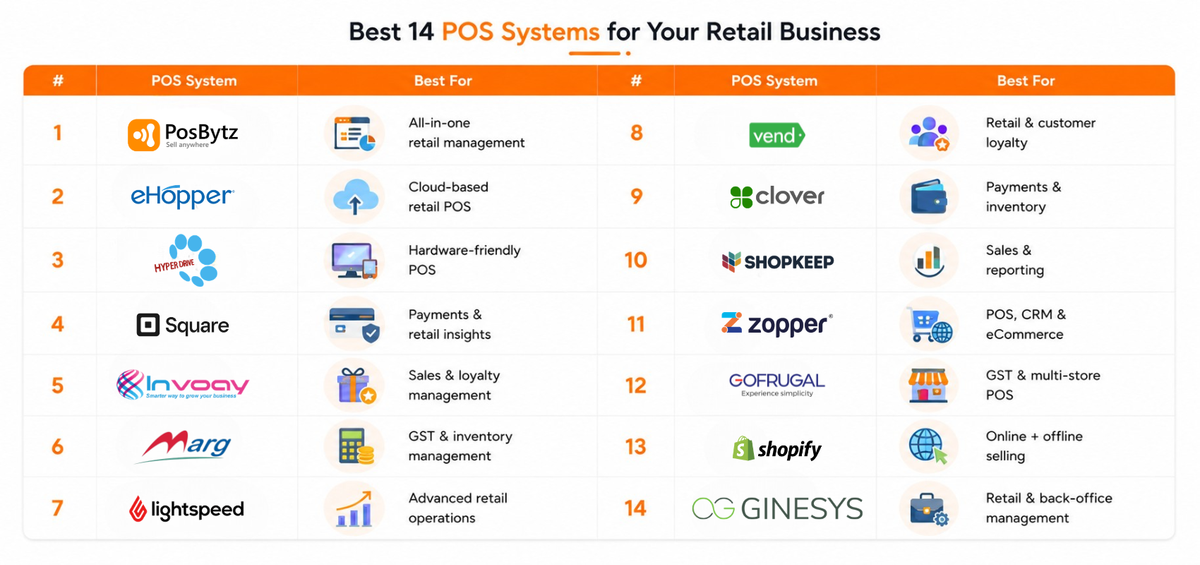
1. Posbytz
A simple yet powerful point-of-sale software, Posbytz Retail has everything you need to run your business. It comes with a built-in inventory system and shopping cart as well as support for multiple locations and languages. The platform also integrates with many third-party apps so that you can customize it even further to fit your needs.
With PosBytz , launch your own online e-commerce and ordering apps whitelabelled in your own brand to increase your brand visibility along with Loyal customer base.
The system is easy to use and comes with a variety of training materials. It also has an active support community, which is helpful if you need help troubleshooting or have questions about how best to use the software.
The PosBytz software comes with a mobile app, which allows you to manage your business on the go. The platform provides complete inventory management including multiple batches & expiry, CRM , Advance discounts , customer loyalty, in-built Accounting, audit logs and other reports—so you can track everything from inventory to profit/loss.
- Free plan.
- Lite plan: $ 39/month.
2. eHopper POS
eHopper POS is a cloud-based point of sale system that you can use to manage all aspects of your business. It features an intuitive interface and comes with a variety of features.
The software allows you to track inventory, manage employees, and view reports on sales activity. It also integrates with many third-party apps so that you can customize it even further to fit your needs. The system is easy to use and comes with a variety of training materials.
Pricing
- Free plan.
- Lite plan: $ 19/month.
3. HDPOS smart
This is a retail POS that offers seamless integrations with most of the hardware out there. It has a simple and easy-to-use interface that allows you to manage inventory, track sales, and view reports on your business. The system offers several features such as customer loyalty programs, customer analytics, and more.
It also comes with integrations with most third-party apps so that you can customize it even further.
Pricing
- Single: $ 45/month.
- Client server: $ 89/month.
- Cloud set up: $ 99/month.
4. Square POS
Square Point of Sale gives you everything you need to run and grow your business. With features like customer feedback tracking, sales reports, and inventory management—get a complete picture of how routine transactions affect the health of your business.
Square’s card readers and virtual terminals accept payments via magstripe, chip, or contactless credit/debit cards; Google Pay, and Apple Pay. The only disadvantage is that you won’t be able to access the Retail app, but there are many other Square for Retail features available on your Dashboard.
Pricing
- Free.
- Plus: $29+/month.
- Premium: Custom pricing.
5. Invoay Retail POS
Invoay’s retail POS system is a complete automation tool for your store that ensures repeat customers and higher profits. It helps you manage processes like inventory, sales, and customer loyalty—all in one place.
This POS system for retail stores provides marketers with the ability to manage WhatsApp and SMS campaigns, acquire new customers through those channels, and retain existing ones.
Pricing
- Start: $49/month.
- Grow: $89/month.
- Expand: $149/month.
6. Marg Retail POS
Marg provides GST-ready accounting & inventory software that helps in the smooth running of the retail business. It does so by generating invoices easily, reconciling bank statements—and tracking inventory accurately!
This point of sales GST billing system helps in barcode management, filing returns to the government—and much more. It’s made for stores from small independently owned businesses up to multinational retail chains.
Pricing
- Starts from $70/month.
7. Lightspeed
Lightspeed is a cloud-based point of sale system that’s designed to help you run your business better. It’s easy to use, can be customized to suit the needs of specific industries, and can be accessed anywhere there’s an internet connection.
Lightspeed has features like inventory management, reporting tools, and more. The company offers free trials so businesses can try before they buy. Pricing starts at $49/month for up to 10 users with additional fees for each additional user beyond that number.
Pricing
- Lean: $79/month.
- Standard: $139/month.
- Advanced: $239/month.
8. Vend POS
Vend POS is the ideal solution for retailers who are looking for a convenient way to serve their customers. This system provides customer loyalty features and tools to promote sales, helping stores achieve higher traffic levels.
This is a retail POS system that will streamline your operations with increased efficiency. The software provides a steady stream of data that can be used to make informed decisions about how to improve your store’s performance.
Pricing
- Lean: $99/month.
- Standard: $149/month.
- Advanced: $229/month.
9. Clover
Clover is a great option for retailers who are looking for a POS system that offers high-end features at an affordable price. This system includes support for various payment methods, inventory management capabilities, and customer loyalty options.
It also provides access to mobile apps that allow you to manage your store from anywhere.
Pricing
- Custom pricing.
10. Shopkeep
Shopkeep is a powerful POS system that offers all of the most important features you need to run your store. It includes support for multiple payment methods, inventory management capabilities, and customer loyalty options.
This system also provides access to mobile apps that allow you to manage your store from anywhere. The app also includes a robust reporting system that allows you to track your sales trends.
Pricing
- Custom pricing.
11. Zopper
Zopper POS solution is a complete point of sale system for retailers. It also offers inventory, customer relationship management (CRM), payments and e-commerce functions in addition to the GST billing software.
Moreover, this retail point-of-sale system can be used on a computer or any mobile device. It is suitable for all types of businesses—from small to large ones.
Pricing
- Custom pricing.
12. GoFrugal
GoFrugal GST-ready-POS billing software provides you with a one-stop solution for your retail, restaurant, and distribution business’ point-of-sale needs. This retail POS system facilitates all important features in one simple package!
It offers features such as inventory management, GST billing, customer relationship management, and multi-store management. Plus it allows you to get a POS system without installing one in your store premises—it’s cloud-based!
Pricing
- Custom pricing.
13. Shopify POS
Shopify POS is a point-of-sale system that lets you run your retail business from anywhere. It’s easy to install, and it works with any iPad or Android tablet. You can use Shopify POS in stores, at events, or anywhere else that takes your fancy!
This cloud-based solution offers features such as inventory management, multi-store management, and credit card processing.
Pricing
- Starts from $5/month.
14. Ginesys POS
Ginesys POS provides a touch-based point-of-sale solution and caters to the needs of retailers, helping them manage their stores more efficiently.
Saral is easy to install, and it’s even easier to use. From inventory management to back-office reports and reconciliation of cash balances—Saral does all that for you.
Pricing
- Custom pricing.
How to Choose the Right Retail POS System for Your Small Business
Feature lists only tell you so much. These are the practical questions worth answering before you commit:
- What's your real monthly cost? Add up the software subscription, hardware, and payment processing fees together, not just the advertised starting price. A "free" plan with high transaction fees can cost more than a paid plan at volume.
- Does it work offline? Power and internet outages happen. Confirm the system can keep taking sales offline and sync automatically once connectivity returns.
- Does it match your hardware? Check compatibility with the devices you already own (Windows, Android, or iPad) before buying new hardware you don't need.
- How deep is the inventory management? If you carry variants (size, color, batch, or expiry), confirm the system tracks at that level, not just total stock counts.
- Can it grow with you? If you plan to add a second location, an online store, or a marketplace like Instagram or WhatsApp ordering, check whether that's built in or requires a separate tool.
- What does support actually look like? Ask what channels are available (chat, phone, email), the hours they operate, and whether onboarding and data migration are included.
For a deeper walkthrough of this decision process, see our full guide on how to choose a POS system for small business.
Conclusion
It’s not always easy to choose the right point-of-sale software for your business. You need something simple, reliable, and flexible enough to meet your needs as they change over time. The options above should be able to provide everything you need at a price that won’t break your budget.
The best POS system for your business is the one that will make it easier to run, not harder. It should be easy to set up and use, but it also needs to be flexible enough that you can adapt it as your business grows. Most importantly, it has to give you the information and tools you need to keep track of inventory, sales, and expenses.
One such system is Posbytz. It’s got everything you need to run a successful small business. It has an easy setup process, so you can get up and running in no time. You can customize it to meet the needs of your business.
Want to scale your retail business? Start scaling Posbytz for free now.
Frequently Asked Questions
1. What is a cloud-based retail POS system?
A cloud-based retail POS system stores your sales, inventory, purchasing, and customer data on remote servers instead of a local computer, so you can access reports and manage your store from any device with an internet connection. Most systems also work offline for short periods and sync automatically once you're back online.
2. What are the most important features of retail POS software?
The features that matter most for a small retail business are real-time inventory management (including batches and expiry where relevant), tax and accounting reports, customer and loyalty management, purchase and vendor management, and support for discounts and promotions. PosBytz is one example of a POS software built for small businesses that bundles these into one platform.
3. How much does a POS system cost for a small retail business?
Costs vary widely by vendor and business type. Entry-level cloud POS plans commonly range from free to around $50 per month per location, with mid-tier plans (adding deeper inventory, staff management, or multi-location support) running roughly $90 to $150 per month, plus payment processing fees of around 2.4% to 2.9% per transaction and any hardware you need to buy upfront. Always ask for a total monthly estimate, including processing fees, rather than comparing software list prices alone.
4. Do I need a dedicated POS system if I already use a cash register or basic billing software?
A cash register or basic billing tool can handle transactions, but it typically can't track real-time inventory across locations, manage customer loyalty, or generate the reports you need to see which products are actually profitable. See the key differences between a cash register and POS software to decide if it's time to upgrade.
5. Which is the best retail POS system in 2026?
There isn't one universal "best" system since the right choice depends on your store size, budget, and whether you need multi-location or omnichannel support. For small and mid-sized retailers that want billing, inventory, CRM, and accounting on one platform, PosBytz is worth evaluating; larger chains with complex variant-level inventory may lean toward a platform like Lightspeed Retail instead.
Related Resources
- What Is a Retail POS System? Features and How to Choose
- Best POS Inventory Systems for Small Business 2026
- 7 Best Cloud POS Systems for Small Business in 2026
- Best Restaurant POS Software in UAE
- Best Quick Service Restaurant (QSR) POS Systems
- What Are POS Reports and How Do They Work?
- Best Cloud Kitchen POS Software
About the author

Saravana Damodaram
Co-Founder & CEO, PosBytz
Saravana Damodaram is the Co-Founder & CEO of PosBytz, a cloud-based POS-ERP platform built for F&B and retail businesses since 2018. He focuses on unified commerce, inventory, and multi-location operations, and has helped over 5,000 merchants across 25+ countries move off fragmented, disconnected tools and run their entire operation, billing, inventory, kitchen, and accounting on one platform.